Window server session. More...
#include <w32std.h>
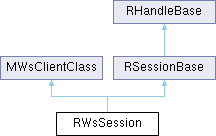
Classes | |
| struct | SSystemInfo |
| WARNING: Struct for internal use ONLY. More... | |
| struct | TWindowGroupChainInfo |
Public Types | |
| enum | TComputeMode { EPriorityControlDisabled , EPriorityControlComputeOn , EPriorityControlComputeOff } |
| Compute mode flags. More... | |
| enum | { ESystemInfoArraySize =16 } |
| enum | TLoggingCommand { ELoggingEnable , ELoggingDisable , ELoggingStatusDump , ELoggingHeapDump } |
| Window server logging commands passed to LogCommand(). More... | |
| enum | TCustomTextCursorAlignment { ECustomTextCursorAlignTop , ECustomTextCursorAlignBaseline , ECustomTextCursorAlignBottom } |
| The vertical alignment of a custom text cursor sprite. More... | |
 Public Types inherited from RSessionBase Public Types inherited from RSessionBase | |
| enum | TAttachMode { EExplicitAttach , EAutoAttach } |
| Indicates whether or not threads in the process are automatically attached to the session when passed as a parameter to the Share() function. More... | |
| Public Types inherited from RHandleBase | |
| enum | TAttributes { EReadAccess =0x1 , EWriteAccess =0x2 , EDirectReadAccess =0x4 , EDirectWriteAccess =0x8 } |
| Read/Write attributes for the handle. More... | |
Public Member Functions | |
| IMPORT_C | RWsSession () |
| Default C++ constructor. | |
| IMPORT_C TInt | Connect () |
| Connects the client session to the window server. | |
| IMPORT_C TInt | Connect (RFs &aFileServer) |
| Connects the client session to the window server using pre constructed file server session. | |
| IMPORT_C void | Close () |
| Closes the window server session. | |
| IMPORT_C TVersion | Version () const |
| Gets the window server version. | |
| IMPORT_C TInt | SetHotKey (THotKey aType, TUint aKeyCode, TUint aModifierMask, TUint aModifier) |
| Sets the hot keys. | |
| IMPORT_C TInt | ClearHotKeys (THotKey aType) |
| Clears all mappings for the specified hotkey, including the default mapping. | |
| IMPORT_C TInt | RestoreDefaultHotKey (THotKey aType) |
| Restores the default mapping for a hot key. | |
| IMPORT_C void | EventReady (TRequestStatus *aStat) |
| Requests standard events from the window server. | |
| IMPORT_C void | EventReadyCancel () |
| Cancels a request for standard events from the window server. | |
| IMPORT_C void | GetEvent (TWsEvent &aEvent) const |
| Gets a standard event from the session for processing. | |
| IMPORT_C void | PurgePointerEvents () |
| Removes all pointer events waiting to be delivered to this session. | |
| IMPORT_C void | RedrawReady (TRequestStatus *aStat) |
| Requests redraw events from the window server. | |
| IMPORT_C void | RedrawReadyCancel () |
| Cancels a redraw event request. | |
| IMPORT_C void | GetRedraw (TWsRedrawEvent &aEvent) |
| Gets the redraw event from the session. | |
| IMPORT_C void | PriorityKeyReady (TRequestStatus *aStat) |
| Requests priority key events from the window server. | |
| IMPORT_C void | PriorityKeyReadyCancel () |
| Cancels a priority key event request. | |
| IMPORT_C void | GetPriorityKey (TWsPriorityKeyEvent &aEvent) const |
| Gets the completed priority key event from the window server session. | |
| IMPORT_C void | Flush () |
| Sends all pending commands in the buffer to the window server. | |
| IMPORT_C TBool | SetAutoFlush (TBool aState) |
| Sets a session's auto-flush state. | |
| IMPORT_C TInt | SetKeyboardRepeatRate (const TTimeIntervalMicroSeconds32 &aInitialTime, const TTimeIntervalMicroSeconds32 &aTime) |
| Sets the system-wide keyboard repeat rate. | |
| IMPORT_C void | GetKeyboardRepeatRate (TTimeIntervalMicroSeconds32 &aInitialTime, TTimeIntervalMicroSeconds32 &aTime) const |
| Gets the current system-wide settings for the keyboard repeat rate. | |
| IMPORT_C void | GetDoubleClickSettings (TTimeIntervalMicroSeconds32 &aInterval, TInt &aDistance) const |
| Gets the current system-wide settings for pointer double clicks. | |
| IMPORT_C TInt | SetDoubleClick (const TTimeIntervalMicroSeconds32 &aInterval, TInt aDistance) |
| Sets the system-wide double click settings. | |
| IMPORT_C TInt | NumWindowGroups () const |
| Gets the total number of window groups currently running in the window server. | |
| IMPORT_C TInt | WindowGroupList (CArrayFixFlat< TInt > *aWindowList) const |
| Gets a list of identifiers of all window groups in all window server sessions. | |
| IMPORT_C TInt | WindowGroupList (RArray< TWindowGroupChainInfo > *aWindowList) const |
| Gets a list of identifier of window group and parent identifier of window group of all window groups in all window server sessions. | |
| IMPORT_C TInt | NumWindowGroups (TInt aPriority) const |
| Gets the number of window groups of a given window group priority running in all sessions in the window server. | |
| IMPORT_C TInt | WindowGroupList (TInt aPriority, CArrayFixFlat< TInt > *aWindowList) const |
| Lists the number of window groups of a given window group priority running in all window server sessions. | |
| IMPORT_C TInt | WindowGroupList (TInt aPriority, RArray< TWindowGroupChainInfo > *aWindowList) const |
| Lists the number of window groups of a given window group priority running in all window server sessions. | |
| IMPORT_C TInt | GetFocusWindowGroup () const |
| Gets the identifier of the window group that currently has the keyboard focus. | |
| IMPORT_C TInt | GetDefaultOwningWindow () const |
| Gets the identifier of the current default owning window group. | |
| IMPORT_C TInt | SetWindowGroupOrdinalPosition (TInt aIdentifier, TInt aPosition) |
| Sets the ordinal position of a window group. | |
| IMPORT_C TInt | GetWindowGroupClientThreadId (TInt aIdentifier, TThreadId &aThreadId) const |
| Gets the thread ID of the client that owns the window group specified by the window group identifier. | |
| IMPORT_C TInt | GetWindowGroupHandle (TInt aIdentifier) const |
| Gets the handle of the window specified by the window group identifier. | |
| IMPORT_C TInt | GetWindowGroupOrdinalPriority (TInt aIdentifier) const |
| Gets a window group's priority. | |
| IMPORT_C TInt | SendEventToWindowGroup (TInt aIdentifier, const TWsEvent &aEvent) |
| Sends an event to a window group. | |
| IMPORT_C TInt | SendEventToAllWindowGroups (const TWsEvent &aEvent) |
| Sends the specified event to all existing window groups. | |
| IMPORT_C TInt | SendEventToAllWindowGroups (TInt aPriority, const TWsEvent &aEvent) |
| Sends the specified event to all window groups with the specified priority. | |
| IMPORT_C TInt | SendEventToOneWindowGroupsPerClient (const TWsEvent &aEvent) |
| IMPORT_C TInt | GetWindowGroupNameFromIdentifier (TInt aIdentifier, TDes &aWindowName) const |
| Gets the name of a window group from its identifier. | |
| IMPORT_C TInt | FindWindowGroupIdentifier (TInt aPreviousIdentifier, const TDesC &aMatch, TInt aOffset=0) const |
| Gets all window groups whose names match a given string, which can contain wildcards. | |
| IMPORT_C TInt | FindWindowGroupIdentifier (TInt aPreviousIdentifier, TThreadId aThreadId) const |
| Gets the identifiers of window groups belonging to a client which is owned by a thread with the specified thread ID. | |
| IMPORT_C TInt | SendMessageToWindowGroup (TInt aIdentifier, TUid aUid, const TDesC8 &aParams) |
| Sends a message to a window group. | |
| IMPORT_C TInt | SendMessageToAllWindowGroups (TUid aUid, const TDesC8 &aParams) |
| Sends a message to all window groups. | |
| IMPORT_C TInt | SendMessageToAllWindowGroups (TInt aPriority, TUid aUid, const TDesC8 &aParams) |
| Sends a message to all window groups with the specified priority. | |
| IMPORT_C TInt | FetchMessage (TUid &aUid, TPtr8 &aParams, const TWsEvent &aMessageEvent) const |
| This function always causes a flush of the window server buffer. | |
| IMPORT_C void | SetShadowVector (const TPoint &aVector) |
| Sets the shadow vector. | |
| IMPORT_C TPoint | ShadowVector () const |
| Gets the current value of the shadow vector. | |
| IMPORT_C void | SetBackgroundColor (TRgb aColor) |
| Sets the background colour for the window server. | |
| IMPORT_C TRgb | GetBackgroundColor () const |
| Gets the window server's background colour. | |
| IMPORT_C TInt | RegisterSurface (TInt aScreenNumber, const TSurfaceId &aSurface) |
| This function registers a surface for use in composition on the screen associated with this device within this session. | |
| IMPORT_C void | UnregisterSurface (TInt aScreenNumber, const TSurfaceId &aSurface) |
| This function removes the surface from the session's register of surfaces that are used in composition on the screen associated with this device. | |
| IMPORT_C TInt | PreferredSurfaceConfigurationSize () const |
| Returns the window server's preferred size for the TSurfaceConfiguration object, used for RWindow::SetBackgroundSurface. | |
| IMPORT_C TInt | SetSystemPointerCursor (const RWsPointerCursor &aPointerCursor, TInt aCursorNumber) |
| Sets a cursor in the system pointer cursor list. | |
| IMPORT_C void | ClearSystemPointerCursor (TInt aCursorNumber) |
| Clears a system pointer cursor from the list. | |
| IMPORT_C TInt | ClaimSystemPointerCursorList () |
| Claims the system pointer cursor list. | |
| IMPORT_C void | FreeSystemPointerCursorList () |
| Releases the system pointer cursor list and deletes all the entries in it. | |
| IMPORT_C TInt | SetCustomTextCursor (TInt aIdentifier, const TArray< TSpriteMember > &aSpriteMemberArray, TUint aSpriteFlags, TCustomTextCursorAlignment aAlignment) |
| Adds a custom text cursor to the server's list of cursors. | |
| IMPORT_C TInt | ResourceCount () const |
| Gets the number of objects that the server has allocated for that client. | |
| IMPORT_C void | PasswordEntered () |
| Disables the window server password mode. | |
| IMPORT_C void | ComputeMode (TComputeMode aMode) |
| Sets the mode used to control process priorities. | |
| IMPORT_C TInt | HeapCount () const |
| Gets the heap count. | |
| IMPORT_C TInt | DebugInfo (TInt aFunction, TInt aParam=0) const |
| IMPORT_C TInt | DebugInfo (TInt aFunction, TDes8 &aReturnBuf, TInt aParam=0) const |
| IMPORT_C void | HeapSetFail (TInt aTAllocFail, TInt aValue) |
| Sets the heap failure mode in the window server. | |
| IMPORT_C void | HeapSetBurstFail (TInt aTAllocFail, TInt aRate, TInt aBurst) |
| Sets the heap failure burst mode in the window server. | |
| IMPORT_C TInt | SetModifierState (TEventModifier aModifier, TModifierState aState) |
| Sets the state of the modifier keys. | |
| IMPORT_C TInt | GetModifierState () const |
| Gets the state of the modifier keys. | |
| IMPORT_C TInt | RequestOffEvents (TBool aOn, RWindowTreeNode *aWin=NULL) |
| Requests the window server to send OFF events to a window. | |
| IMPORT_C TDisplayMode | GetDefModeMaxNumColors (TInt &aColor, TInt &aGray) const |
| Gets the number of colours available in the richest supported colour mode, the number of greys available in the richest grey mode, and returns the default display mode. | |
| IMPORT_C TInt | GetColorModeList (CArrayFixFlat< TInt > *aModeList) const |
| Gets the list of available colour modes. | |
| IMPORT_C void | SetPointerCursorArea (const TRect &aArea) |
| Sets the area of the screen in which the virtual cursor can be used while in relative mouse mode, for the first screen display mode. | |
| IMPORT_C void | SetPointerCursorArea (TInt aScreenSizeMode, const TRect &aArea) |
| Sets the area of the screen in which the virtual cursor can be used while in relative mouse mode, for a specified screen display mode. | |
| IMPORT_C TRect | PointerCursorArea () const |
| Gets the pointer cursor area for the first screen display mode. | |
| IMPORT_C TRect | PointerCursorArea (TInt aScreenSizeMode) const |
| Gets the pointer cursor area for the specified screen display mode. | |
| IMPORT_C void | SetPointerCursorMode (TPointerCursorMode aMode) |
| Sets the current mode for the pointer cursor. | |
| IMPORT_C TInt | SetClientCursorMode (TPointerCursorMode aMode) |
| Sets the current mode for the pointer cursor. | |
| IMPORT_C TPointerCursorMode | PointerCursorMode () const |
| Gets the current mode for the pointer cursor. | |
| IMPORT_C void | SetDefaultSystemPointerCursor (TInt aCursorNumber) |
| Sets the default system pointer cursor. | |
| IMPORT_C void | ClearDefaultSystemPointerCursor () |
| Clears the default system pointer cursor. | |
| IMPORT_C TInt | SetPointerCursorPosition (const TPoint &aPosition) |
| Sets the pointer cursor position. | |
| IMPORT_C TPoint | PointerCursorPosition () const |
| Gets the pointer cursor position. | |
| IMPORT_C void | SetDefaultFadingParameters (TUint8 aBlackMap, TUint8 aWhiteMap) |
| Sets the default fading parameters. | |
| IMPORT_C void | PrepareForSwitchOff () |
| Prepares for switch off. | |
| IMPORT_C void | SetBufferSizeL (TInt aBufSize) |
| Sets both the buffer size and maximum buffer size for queuing commands to send to the Windows Server. | |
| IMPORT_C void | SetMaxBufferSizeL (TInt aMaxBufSize) |
| Sets the maximum size that the buffer for queuing commands to send to the Windows Server can expand to. | |
| IMPORT_C TInt | SetSystemFaded (TBool aFaded) |
| Sets all windows in the system as faded or unfaded, using the default fading parameters. | |
| IMPORT_C TInt | SetSystemFaded (TBool aFaded, TUint8 aBlackMap, TUint8 aWhiteMap) |
| Sets all windows in the system as faded or unfaded, overriding the default fading parameters (as set by SetDefaultFadingParameters()). | |
| IMPORT_C TInt | SetFocusScreen (TInt aScreenNumber) |
| Set focus screen. | |
| IMPORT_C TInt | GetFocusScreen () const |
| Get focus screen. | |
| IMPORT_C void | ClearAllRedrawStores () |
| Clear the redraw store for all windows in the system By default Windows will recorded the drawing commands used during a redraw and use them latter if the window needs to be redrawn. | |
| IMPORT_C TInt | NumWindowGroups (TInt aScreenNumber, TInt aPriority) const |
| Gets the number of window groups of a given window group priority running on a specified screen. | |
| IMPORT_C TInt | NumberOfScreens () const |
| Number Of Screens. | |
| IMPORT_C TInt | WindowGroupList (CArrayFixFlat< TInt > *aWindowList, TInt aScreenNumber, TInt aPriority=EAllPriorities) const |
| Lists the number of window groups of a given window group priority running on a specified screen. | |
| IMPORT_C TInt | GetFocusWindowGroup (TInt aScreenNumber) const |
| Gets the identifier of the window group on a specified screen that currently has the keyboard focus. | |
| IMPORT_C TInt | GetDefaultOwningWindow (TInt aScreenNumber) const |
| Gets the identifier of the current default owning window group on a specified screen. | |
| IMPORT_C TDisplayMode | GetDefModeMaxNumColors (TInt aScreenNumber, TInt &aColor, TInt &aGray) const |
| Gets the number of colours available in the richest supported colour mode, the number of greys available in the richest grey mode, and returns the default display mode, on the specified screen. | |
| IMPORT_C TInt | GetColorModeList (TInt aScreenNumber, CArrayFixFlat< TInt > *aModeList) const |
| Gets the list of available colour modes on a particular screen. | |
| IMPORT_C void | SimulateRawEvent (TRawEvent aEvent) |
| Simulates raw events. | |
| IMPORT_C void | SimulateKeyEvent (TKeyEvent aEvent) |
| Sends a simulated key event to the window server. | |
| IMPORT_C void | LogCommand (TLoggingCommand aCommand) |
| Allows the window server client to enable or disable logging of window server events. | |
| IMPORT_C void | LogMessage (const TLogMessageText &aMessage) |
| Adds a message to the window server debug log if one is currently in operation. | |
| IMPORT_C void | SystemInfo (TInt &aSystemInfoNumber, SSystemInfo &aSystemInfo) |
| IMPORT_C void | TestWrite (TInt aHandle, TInt aOpcode, const TAny *aData, TInt aLength) |
| IMPORT_C void | TestWriteReply (TInt aHandle, TInt aOpcode, const TAny *aData, TInt aLength) |
| IMPORT_C void | TestWriteReplyP (TInt aHandle, TInt aOpcode, const TAny *aData, TInt aLength, TDes8 *aReplyPackage) |
| IMPORT_C TInt | TestWriteReplyByProvidingRemoteReadAccess (TInt aHandle, TInt aOpcode, const TDesC8 &aData, const TDesC8 &aRemoteReadBuffer) |
| IMPORT_C TInt | TestWriteReplyByProvidingRemoteReadAccess (TInt aHandle, TInt aOpcode, const TDesC8 &aData, const TDesC16 &aRemoteReadBuffer) |
| IMPORT_C TInt | Finish () |
| Blocks until all outstanding window server rendering has been completed. | |
| IMPORT_C void | SyncMsgBuf () |
| Sends all pending commands in the buffer to the window server. | |
| IMPORT_C TInt | SetCloseProximityThresholds (TInt aEnterCloseProximityThreshold, TInt aExitCloseProximityThreshold) |
| Dummy implementation in order to preserve compatibility with WSERV NGA. | |
| IMPORT_C TInt | GetEnterCloseProximityThreshold () const |
| Dummy implementation in order to preserve compatibility with WSERV NGA. | |
| IMPORT_C TInt | GetExitCloseProximityThreshold () const |
| Dummy implementation in order to preserve compatibility with WSERV NGA. | |
| IMPORT_C TInt | SetHighPressureThresholds (TInt aEnterHighPressureThreshold, TInt aExitHighPressureThreshold) |
| Dummy implementation in order to preserve compatibility with WSERV NGA. | |
| IMPORT_C TInt | GetEnterHighPressureThreshold () const |
| Dummy implementation in order to preserve compatibility with WSERV NGA. | |
| IMPORT_C TInt | GetExitHighPressureThreshold () const |
| Dummy implementation in order to preserve compatibility with WSERV NGA. | |
| IMPORT_C void | EnableWindowSizeCacheL () |
| Dummy implementation in order to preserve compatibility with WSERV NGA. | |
| IMPORT_C void | SendEffectCommand (TInt aTfxCmd, const TDesC8 &aTfxCmdData=KNullDesC8) |
| IMPORT_C void | RegisterEffect (TInt aAction, TInt aPurpose, const TFileName &aResourceDir, const TFileName &aFilenameOutgoing, const TFileName &aFilenameIncoming, TUint aAppUid=0, TBitFlags aFlags=0) |
| IMPORT_C void | UnregisterEffect (TInt aAction, TInt aPurpose, TUint aAppUid=0) |
| IMPORT_C void | UnregisterAllEffects () |
| IMPORT_C void | OverrideEffects (TInt aAction, TInt aPurpose, const TFileName &aResourceDir, const TFileName &aFilenameOutgoing, const TFileName &aFilenameIncoming, TBitFlags aFlags=0) |
| IMPORT_C void | IndicateAppOrientation (TRenderOrientation aOrientation) |
| void | GraphicMessageReady (TRequestStatus *aStat) |
| void | GetGraphicMessage (TDes8 &aData) const |
| void | GraphicMessageCancel () |
| void | GraphicAbortMessage (TInt aError) |
| TInt | GraphicFetchHeaderMessage () |
| Public Member Functions inherited from MWsClientClass | |
| MWsClientClass () | |
| MWsClientClass (RWsBuffer *aBuffer) | |
| TInt | WsHandle () const |
| Gets the server side handle for the object. | |
| Public Member Functions inherited from RSessionBase | |
| TInt | ShareAuto () |
| Creates a session that can be shared by other threads in the current process. | |
| TInt | ShareProtected () |
| Creates a session handle that can be be passed via IPC to another process as well as being shared by other threads in the current process. | |
| IMPORT_C TInt | Open (RMessagePtr2 aMessage, TInt aParam, TOwnerType aType=EOwnerProcess) |
| Opens a handle to a session using a handle number sent by a client to a server. | |
| IMPORT_C TInt | Open (RMessagePtr2 aMessage, TInt aParam, const TSecurityPolicy &aServerPolicy, TOwnerType aType=EOwnerProcess) |
| Opens a handle to a session using a handle number sent by a client to a server, and validate that the session's server passes a given security policy. | |
| IMPORT_C TInt | Open (TInt aArgumentIndex, TOwnerType aType=EOwnerProcess) |
| Opens a handle to a session using a handle number passed as an environment data item to the child process during the creation of that child process. | |
| IMPORT_C TInt | Open (TInt aArgumentIndex, const TSecurityPolicy &aServerPolicy, TOwnerType aType=EOwnerProcess) |
| Opens a handle to a session using a handle number passed as an environment data item to the child process during the creation of that child process, after validating that the session's server passes the given security policy. | |
| TInt | SetReturnedHandle (TInt aHandleOrError) |
| Sets the handle-number of this handle to the specified value. | |
| IMPORT_C TInt | SetReturnedHandle (TInt aHandleOrError, const TSecurityPolicy &aServerPolicy) |
| Sets the handle-number of this session handle to the specified value after validating that the session's server passes a given security policy. | |
| Public Member Functions inherited from RHandleBase | |
| RHandleBase () | |
| Default constructor. | |
| TInt | Handle () const |
| Retrieves the handle-number of the object associated with this handle. | |
| void | SetHandle (TInt aHandle) |
| Sets the handle-number of this handle to the specified value. | |
| TInt | SetReturnedHandle (TInt aHandleOrError) |
| Sets the handle-number of this handle to the specified value. | |
| IMPORT_C void | Close () |
| Closes the handle. | |
| IMPORT_C TName | Name () const |
| Gets the name of the handle. | |
| IMPORT_C TFullName | FullName () const |
| Gets the full name of the handle. | |
| IMPORT_C void | FullName (TDes &aName) const |
| Gets the full name of the handle. | |
| IMPORT_C void | SetHandleNC (TInt aHandle) |
| Sets the handle-number of this handle to the specified value, and marks it as not closable. | |
| IMPORT_C TInt | Duplicate (const RThread &aSrc, TOwnerType aType=EOwnerProcess) |
| Creates a valid handle to the kernel object for which the specified thread already has a handle. | |
| IMPORT_C void | HandleInfo (THandleInfo *anInfo) |
| Gets information about the handle. | |
| IMPORT_C TUint | Attributes () const |
| IMPORT_C TInt | BTraceId () const |
| Returns a unique object identifier for use with BTrace. | |
| IMPORT_C void | NotifyDestruction (TRequestStatus &aStatus) |
| Internal technology API. | |
Friends | |
| class | RWsBuffer |
| class | RWindowTreeNode |
| class | CWsScreenDevice |
| class | CWsBitmap |
| class | RAnimDll |
| class | RWsSpriteBase |
| class | RDirectScreenAccess |
| class | RSoundPlugIn |
| class | CWsGraphic |
| class | RWsDrawableSource |
Additional Inherited Members | |
| Static Public Member Functions inherited from RHandleBase | |
| static void | DoExtendedClose () |
| Protected Member Functions inherited from MWsClientClass | |
| void | Write (const TAny *aData1, TInt aLength1, TInt aLength2, TUint aOpcode) const |
| void | Write (const TAny *aData, TInt aLength, const TAny *aData2, TInt aLength2, TUint aOpcode, const TIpcArgs *aIpcArgs=NULL) const |
| void | Write (const TAny *aBuf, TInt aBufLen, TUint aOpcode, const TIpcArgs *aIpcArgs=NULL) const |
| void | Write (TUint aOpcode) const |
| void | WriteInt (TInt aInt, TUint aOpcode) const |
| void | WriteRect (const TRect &aRect, TUint aOpcode) const |
| void | WritePoint (const TPoint &aPoint, TUint aOpcode) const |
| void | WriteSize (const TSize &aSize, TUint aOpcode) const |
| TInt | WriteReply (TUint aOpcode, const TIpcArgs *aIpcArgs=NULL) const |
| TInt | WriteReplyInt (TInt aInt, TUint aOpcode, const TIpcArgs *aIpcArgs=NULL) const |
| TInt | WriteReply (const TAny *aBuf, TInt aBufLen, TUint aOpcode, const TIpcArgs *aIpcArgs=NULL) const |
| TInt | WriteReply (const TAny *aBuf, TInt aBufLen, const TAny *aBuf2, TInt aBuflen2, TUint aOpcode, const TIpcArgs *aIpcArgs=NULL) const |
| TInt | WriteReplyP (const TWriteDescriptorType &aReplyPackage, TUint aOpcode) const |
| TInt | WriteReplyIntP (TInt aInt, const TWriteDescriptorType &aReplyPackage, TUint aOpcode) const |
| TInt | WriteReplyP (const TAny *aBuf, TInt aBufLen, const TWriteDescriptorType &aReplyPackage, TUint aOpcode) const |
| TInt | WriteReplyP (const TAny *aBuf, TInt aBufLen, const TAny *aBuf2, TInt aBuflen2, const TWriteDescriptorType &aReplyPackage, TUint aOpcode) const |
| TInt | WriteReplyByProvidingRemoteReadAccess (const TAny *aBuf, TInt aBufLen, const TReadDescriptorType &aRemoteReadBuffer, TUint aOpcode) const |
| void | AddToBitmapArray (const TInt aBitmapHandle) const |
| void | AsyncRequest (TRequestStatus &aStatus, TUint aOpcode) const |
| TBool | WindowSizeCacheEnabled () const |
| void | MarkWindowSizeCacheDirty () |
| void | RefreshWindowSizeCache (const TSize &aNewSize) const |
| TInt | CachedWindowSize (TSize &aSize) const |
| void | DestroyWindowSizeCacheEntry () |
| Protected Member Functions inherited from RSessionBase | |
| TInt | CreateSession (const TDesC &aServer, const TVersion &aVersion) |
| Creates a session with a server, specifying no message slots. | |
| IMPORT_C TInt | CreateSession (const TDesC &aServer, const TVersion &aVersion, TInt aAsyncMessageSlots) |
| Creates a session with a server. | |
| IMPORT_C TInt | CreateSession (const TDesC &aServer, const TVersion &aVersion, TInt aAsyncMessageSlots, TIpcSessionType aType, const TSecurityPolicy *aPolicy=0, TRequestStatus *aStatus=0) |
| Creates a session with a server. | |
| TInt | CreateSession (RServer2 aServer, const TVersion &aVersion) |
| Creates a session with a server, specifying no message slots. | |
| IMPORT_C TInt | CreateSession (RServer2 aServer, const TVersion &aVersion, TInt aAsyncMessageSlots) |
| Creates a session with a server. | |
| IMPORT_C TInt | CreateSession (RServer2 aServer, const TVersion &aVersion, TInt aAsyncMessageSlots, TIpcSessionType aType, const TSecurityPolicy *aPolicy=0, TRequestStatus *aStatus=0) |
| Creates a session with a server. | |
| TInt | CreateSession (const TDesC &aServer, const TVersion &aVersion, TInt aAsyncMessageSlots, TRequestStatus *aStatus) |
| TInt | Send (TInt aFunction, const TIpcArgs &aArgs) const |
| Issues a blind request to the server with the specified function number, and arguments. | |
| void | SendReceive (TInt aFunction, const TIpcArgs &aArgs, TRequestStatus &aStatus) const |
| Issues an asynchronous request to the server with the specified function number and arguments. | |
| TInt | SendReceive (TInt aFunction, const TIpcArgs &aArgs) const |
| Issues a synchronous request to the server with the specified function number and arguments. | |
| TInt | Send (TInt aFunction) const |
| Issues a blind request to the server with the specified function number, but with no arguments. | |
| void | SendReceive (TInt aFunction, TRequestStatus &aStatus) const |
| Issues an asynchronous request to the server with the specified function number, but with no arguments. | |
| TInt | SendReceive (TInt aFunction) const |
| Issues a synchronous request to the server with the specified function number, but with no arguments. | |
| Protected Member Functions inherited from RHandleBase | |
| RHandleBase (TInt aHandle) | |
| Copy constructor. | |
| IMPORT_C TInt | Open (const TFindHandleBase &aHandle, TOwnerType aType) |
| Opens a handle to a kernel side object found using a find-handle object. | |
| TInt | OpenByName (const TDesC &aName, TOwnerType aOwnerType, TInt aObjectType) |
| Implementation for RXxxxx::Open/OpenGlocbal(const TDesC &aName,,TOwnerType aType) functions. | |
| Static Protected Member Functions inherited from RSessionBase | |
| static TInt | SetReturnedHandle (TInt aHandleOrError, RHandleBase &aHandle) |
| Static Protected Member Functions inherited from RHandleBase | |
| static TInt | SetReturnedHandle (TInt aHandleOrError, RHandleBase &aHandle) |
| Protected Attributes inherited from MWsClientClass | |
| TInt32 | iWsHandle |
| WARNING: Member variable for internal use ONLY. | |
| RWsBuffer * | iBuffer |
| WARNING: Member variable for internal use ONLY. | |
| Protected Attributes inherited from RHandleBase | |
| TInt | iHandle |
Detailed Description
Window server session.
The session between the client and the window server can be used to mediate asynchronous events, for client interface control and for system control. A description of each of these capabilities is given below.
Mediating asynchronous events:
Primarily, the session mediates asynchronous events to the user. Three event streams are available: the standard event stream which all applications must use; the redraw event stream which must be used by all applications except those which exclusively use backed-up windows; and the priority key event stream which may be used for abort keys and the like for specialist applications.
All these events are mediated as standard asynchronous services. Typical window server client programs encapsulate each service they require in an active object whose RunL() identifies the event and calls the appropriate member function of a class associated with an application framework, or a window.
Client interface control:
The client's interface with the window server has several aspects, each of which is controlled through the window server session.
Flushing defines how requests to the window server are handled.
System control:
Many system-wide settings may be controlled through the window server session. Typically, these functions are only used by the system shell and its associated sessions/applications. They include: auto-repeat and double-click, querying all window groups in the system, setting the default shadow vector, setting the system pointer cursors, counting resources used by the window server (this is only useful for debugging checks), getting and setting the state of the modifier keys (for instance Shift and Ctrl), setting the window server background colour, getting and setting thresholds for window server generated pointer events.
- API status
- Published to all clients. Released API.
Member Enumeration Documentation
◆ anonymous enum
◆ TComputeMode
Compute mode flags.
When a window group takes focus or loses it, the window server can boost its client's thread or process priority to provide a better response to the user. How it alters the priority is determined by the current compute mode of the client.
- See also
- ComputeMode()
| Enumerator | |
|---|---|
| EPriorityControlDisabled | Client priority is permanently set to its current level. It is not altered or set by the windowing system if the focus changes. Thus if ComputeMode() is called with this flag when a client is in the foreground, it will subsequently have foreground priority even if it is in the background. |
| EPriorityControlComputeOn | Client process's priority is always set to EPriorityBackground. |
| EPriorityControlComputeOff | Client process's priority is set to EPriorityForeground when the window group takes focus, and set to EPriorityBackground when it loses focus. This is the default behaviour. |
◆ TCustomTextCursorAlignment
The vertical alignment of a custom text cursor sprite.
One of these values must be set, see SetCustomTextCursor(). This value also determines which part of each sprite member bitmap is clipped when the cursor's TTextCursor::EFlagClipVertical flag is set.
◆ TLoggingCommand
Window server logging commands passed to LogCommand().
- See also
- RWsSession::LogCommand()
Constructor & Destructor Documentation
◆ RWsSession()
| IMPORT_C RWsSession::RWsSession | ( | ) |
Default C++ constructor.
Constructs an uninitialised window server session. Note that it does not establish a connection to the window server - this must be done explicitly by calling the session's Connect() function. Before Connect() is called, no corresponding session object exists in the server, and the RWsSession contains no meaningful handle.
(generated from Symbian Developer Library)
Member Function Documentation
◆ ClaimSystemPointerCursorList()
| IMPORT_C TInt RWsSession::ClaimSystemPointerCursorList | ( | ) |
Claims the system pointer cursor list.
You must call this function before you can call SetSystemPointerCursor() or ClearSystemPointerCursor().
This function always causes a flush of the window server buffer.
- capability
- WriteDeviceData
(generated from Symbian Developer Library)
◆ ClearAllRedrawStores()
| IMPORT_C void RWsSession::ClearAllRedrawStores | ( | ) |
Clear the redraw store for all windows in the system By default Windows will recorded the drawing commands used during a redraw and use them latter if the window needs to be redrawn.
Calling this function will cause all these stores to be thrown away redraw will then be sent to all window, visible windows will recieve them first.
This function always causes a flush of the window server buffer.
(generated from Symbian Developer Library)
◆ ClearDefaultSystemPointerCursor()
| IMPORT_C void RWsSession::ClearDefaultSystemPointerCursor | ( | ) |
Clears the default system pointer cursor.
This sets the pointer to the current default system pointer cursor to NULL.
Panic condition: WSERV 42 If this function is called by a client other than the owner of the system pointer cursor list.
(generated from Symbian Developer Library)
◆ ClearHotKeys()
| IMPORT_C TInt RWsSession::ClearHotKeys | ( | THotKey | aType | ) |
Clears all mappings for the specified hotkey, including the default mapping.
Hotkeys allow standard functions to be performed by application-defined key combinations.
This function always causes a flush of the window server buffer.
- Parameters
-
aType The hot key to be cleared
- capability
- SwEvent
(generated from Symbian Developer Library)
◆ ClearSystemPointerCursor()
| IMPORT_C void RWsSession::ClearSystemPointerCursor | ( | TInt | aCursorNumber | ) |
Clears a system pointer cursor from the list.
Before calling this function, the client must first gain access to the list by calling ClaimSystemPointerCursorList().
- Parameters
-
aCursorNumber Cursor number to clear
(generated from Symbian Developer Library)
◆ Close()
| IMPORT_C void RWsSession::Close | ( | ) |
Closes the window server session.
This function cleans up all resources in the RWsSession and disconnects it from the server. Prior to disconnecting from the window server, the client-side window server buffer is destroyed without being flushed. This function should be called when the RWsSession is no longer needed - normally just before it is destroyed.
(generated from Symbian Developer Library)
◆ ComputeMode()
| IMPORT_C void RWsSession::ComputeMode | ( | TComputeMode | aMode | ) |
Sets the mode used to control process priorities.
The default window server behaviour is that the application that owns the window with keyboard focus gets foreground process priority (EPriorityForeground) while all other clients get background priority (EPriorityBackground). This function can be used to over-ride this default behaviour, as discussed in TComputeMode.
Note:
Unlike real Symbian phones, the Emulator runs on a single process. As a result, on the Emulator this function sets the priority of individual threads rather than of processes. The values used for thread priorities are EPriorityLess instead of EPriorityBackground, and EPriorityNormal instead of EPriorityForeground.
- Parameters
-
aMode The compute mode.
(generated from Symbian Developer Library)
◆ Connect() [1/2]
| IMPORT_C TInt RWsSession::Connect | ( | ) |
Connects the client session to the window server.
Connect() should be the first function called on an RWsSession object after it is created. The function establishes a connection to the window server, creating a corresponding session object in the server. Each session has one and only one connection to the server. Attempting to call Connect() when a connection has already been made will cause a panic.
After a connection has been successfully established, all events are delivered to the client application through the RWsSession object.
(generated from Symbian Developer Library)
◆ Connect() [2/2]
| IMPORT_C TInt RWsSession::Connect | ( | RFs & | aFileServer | ) |
Connects the client session to the window server using pre constructed file server session.
Connect() should be the first function called on an RWsSession object after it is created. The function establishes a connection to the window server, creating a corresponding session object in the server. Each session has one and only one connection to the server. Attempting to call Connect() when a connection has already been made will cause a panic.
After a connection has been successfully established, all events are delivered to the client application through the RWsSession object.
- Parameters
-
aFileServer A fully constructed file server session
(generated from Symbian Developer Library)
◆ DebugInfo() [1/2]
| IMPORT_C TInt RWsSession::DebugInfo | ( | TInt | aFunction, |
| TDes8 & | aReturnBuf, | ||
| TInt | aParam = 0 |
||
| ) | const |
◆ DebugInfo() [2/2]
| IMPORT_C TInt RWsSession::DebugInfo | ( | TInt | aFunction, |
| TInt | aParam = 0 |
||
| ) | const |
◆ EnableWindowSizeCacheL()
| IMPORT_C void RWsSession::EnableWindowSizeCacheL | ( | ) |
Dummy implementation in order to preserve compatibility with WSERV NGA.
(generated from Symbian Developer Library)
◆ EventReady()
| IMPORT_C void RWsSession::EventReady | ( | TRequestStatus * | aStat | ) |
Requests standard events from the window server.
Standard events include all events except redraws and priority key events.
The client application will typically handle the completed request using the RunL() function of an active object, and in this case the request status aStat should be the iStatus member of that CActive object.
Notes:
- The active object runs when an event is waiting. You should call GetEvent() in the RunL() function to get the event.
- You should not call this function again until you have either called GetEvent() or EventReadyCancel().
- Because this function is asynchronous, there is no guarantee that the Window Server will process the request before the function returns. However, on single core systems it is unusual for this function to return before the Window Server has processed the request, because the client generally runs in a lower priority thread than the Window Server. You should therefore expect the use of this function to give rise to different behaviour between single and multicore systems.
- Parameters
-
aStat Request status. On successful completion contains KErrNone, otherwise another of the system-wide error codes.
(generated from Symbian Developer Library)
◆ EventReadyCancel()
| IMPORT_C void RWsSession::EventReadyCancel | ( | ) |
Cancels a request for standard events from the window server.
This request was made using EventReady().
The client application will typically use an active object to handle standard events, and this function should be called from the active object's DoCancel() function.
This function always causes a flush of the window server buffer.
(generated from Symbian Developer Library)
◆ FetchMessage()
| IMPORT_C TInt RWsSession::FetchMessage | ( | TUid & | aUid, |
| TPtr8 & | aParams, | ||
| const TWsEvent & | aMessageEvent | ||
| ) | const |
This function always causes a flush of the window server buffer.
(generated from Symbian Developer Library)
◆ FindWindowGroupIdentifier() [1/2]
| IMPORT_C TInt RWsSession::FindWindowGroupIdentifier | ( | TInt | aPreviousIdentifier, |
| const TDesC & | aMatch, | ||
| TInt | aOffset = 0 |
||
| ) | const |
Gets all window groups whose names match a given string, which can contain wildcards.
An example use of this function might be to find all the currently running instances of a particular application, assuming that the window group name contains the application name. An optional argument, aOffset, specifies the number of characters to be ignored at the beginning of the window group name. As several window group names may match the given string, and the function can return only one at a time, there is an argument, aPreviousIdentifier, which gives the identifier for the previous match that was returned. In other words, it means, "get me the next match after this one." The first time the function is called, give 0 as the previous identifier.
Matching is done using TDesC::MatchF(), which does a folded match. Wildcards '*' and '?' can be used to denote one or more characters and exactly one character, respectively. Windows are searched in front to back order.
This function always causes a flush of the window server buffer.
- Parameters
-
aPreviousIdentifier Identifier of the last window group returned. If the value passed is not a valid identifier, the function returns KErrNotFound. aMatch String to match window group name against: may contain wildcards aOffset The first aOffset characters of the window group name are ignored when doing the match.
(generated from Symbian Developer Library)
◆ FindWindowGroupIdentifier() [2/2]
| IMPORT_C TInt RWsSession::FindWindowGroupIdentifier | ( | TInt | aPreviousIdentifier, |
| TThreadId | aThreadId | ||
| ) | const |
Gets the identifiers of window groups belonging to a client which is owned by a thread with the specified thread ID.
The thread may own more than one window group, so the identifier returned is the one after aPreviousIdentifier. The first time the function is called, use 0 for the previous identifier.
This function always causes a flush of the window server buffer.
- Parameters
-
aPreviousIdentifier Identifier returned by previous call aThreadId Thread owning the window group or groups.
(generated from Symbian Developer Library)
◆ Finish()
| IMPORT_C TInt RWsSession::Finish | ( | ) |
Blocks until all outstanding window server rendering has been completed.
(generated from Symbian Developer Library)
◆ Flush()
| IMPORT_C void RWsSession::Flush | ( | ) |
Sends all pending commands in the buffer to the window server.
Delivering a command to the window server requires a context switch, and so it is more efficient to deliver several commands in one go. Hence all client commands are normally first placed into a buffer for delivery to the window server.
The buffer is delivered when it gets full, or when a command that returns a value is called (there are a few exceptions to this), or when this function is called.
Note: this function is called when a prompt response is required from the window server, e.g. after doing some drawing.
RWsSession::SetAutoFlush() RWsSession::SetBufferSizeL() RWsSession::SetMaxBufferSizeL()
(generated from Symbian Developer Library)
◆ FreeSystemPointerCursorList()
| IMPORT_C void RWsSession::FreeSystemPointerCursorList | ( | ) |
Releases the system pointer cursor list and deletes all the entries in it.
A client should call this function when it no longer needs the system pointer cursor list.
(generated from Symbian Developer Library)
◆ GetBackgroundColor()
| IMPORT_C TRgb RWsSession::GetBackgroundColor | ( | ) | const |
Gets the window server's background colour.
This function always causes a flush of the window server buffer.
(generated from Symbian Developer Library)
◆ GetColorModeList() [1/2]
| IMPORT_C TInt RWsSession::GetColorModeList | ( | CArrayFixFlat< TInt > * | aModeList | ) | const |
Gets the list of available colour modes.
Note that this function should usually be called within User::LeaveIfError(). The only time that an error can be generated is when the array gets resized to the number of display modes. Thus if you make the size of your array equal to the maximum number of display modes over all hardware (this is the number of different values in TDisplayMode) then this function will never leave.
This function always causes a flush of the window server buffer.
- Parameters
-
aModeList On return, contains a TDisplayMode entry for each of the available display modes. Note that the array's contents are deleted prior to filling with display mode information.
(generated from Symbian Developer Library)
◆ GetColorModeList() [2/2]
| IMPORT_C TInt RWsSession::GetColorModeList | ( | TInt | aScreenNumber, |
| CArrayFixFlat< TInt > * | aModeList | ||
| ) | const |
Gets the list of available colour modes on a particular screen.
Note that this function should usually be called within User::LeaveIfError(). The only time that an error can be generated is when the array gets resized to the number of display modes. Thus if you make the size of your array equal to the maximum number of display modes over all hardware (this is the number of different values in TDisplayMode) then this function will never leave.
This function always causes a flush of the window server buffer.
- Parameters
-
aScreenNumber specifies the screen. aModeList On return, contains a TDisplayMode entry for each of the available display modes. Note that the array's contents are deleted prior to filling with display mode information.
(generated from Symbian Developer Library)
◆ GetDefaultOwningWindow() [1/2]
| IMPORT_C TInt RWsSession::GetDefaultOwningWindow | ( | ) | const |
Gets the identifier of the current default owning window group.
This function always causes a flush of the window server buffer.
(generated from Symbian Developer Library)
◆ GetDefaultOwningWindow() [2/2]
| IMPORT_C TInt RWsSession::GetDefaultOwningWindow | ( | TInt | aScreenNumber | ) | const |
Gets the identifier of the current default owning window group on a specified screen.
This function always causes a flush of the window server buffer.
- Parameters
-
aScreenNumber specifies the screen.
(generated from Symbian Developer Library)
◆ GetDefModeMaxNumColors() [1/2]
| IMPORT_C TDisplayMode RWsSession::GetDefModeMaxNumColors | ( | TInt & | aColor, |
| TInt & | aGray | ||
| ) | const |
Gets the number of colours available in the richest supported colour mode, the number of greys available in the richest grey mode, and returns the default display mode.
This function always causes a flush of the window server buffer.
- Parameters
-
aColor The number of colours in the richest supported colour mode. aGray The number of greys in the richest supported grey mode.
(generated from Symbian Developer Library)
◆ GetDefModeMaxNumColors() [2/2]
| IMPORT_C TDisplayMode RWsSession::GetDefModeMaxNumColors | ( | TInt | aScreenNumber, |
| TInt & | aColor, | ||
| TInt & | aGray | ||
| ) | const |
Gets the number of colours available in the richest supported colour mode, the number of greys available in the richest grey mode, and returns the default display mode, on the specified screen.
This function always causes a flush of the window server buffer.
- Parameters
-
aScreenNumber specifies the screen. aColor The number of colours in the richest supported colour mode. aGray The number of greys in the richest supported grey mode.
(generated from Symbian Developer Library)
◆ GetDoubleClickSettings()
| IMPORT_C void RWsSession::GetDoubleClickSettings | ( | TTimeIntervalMicroSeconds32 & | aInterval, |
| TInt & | aDistance | ||
| ) | const |
Gets the current system-wide settings for pointer double clicks.
Double click distances are measured in pixels as the sum of the X distance moved and the Y distance moved between clicks. For example: a first click at 10, 20 and a second click at 13,19 gives a distance of (13-10)+(21-20) = 4.
This function always causes a flush of the window server buffer.
- Parameters
-
aInterval Maximum interval between clicks that constitutes a double click aDistance Maximum distance between clicks that constitutes a double click
(generated from Symbian Developer Library)
◆ GetEnterCloseProximityThreshold()
| IMPORT_C TInt RWsSession::GetEnterCloseProximityThreshold | ( | ) | const |
Dummy implementation in order to preserve compatibility with WSERV NGA.
(generated from Symbian Developer Library)
◆ GetEnterHighPressureThreshold()
| IMPORT_C TInt RWsSession::GetEnterHighPressureThreshold | ( | ) | const |
Dummy implementation in order to preserve compatibility with WSERV NGA.
(generated from Symbian Developer Library)
◆ GetEvent()
| IMPORT_C void RWsSession::GetEvent | ( | TWsEvent & | aEvent | ) | const |
Gets a standard event from the session for processing.
The type of event returned by GetEvent() may be any of those listed in TEventCode. To access the data within an event, the event should be converted to the appropriate type, using functions provided by the TWsEvent class. TWsEvent also provides a function to find out the type of the event.
Notes:
It is possible that the returned event is of type EEventNull. Clients should normally ignore these events.
This function should only be called in response to notification that an event has occurred, otherwise the client will be panicked.
This function would normally be called in the RunL() function of an active object which completes with the EventReady() function's request status.
This function always causes a flush of the window server buffer.
TEventCode EventReady()
- Parameters
-
aEvent On return, contains the event that occurred
(generated from Symbian Developer Library)
◆ GetExitCloseProximityThreshold()
| IMPORT_C TInt RWsSession::GetExitCloseProximityThreshold | ( | ) | const |
Dummy implementation in order to preserve compatibility with WSERV NGA.
(generated from Symbian Developer Library)
◆ GetExitHighPressureThreshold()
| IMPORT_C TInt RWsSession::GetExitHighPressureThreshold | ( | ) | const |
Dummy implementation in order to preserve compatibility with WSERV NGA.
(generated from Symbian Developer Library)
◆ GetFocusScreen()
| IMPORT_C TInt RWsSession::GetFocusScreen | ( | ) | const |
Get focus screen.
(generated from Symbian Developer Library)
◆ GetFocusWindowGroup() [1/2]
| IMPORT_C TInt RWsSession::GetFocusWindowGroup | ( | ) | const |
Gets the identifier of the window group that currently has the keyboard focus.
Note: this might not necessarily be the front-most window group, as window groups can disable keyboard focus.
This function always causes a flush of the window server buffer.
(generated from Symbian Developer Library)
◆ GetFocusWindowGroup() [2/2]
| IMPORT_C TInt RWsSession::GetFocusWindowGroup | ( | TInt | aScreenNumber | ) | const |
Gets the identifier of the window group on a specified screen that currently has the keyboard focus.
Note: this might not necessarily be the front-most window group, as window groups can disable keyboard focus.
This function always causes a flush of the window server buffer.
- Parameters
-
aScreenNumber specifies the screen.
(generated from Symbian Developer Library)
◆ GetGraphicMessage()
| void RWsSession::GetGraphicMessage | ( | TDes8 & | aData | ) | const |
◆ GetKeyboardRepeatRate()
| IMPORT_C void RWsSession::GetKeyboardRepeatRate | ( | TTimeIntervalMicroSeconds32 & | aInitialTime, |
| TTimeIntervalMicroSeconds32 & | aTime | ||
| ) | const |
Gets the current system-wide settings for the keyboard repeat rate.
This function always causes a flush of the window server buffer.
- Parameters
-
aInitialTime Time before first repeat key event aTime Time between subsequent repeat key events
(generated from Symbian Developer Library)
◆ GetModifierState()
| IMPORT_C TInt RWsSession::GetModifierState | ( | ) | const |
Gets the state of the modifier keys.
The state of each modifier key (defined in TEventModifier) is returned in a bitmask.
This function always causes a flush of the window server buffer.
TEventModifier
(generated from Symbian Developer Library)
◆ GetPriorityKey()
| IMPORT_C void RWsSession::GetPriorityKey | ( | TWsPriorityKeyEvent & | aEvent | ) | const |
Gets the completed priority key event from the window server session.
Priority key events are typically used for providing "Abort" or "Escape" keys for an application.
This function is similar to GetEvent(), except that it returns a TWsPriorityKeyEvent instead of a TWsEvent.
Note: this should only be called after notification that a priority key event has occurred.
This function always causes a flush of the window server buffer.
PriorityKeyReady() PriorityKeyReadyCancel()
- Parameters
-
aEvent On return, contains the priority key event that occurred.
(generated from Symbian Developer Library)
◆ GetRedraw()
| IMPORT_C void RWsSession::GetRedraw | ( | TWsRedrawEvent & | aEvent | ) |
Gets the redraw event from the session.
This function is similar to GetEvent(), except that the event is returned as a TWsRedrawEvent, and hence there is no need to convert it from a TWsEvent.
The function should only be called after notification that a redraw is waiting.
It always causes a flush of the window server buffer.
RedrawReady() GetEvent() CActive
- Parameters
-
aEvent On return, contains the redraw event that occurred
(generated from Symbian Developer Library)
◆ GetWindowGroupClientThreadId()
| IMPORT_C TInt RWsSession::GetWindowGroupClientThreadId | ( | TInt | aIdentifier, |
| TThreadId & | aThreadId | ||
| ) | const |
Gets the thread ID of the client that owns the window group specified by the window group identifier.
This function always causes a flush of the window server buffer.
- Parameters
-
aIdentifier The window group identifier. aThreadId On return, contains the thread ID.
(generated from Symbian Developer Library)
◆ GetWindowGroupHandle()
| IMPORT_C TInt RWsSession::GetWindowGroupHandle | ( | TInt | aIdentifier | ) | const |
Gets the handle of the window specified by the window group identifier.
This is the handle that was passed as an argument to RWindowGroup::Construct().
This function always causes a flush of the window server buffer.
- Parameters
-
aIdentifier The window group identifier.
(generated from Symbian Developer Library)
◆ GetWindowGroupNameFromIdentifier()
| IMPORT_C TInt RWsSession::GetWindowGroupNameFromIdentifier | ( | TInt | aIdentifier, |
| TDes & | aWindowName | ||
| ) | const |
Gets the name of a window group from its identifier.
Using the list of identifiers returned by WindowGroupList(), it is possible to get the names of all window groups in the system. Note that window names are a zero length string by default.
Note that the window group name must have been previously set using RWindowGroup::SetName() to contain a meaningful value.
This function always causes a flush of the window server buffer.
- Parameters
-
aIdentifier The identifier of the window group whose name is to be inquired. aWindowName On return, contains the window group name.
(generated from Symbian Developer Library)
◆ GetWindowGroupOrdinalPriority()
| IMPORT_C TInt RWsSession::GetWindowGroupOrdinalPriority | ( | TInt | aIdentifier | ) | const |
Gets a window group's priority.
This function always causes a flush of the window server buffer.
- Parameters
-
aIdentifier The window group identifier.
(generated from Symbian Developer Library)
◆ GraphicAbortMessage()
| void RWsSession::GraphicAbortMessage | ( | TInt | aError | ) |
◆ GraphicFetchHeaderMessage()
| TInt RWsSession::GraphicFetchHeaderMessage | ( | ) |
◆ GraphicMessageCancel()
| void RWsSession::GraphicMessageCancel | ( | ) |
◆ GraphicMessageReady()
| void RWsSession::GraphicMessageReady | ( | TRequestStatus * | aStat | ) |
◆ HeapCount()
| IMPORT_C TInt RWsSession::HeapCount | ( | ) | const |
Gets the heap count.
This function calls RHeap::Count() on the window server's heap, after throwing away all the temporary objects allocated for each window.
This function always causes a flush of the window server buffer.
(generated from Symbian Developer Library)
◆ HeapSetBurstFail()
| IMPORT_C void RWsSession::HeapSetBurstFail | ( | TInt | aTAllocFail, |
| TInt | aRate, | ||
| TInt | aBurst | ||
| ) |
Sets the heap failure burst mode in the window server.
The release version of the base does not support simulated heap failure functionality, and the result of this function is additional error messages. In the debug version the clients are notified of the simulated failure and handle it. See RHeap::__DbgSetBurstAllocFail() for more information.
Note:
It is unlikely, but possible to create a ROM with a mixture of Release and Debug versions of the Base and Window Server DLLs, which results in different behaviour to that described above. If you run a debug Window Server with a release version of the Base, then calling this function will result in neither extra error messages (e.g. EDrawingRegion) nor simulated heap failures. However if you have a release Window Server with a debug Base then you will get both simulated heap failures and the extra error messages.
This function always causes a flush of the window server buffer.
- Parameters
-
aTAllocFail A value from the RHeap::TAllocFail enumeration which indicates how to simulate heap allocation failure. aRate The rate of failure; when aType is RHeap::EDeterministic, heap allocation fails every aRate attempt. aBurst The number of consecutive allocations that should fail.
- capability
- WriteDeviceData
(generated from Symbian Developer Library)
◆ HeapSetFail()
| IMPORT_C void RWsSession::HeapSetFail | ( | TInt | aTAllocFail, |
| TInt | aValue | ||
| ) |
Sets the heap failure mode in the window server.
The release version of the base does not support simulated heap failure functionality, and the result of this function is additional error messages. In the debug version the clients are notified of the simulated failure and handle it. See RHeap::__DbgSetAllocFail() for more information.
Note:
It is unlikely, but possible to create a ROM with a mixture of Release and Debug versions of the Base and Window Server DLLs, which results in different behaviour to that described above. If you run a debug Window Server with a release version of the Base, then calling this function will result in neither extra error messages (e.g. EDrawingRegion) nor simulated heap failures. However if you have a release Window Server with a debug Base then you will get both simulated heap failures and the extra error messages.
This function always causes a flush of the window server buffer.
- Parameters
-
aTAllocFail A value from the RHeap::TAllocFail enumeration which indicates how to simulate heap allocation failure. aValue The rate of failure; when aType is RHeap::EDeterministic, heap allocation fails every aRate attempt
- capability
- WriteDeviceData
(generated from Symbian Developer Library)
◆ IndicateAppOrientation()
| IMPORT_C void RWsSession::IndicateAppOrientation | ( | TRenderOrientation | aOrientation | ) |
◆ LogCommand()
| IMPORT_C void RWsSession::LogCommand | ( | TLoggingCommand | aCommand | ) |
Allows the window server client to enable or disable logging of window server events.
The type of logging that takes place (e.g. whether to file or to serial port) depends on the settings specified in the wsini.ini file.
Clients can also force a dump of the window tree or information about the window server's heap size and usage.
For logging to work, the wsini.ini file has to specify the type of logging required and the DLLs for that type of logging must have been correctly installed. Otherwise, calling this function will have no effect.
- Parameters
-
aCommand The logging command.
(generated from Symbian Developer Library)
◆ LogMessage()
| IMPORT_C void RWsSession::LogMessage | ( | const TLogMessageText & | aMessage | ) |
Adds a message to the window server debug log if one is currently in operation.
This function always causes a flush of the window server buffer.
- Parameters
-
aMessage The text added to the message log.
(generated from Symbian Developer Library)
◆ NumberOfScreens()
| IMPORT_C TInt RWsSession::NumberOfScreens | ( | ) | const |
Number Of Screens.
(generated from Symbian Developer Library)
◆ NumWindowGroups() [1/3]
| IMPORT_C TInt RWsSession::NumWindowGroups | ( | ) | const |
Gets the total number of window groups currently running in the window server.
This includes all the groups running in all sessions.
This function always causes a flush of the window server buffer.
(generated from Symbian Developer Library)
◆ NumWindowGroups() [2/3]
| IMPORT_C TInt RWsSession::NumWindowGroups | ( | TInt | aPriority | ) | const |
Gets the number of window groups of a given window group priority running in all sessions in the window server.
This function always causes a flush of the window server buffer.
- Parameters
-
aPriority Window group priority
(generated from Symbian Developer Library)
◆ NumWindowGroups() [3/3]
| IMPORT_C TInt RWsSession::NumWindowGroups | ( | TInt | aScreenNumber, |
| TInt | aPriority | ||
| ) | const |
Gets the number of window groups of a given window group priority running on a specified screen.
This function always causes a flush of the window server buffer.
- Parameters
-
aScreenNumber specifies the screen. aPriority Window group priority. EAllPriorities is the enum for all priorities
(generated from Symbian Developer Library)
◆ OverrideEffects()
| IMPORT_C void RWsSession::OverrideEffects | ( | TInt | aAction, |
| TInt | aPurpose, | ||
| const TFileName & | aResourceDir, | ||
| const TFileName & | aFilenameOutgoing, | ||
| const TFileName & | aFilenameIncoming, | ||
| TBitFlags | aFlags = 0 |
||
| ) |
◆ PasswordEntered()
| IMPORT_C void RWsSession::PasswordEntered | ( | ) |
Disables the window server password mode.
This function must be called by the session which owns the password window when the correct machine password has been entered.
(generated from Symbian Developer Library)
◆ PointerCursorArea() [1/2]
| IMPORT_C TRect RWsSession::PointerCursorArea | ( | ) | const |
Gets the pointer cursor area for the first screen display mode.
This is the area of the screen in which the virtual cursor can be used while in relative mouse mode. While in pen or mouse mode the event co-ordinates are forced to be within this area unless you click outside the drawable area.
This function always causes a flush of the window server buffer.
(generated from Symbian Developer Library)
◆ PointerCursorArea() [2/2]
| IMPORT_C TRect RWsSession::PointerCursorArea | ( | TInt | aScreenSizeMode | ) | const |
Gets the pointer cursor area for the specified screen display mode.
This is the area of the screen in which the virtual cursor can be used while in relative mouse mode. While in pen or mouse mode the event co-ordinates are forced to be within this area unless you click outside the drawable area.
This function always causes a flush of the window server buffer.
- Parameters
-
aScreenSizeMode The screen mode for which the pointer cursor area is required.
(generated from Symbian Developer Library)
◆ PointerCursorMode()
| IMPORT_C TPointerCursorMode RWsSession::PointerCursorMode | ( | ) | const |
Gets the current mode for the pointer cursor.
The mode determines which sprite is used for the pointer cursor at any point.
This function always causes a flush of the window server buffer.
(generated from Symbian Developer Library)
◆ PointerCursorPosition()
| IMPORT_C TPoint RWsSession::PointerCursorPosition | ( | ) | const |
Gets the pointer cursor position.
This function allows an application to determine the position of the virtual cursor.
It always causes a flush of the window server buffer.
(generated from Symbian Developer Library)
◆ PreferredSurfaceConfigurationSize()
| IMPORT_C TInt RWsSession::PreferredSurfaceConfigurationSize | ( | ) | const |
Returns the window server's preferred size for the TSurfaceConfiguration object, used for RWindow::SetBackgroundSurface.
Client code is permitted to present any defined version of the TSurfaceConfiguration class, distinguished by its size. If smaller, earlier versions are presented, the server will substitute the stated default values. If later, larger, structures are presented to the server then the additional data will be ignored.
However, by using this method, the client can fine-tune its use of the interface, avoiding generating attribute data that may not be supported, or reduce the options presented to users.
(generated from Symbian Developer Library)
◆ PrepareForSwitchOff()
| IMPORT_C void RWsSession::PrepareForSwitchOff | ( | ) |
Prepares for switch off.
This stops the window server heart beat timer if running.
- capability
- PowerMgmt
(generated from Symbian Developer Library)
◆ PriorityKeyReady()
| IMPORT_C void RWsSession::PriorityKeyReady | ( | TRequestStatus * | aStat | ) |
Requests priority key events from the window server.
Typically, an client will create an active object for priority key events with a higher priority than the active objects for standard events. The client will then normally handle completed priority key requests in the active object's RunL() function.
As in EventReady(), the request status argument should be the set to the iStatus member of CActive. When priority key events occur, they are obtained using GetPriorityKey().
Notes:
- You should not call this function again until you have either called GetPriorityKey() or PriorityKeyReadyCancel().
- Because this function is asynchronous, there is no guarantee that the Window Server will process the request before the function returns. However, on single core systems it is unusual for this function to return before the Window Server has processed the request, because the client generally runs in a lower priority thread than the Window Server. You should therefore expect the use of this function to give rise to different behaviour between single and multicore systems.
PriorityKeyReadyCancel() GetPriorityKey() CActive
- Parameters
-
aStat Request status. On successful completion contains KErrNone, otherwise another of the system-wide error codes.
(generated from Symbian Developer Library)
◆ PriorityKeyReadyCancel()
| IMPORT_C void RWsSession::PriorityKeyReadyCancel | ( | ) |
Cancels a priority key event request.
If active objects are used, this function should be called from the active object's DoCancel() function.
This function always causes a flush of the window server buffer.
(generated from Symbian Developer Library)
◆ PurgePointerEvents()
| IMPORT_C void RWsSession::PurgePointerEvents | ( | ) |
Removes all pointer events waiting to be delivered to this session.
The events are removed from the event queue without being processed. This might occur, for example, at application startup.
(generated from Symbian Developer Library)
◆ RedrawReady()
| IMPORT_C void RWsSession::RedrawReady | ( | TRequestStatus * | aStat | ) |
Requests redraw events from the window server.
Typically, a client will create an active object for redraw events with a lower priority than the active objects for standard events. The client will then typically handle completed redraw requests in the active object's RunL() function.
As in EventReady(), the request status aStat should be used as the iStatus member of an active object. When a redraw event occurs the active object's RunL() function is called. The redraw event can be obtained by calling GetRedraw() in the RunL().
Notes:
- You should not call this function again until you have either called GetRedraw() or RedrawReadyCancel().
- Because this function is asynchronous, there is no guarantee that the Window Server will process the request before the function returns. However, on single core systems it is unusual for this function to return before the Window Server has processed the request, because the client generally runs in a lower priority thread than the Window Server. You should therefore expect the use of this function to give rise to different behaviour between single and multicore systems.
RedrawReadyCancel() GetRedraw() CActive
- Parameters
-
aStat The request status. On successful completion contains KErrNone, otherwise another of the system-wide error codes.
(generated from Symbian Developer Library)
◆ RedrawReadyCancel()
| IMPORT_C void RWsSession::RedrawReadyCancel | ( | ) |
Cancels a redraw event request.
If active objects are used, this function should be called from the active object's DoCancel() function.
This function always causes a flush of the window server buffer.
(generated from Symbian Developer Library)
◆ RegisterEffect()
| IMPORT_C void RWsSession::RegisterEffect | ( | TInt | aAction, |
| TInt | aPurpose, | ||
| const TFileName & | aResourceDir, | ||
| const TFileName & | aFilenameOutgoing, | ||
| const TFileName & | aFilenameIncoming, | ||
| TUint | aAppUid = 0, |
||
| TBitFlags | aFlags = 0 |
||
| ) |
◆ RegisterSurface()
| IMPORT_C TInt RWsSession::RegisterSurface | ( | TInt | aScreenNumber, |
| const TSurfaceId & | aSurface | ||
| ) |
This function registers a surface for use in composition on the screen associated with this device within this session.
A surface may be registered as a separate step before it is added as a background surface for a window created in the same session and that is displayed on this screen. This then allows content to be provisioned before the surface is displayed for the first time, and to be kept "live" while not assigned to any window.
A surface can be successfully registered in multiple sessions and on multiple screens, but only once for a given combination of session and screen.
The client should call UnregisterSurface when finished with the surface registered using this method. The surface will be automatically unregistered if necessary when the session closes.
- Parameters
-
aScreenNumber The screen to which to register. aSurface The surface to be registered.
- Pre-condition
- aSurface has been initialized and is compatible with being composited on this device's screen; otherwise the client thread is panicked with code EWservPanicIncompatibleSurface. aScreenNumber is an acceptable screen number. Otherwise the client thread is panicked with code EWservPanicScreenNumber.
- Post-condition
- The surface has been successfully registered for use in composition on this device's screen. The surface s content is in an undefined state, but the surface remains initialized. This function always causes a flush of the WServ session buffer.
(generated from Symbian Developer Library)
◆ RequestOffEvents()
| IMPORT_C TInt RWsSession::RequestOffEvents | ( | TBool | aOn, |
| RWindowTreeNode * | aWin = NULL |
||
| ) |
Requests the window server to send OFF events to a window.
After calling this function, the window server sends OFF events to the window when an event occurs which requires power down, rather than handling powering down itself.
Notes:
Any client can ask for OFF events, but only one window in the system can be set to receive them. If this function is called when another window is set to receive OFF events then the client will be panicked. The exception is the shell, which is allowed to take receipt of OFF events from other clients.
The window server identifies the shell client by comparing the process name of the client with the process name of the shell. Only the first client created by the shell is guaranteed to have the extra shell client privileges.
If the shell dies or terminates just before the action requiring power down happens then the window server will handle it rather than passing it on to the shell.
The window server has a queue of messages that it is waiting to send to clients. If the shell's client's queue is full and the window server cannot make room for the OFF message then it will power down the machine itself.
This function always causes a flush of the window server buffer.
- Parameters
-
aOn ETrue to get the window server to send EEventShellSwitchOff messages to the shell (rather than powering down). EFalse makes the window server switch back to powering down the machine itself. aWin The handle to the window or window group of the shell to which the message is to be sent. This may be NULL only if aOn=EFalse, in other words, the window server is handling power down itself. If aOn=ETrue then this must not be NULL, or the Window Server will panic the shell. Note that as far as the window server is concerned the handle must exist when this function is called.
Panic condition: WSERV 51 aOn is true, but no window was specified (aWin is NULL).
- capability
- PowerMgmt
(generated from Symbian Developer Library)
◆ ResourceCount()
| IMPORT_C TInt RWsSession::ResourceCount | ( | ) | const |
Gets the number of objects that the server has allocated for that client.
This function can be used to check that the client has correctly cleaned up all of its objects.
It always causes a flush of the window server buffer.
(generated from Symbian Developer Library)
◆ RestoreDefaultHotKey()
| IMPORT_C TInt RWsSession::RestoreDefaultHotKey | ( | THotKey | aType | ) |
Restores the default mapping for a hot key.
The function clears current mappings for a hot key and restores the default mapping. See THotKey for the default.
This function always causes a flush of the window server buffer.
- Parameters
-
aType The hot key to restore to its default value
(generated from Symbian Developer Library)
◆ SendEffectCommand()
| IMPORT_C void RWsSession::SendEffectCommand | ( | TInt | aTfxCmd, |
| const TDesC8 & | aTfxCmdData = KNullDesC8 |
||
| ) |
◆ SendEventToAllWindowGroups() [1/2]
| IMPORT_C TInt RWsSession::SendEventToAllWindowGroups | ( | const TWsEvent & | aEvent | ) |
Sends the specified event to all existing window groups.
This function always causes a flush of the window server buffer.
- Parameters
-
aEvent The event to be sent to all window groups.
- capability
- SwEvent Required when aEvent.Type() < EEventUser
(generated from Symbian Developer Library)
◆ SendEventToAllWindowGroups() [2/2]
| IMPORT_C TInt RWsSession::SendEventToAllWindowGroups | ( | TInt | aPriority, |
| const TWsEvent & | aEvent | ||
| ) |
Sends the specified event to all window groups with the specified priority.
This function always causes a flush of the window server buffer.
- Parameters
-
aPriority The priority which window groups must have to be sent the message. aEvent The event to be sent to the specified window groups.
- capability
- SwEvent Required when aEvent.Type() < EEventUser
(generated from Symbian Developer Library)
◆ SendEventToOneWindowGroupsPerClient()
| IMPORT_C TInt RWsSession::SendEventToOneWindowGroupsPerClient | ( | const TWsEvent & | aEvent | ) |
- capability
- SwEvent Required when aEvent.Type() < EEventUser
(generated from Symbian Developer Library)
◆ SendEventToWindowGroup()
| IMPORT_C TInt RWsSession::SendEventToWindowGroup | ( | TInt | aIdentifier, |
| const TWsEvent & | aEvent | ||
| ) |
Sends an event to a window group.
This function always causes a flush of the window server buffer.
- Parameters
-
aIdentifier Window group identifier. aEvent Event to send to the window group.
- capability
- SwEvent Required when aEvent.Type() < EEventUser unless the event is for a window group owned by this session
(generated from Symbian Developer Library)
◆ SendMessageToAllWindowGroups() [1/2]
| IMPORT_C TInt RWsSession::SendMessageToAllWindowGroups | ( | TInt | aPriority, |
| TUid | aUid, | ||
| const TDesC8 & | aParams | ||
| ) |
Sends a message to all window groups with the specified priority.
In order to receive messages sent using this function you will need to implement the MCoeMessageObserver interface which is defined in the UI Control Framework API.
This function always causes a flush of the window server buffer.
- Parameters
-
aPriority The priority which window groups must have to be sent the message. aUid A UID which uniquely identifies the session sending the message. aParams The message data. An unlimited amount of data can be passed in this argument.
(generated from Symbian Developer Library)
◆ SendMessageToAllWindowGroups() [2/2]
| IMPORT_C TInt RWsSession::SendMessageToAllWindowGroups | ( | TUid | aUid, |
| const TDesC8 & | aParams | ||
| ) |
Sends a message to all window groups.
In order to receive messages sent using this function you will need to implement the MCoeMessageObserver interface which is defined in the UI Control Framework API.
This function always causes a flush of the window server buffer.
- Parameters
-
aUid A UID which uniquely identifies the session sending the message. aParams The message data. An unlimited amount of data can be passed in this argument.
(generated from Symbian Developer Library)
◆ SendMessageToWindowGroup()
| IMPORT_C TInt RWsSession::SendMessageToWindowGroup | ( | TInt | aIdentifier, |
| TUid | aUid, | ||
| const TDesC8 & | aParams | ||
| ) |
Sends a message to a window group.
The window group will then receive an event of type EEventMessageReady notifying it that a message has been received. The window group can belong to this or another session.
In order to receive messages sent using this function you will need to implement the MCoeMessageObserver interface which is defined in the UI Control Framework API.
This function always causes a flush of the window server buffer.
MCoeMessageObserver
- Parameters
-
aIdentifier The identifier of the window group to receive the message. aUid A UID which uniquely identifies the session sending the message. aParams The message data. An unlimited amount of data can be passed in this argument.
(generated from Symbian Developer Library)
◆ SetAutoFlush()
| IMPORT_C TBool RWsSession::SetAutoFlush | ( | TBool | aState | ) |
Sets a session's auto-flush state.
If auto-flush is set to ETrue, the window server buffer is flushed immediately anything is put into it, instead of waiting until it becomes full. This setting is normally used only in a debugging environment.
If the auto-flush state is EFalse, the window server buffer is flushed normally.
RWsSession::Flush() RWsSession::SetBufferSizeL() RWsSession::SetMaxBufferSizeL()
- Parameters
-
aState ETrue to set auto-flushing on, EFalse to disable auto-flushing.
(generated from Symbian Developer Library)
◆ SetBackgroundColor()
| IMPORT_C void RWsSession::SetBackgroundColor | ( | TRgb | aColor | ) |
Sets the background colour for the window server.
This background can only be seen in areas of the display that have no windows on them: so for many applications it will never be seen. It affects no other windows.
- Parameters
-
aColor Background colour
(generated from Symbian Developer Library)
◆ SetBufferSizeL()
| IMPORT_C void RWsSession::SetBufferSizeL | ( | TInt | aBufSize | ) |
Sets both the buffer size and maximum buffer size for queuing commands to send to the Windows Server.
The value should be at least the size of the largest message that will be sent, otherwise a panic of the client may occur.
The minimum possible buffer size is 640 and the maximum possible size is 16384 bytes. The default size of 640 bytes is sufficient for most uses.
Larger buffers can reduce drawing flicker by allowing more drawing commands to be collected in the buffer before being sent to the server.
Smaller buffers conserve system memory.
Can be used to set a minimum buffer size, sufficient for largest drawing command used, before calling RWsSession::SetMaxBufferSizeL() to set a maximum buffer size for queuing commands.
- Parameters
-
aBufSize The desired buffer size in bytes, at least the size of largest message to be sent.
Leave condition: KErrNoMemory Could not allocate the required memory.
Panic condition: TW32Panic 5 Occurs during the session if a single drawing command is too big to fit in the buffer.
(generated from Symbian Developer Library)
◆ SetClientCursorMode()
| IMPORT_C TInt RWsSession::SetClientCursorMode | ( | TPointerCursorMode | aMode | ) |
Sets the current mode for the pointer cursor.
The mode determines which sprite is used for the pointer cursor at any point. See TPointerCursorMode for more information.
This function always causes a flush of the window server buffer.
- Parameters
-
aMode The new mode for the pointer cursor.
- capability
- WriteDeviceData
(generated from Symbian Developer Library)
◆ SetCloseProximityThresholds()
| IMPORT_C TInt RWsSession::SetCloseProximityThresholds | ( | TInt | aEnterCloseProximityThreshold, |
| TInt | aExitCloseProximityThreshold | ||
| ) |
Dummy implementation in order to preserve compatibility with WSERV NGA.
(generated from Symbian Developer Library)
◆ SetCustomTextCursor()
| IMPORT_C TInt RWsSession::SetCustomTextCursor | ( | TInt | aIdentifier, |
| const TArray< TSpriteMember > & | aSpriteMemberArray, | ||
| TUint | aSpriteFlags, | ||
| TCustomTextCursorAlignment | aAlignment | ||
| ) |
Adds a custom text cursor to the server's list of cursors.
After adding a custom text cursor, it can be selected for use by calling RWindowGroup::SetTextCursor().
Note that once added, custom text cursors cannot be removed.
This function always causes a flush of the window server buffer.
- Parameters
-
aIdentifier The unique identifier for the cursor. aSpriteMemberArray An array defining the bitmap(s) that make up the cursor. Typically, this array will contain a single element for a static, non-animated cursor. aSpriteFlags Flags affecting the sprite behaviour. For possible values see TSpriteFlags. aAlignment The vertical alignment of the cursor sprite.
(generated from Symbian Developer Library)
◆ SetDefaultFadingParameters()
| IMPORT_C void RWsSession::SetDefaultFadingParameters | ( | TUint8 | aBlackMap, |
| TUint8 | aWhiteMap | ||
| ) |
Sets the default fading parameters.
Fading is used to change the colour of windows to be either closer to white or closer to black, so that another window stands out. For example, when displaying a dialogue you could fade all visible windows, then unfade the dialog window. This function sets whether, and the amount by which, faded windows appear closer to white or closer to black.
The white and black mapping values define the range over which colours are re-mapped when a window is faded. If aBlackMap=0 and aWhiteMap=255 then the colours are mapped unchanged. As the two values get closer together, all colours in the faded window becomes more similar - creating the fading effect. When the numbers cross over (so that the black value is greater than the white value) the colours in the faded window start to invert - i.e. colours that were closer to white in the unfaded window are mapped to a darker colour in the faded window.
Changing the default will automatically apply to current graphics contexts but will not have any affect on windows that are already faded.
Note: RWindowTreeNode::SetFaded(), CWindowGc::SetFaded() and RWsSession::SetSystemFaded() use these fading parameters, and in addition allow the default fading value to be overridden.
- Parameters
-
aBlackMap Black map fading parameter. aWhiteMap White map fading parameter.
- capability
- WriteDeviceData
(generated from Symbian Developer Library)
◆ SetDefaultSystemPointerCursor()
| IMPORT_C void RWsSession::SetDefaultSystemPointerCursor | ( | TInt | aCursorNumber | ) |
Sets the default system pointer cursor.
This function can only be called by the owner of the system pointer cursor list. By default the 0th entry in the pointer cursor list is assigned as the system pointer. The function allows any cursor from the list or even no cursor to be set as the system pointer cursor.
Note: ownership of the system pointer cursor list can be obtained by calling ClaimSystemPointerCursorList() when no-one else has ownership.
- Parameters
-
aCursorNumber The index of the new default system pointer cursor within the system cursor list.
(generated from Symbian Developer Library)
◆ SetDoubleClick()
| IMPORT_C TInt RWsSession::SetDoubleClick | ( | const TTimeIntervalMicroSeconds32 & | aInterval, |
| TInt | aDistance | ||
| ) |
Sets the system-wide double click settings.
Double click distance is measured, in pixels, as the sum of the X distance moved and the Y distance moved between clicks. For example: a first click at 10, 20 and a second click at 13,19 gives a distance of (13-10)+(21-20) = 4.
This function always causes a flush of the window server buffer.
- Parameters
-
aInterval Maximum interval between clicks that constitutes a double click aDistance Maximum distance between clicks that constitutes a double click
- capability
- WriteDeviceData
(generated from Symbian Developer Library)
◆ SetFocusScreen()
| IMPORT_C TInt RWsSession::SetFocusScreen | ( | TInt | aScreenNumber | ) |
Set focus screen.
- Parameters
-
aScreenNumber The new focus screen.
(generated from Symbian Developer Library)
◆ SetHighPressureThresholds()
| IMPORT_C TInt RWsSession::SetHighPressureThresholds | ( | TInt | aEnterHighPressureThreshold, |
| TInt | aExitHighPressureThreshold | ||
| ) |
Dummy implementation in order to preserve compatibility with WSERV NGA.
(generated from Symbian Developer Library)
◆ SetHotKey()
| IMPORT_C TInt RWsSession::SetHotKey | ( | THotKey | aType, |
| TUint | aKeyCode, | ||
| TUint | aModifierMask, | ||
| TUint | aModifier | ||
| ) |
Sets the hot keys.
Hot keys allow standard functions to be performed by application-defined key combinations.
This function maps any key press (with optional modifiers) to one of the hot keys defined in THotKey. More than one key combination may be mapped to each hot key: a new mapping is added each time the function is called.
Modifier key states are defined in TEventModifier. The modifiers that you want to be in a particular state should be specified in aModifierMask and the ones of these you want to be set should be specified in aModifiers. For example, if you want to capture FN-A and you want the SHIFT modifier unset, but you don't care about the state of the other modifiers then set both the flags for SHIFT and FN in aModiferMask and only set FN in aModifiers.
Note: default hotkey settings exist, but this function can be used for customisation. Typically it might be be used by a shell application or other application that controls system-wide settings.
This function always causes a flush of the window server buffer.
- Parameters
-
aType The hot key to be mapped aKeyCode The keycode to be mapped to the hot key aModifierMask Modifier keys to test for a match aModifier Modifier keys to be tested for "on" state
- capability
- SwEvent
(generated from Symbian Developer Library)
◆ SetKeyboardRepeatRate()
| IMPORT_C TInt RWsSession::SetKeyboardRepeatRate | ( | const TTimeIntervalMicroSeconds32 & | aInitialTime, |
| const TTimeIntervalMicroSeconds32 & | aTime | ||
| ) |
Sets the system-wide keyboard repeat rate.
This is the rate at which keyboard events are generated when a key is held down.
The default settings for the keyboard repeat rate are 0.3 seconds for the initial delay, and 0.1 seconds for the interval between subsequent repeats. However, since the settings are system-wide, these will not necessarily be the current settings when an application is launched: the settings may have been over-ridden by another module.
This function always causes a flush of the window server buffer.
- Parameters
-
aInitialTime Time before first repeat key event aTime Time between subsequent repeat key events
- capability
- WriteDeviceData
(generated from Symbian Developer Library)
◆ SetMaxBufferSizeL()
| IMPORT_C void RWsSession::SetMaxBufferSizeL | ( | TInt | aMaxBufSize | ) |
Sets the maximum size that the buffer for queuing commands to send to the Windows Server can expand to.
The minimum possible buffer size is 640 and the maximum possible size is 16384 bytes.
If the buffer size is larger than the new maximum it is reduced.
A minimum size is calculated to be one quarter the maximum size, but in any case at least 640 bytes. If the buffer size is smaller than the calculated minimum it is expanded.
RWsSession::SetBufferSizeL() can be used to set a specific minimum size >640 bytes before setting a maximum size. This is useful if you will send very large drawing commands.
After calling this function the buffer size will be between the specified maximum and calculated minimum sizes.
The algorithm for growing the buffer up to the maximum is chosen to balance the cost of expanding the buffer with the waste of an excessively large buffer that is never filled.
If the buffer becomes too full to add a new drawing command, and the buffer size is less than the maximum, the buffer size will be expanded. If the buffer is already at the maximum size, or the expansion fails due to low memory, the buffer will be emptied with RWsSession::Flush(). If there is not enough space now for the new command a panic occurs.
- Parameters
-
aMaxBufSize The desired maximum buffer size in bytes.
Leave condition: KErrNoMemory Could not allocate the required minimum memory.
Panic condition: TW32Panic 5 Occurs during the session if a single drawing command is too big to fit in the buffer.
(generated from Symbian Developer Library)
◆ SetModifierState()
| IMPORT_C TInt RWsSession::SetModifierState | ( | TEventModifier | aModifier, |
| TModifierState | aState | ||
| ) |
Sets the state of the modifier keys.
This function is typically used for permanent modifier states such as Caps Lock or Num Lock, but other possible uses include on-screen function key simulation, or the implementation of a Shift Lock key.
This function always causes a flush of the window server buffer.
- Parameters
-
aModifier Modifier to set. aState Modifier state.
- capability
- WriteDeviceData
(generated from Symbian Developer Library)
◆ SetPointerCursorArea() [1/2]
| IMPORT_C void RWsSession::SetPointerCursorArea | ( | const TRect & | aArea | ) |
Sets the area of the screen in which the virtual cursor can be used while in relative mouse mode, for the first screen display mode.
This function sets the area for the first screen mode - the one with index 0, which in most devices will be the only screen mode. The other function overload can be used to set the screen area for other modes. The area is set and stored independently on each screen mode, so that it is not necessary to call this function again when switching back to the first screen mode.
The default area is the full digitiser area. When you set the area it will come into immediate affect, i.e. if necessary the current pointer position will be updated to be within the new area.
Notes:
Relative mouse mode is where the events received from the base by window server are deltas from the last position of the pointer, as opposed to absolute co-ordinates.
This function is honoured even if there is a mouse or pen (e.g. on the emulator), by mapping the co-ordinates of where you click into the area set using this function. However the function does not restrict clicks outside of the 'drawing area' on the Emulator, to allow you to select items on the fascia.
- Parameters
-
aArea The area of the screen in which the virtual cursor can be used.
- capability
- WriteDeviceData
(generated from Symbian Developer Library)
◆ SetPointerCursorArea() [2/2]
| IMPORT_C void RWsSession::SetPointerCursorArea | ( | TInt | aScreenSizeMode, |
| const TRect & | aArea | ||
| ) |
Sets the area of the screen in which the virtual cursor can be used while in relative mouse mode, for a specified screen display mode.
The default area is the full digitiser area for the given mode. When you set the area it will come into immediate affect, i.e. if necessary the current pointer position will be updated to be within the new area.
The area is set and stored independently on each screen mode, so that it is not necessary to call this function again when switching back to a mode.
Notes:
Relative mouse mode is where the events received from the base by window server are deltas from the last position of the pointer, as opposed to absolute co-ordinates.
The previous function overload may be used to set the screen area for only the first mode.
This function is honoured even if there is a mouse or pen (e.g. on the emulator), by mapping the co-ordinates of where you click into the area set using this function. However the function does not restrict clicks outside of the 'drawing area' on the Emulator, to allow you to select items on the fascia.
- Parameters
-
aScreenSizeMode The screen mode to which the new area applies. aArea The area of the screen, in the aScreenSizeMode screen mode, within which the virtual cursor can be used.
- capability
- WriteDeviceData
(generated from Symbian Developer Library)
◆ SetPointerCursorMode()
| IMPORT_C void RWsSession::SetPointerCursorMode | ( | TPointerCursorMode | aMode | ) |
Sets the current mode for the pointer cursor.
The mode determines which sprite is used for the pointer cursor at any point. The request is ignored unless the calling application is the application that currently has keyboard focus. See TPointerCursorMode for more information.
TPointerCursorMode
- Parameters
-
aMode The new mode for the pointer cursor.
(generated from Symbian Developer Library)
◆ SetPointerCursorPosition()
| IMPORT_C TInt RWsSession::SetPointerCursorPosition | ( | const TPoint & | aPosition | ) |
Sets the pointer cursor position.
This function allows an application to move the virtual cursor. It works in all modes, not just relative mouse mode.
Note: the function works in screen co-ordinates and honours the pointer cursor area exactly as pen presses do, i.e. only when they are in the drawing area on the Emulator.
This function always causes a flush of the window server buffer.
- Parameters
-
aPosition The new pointer cursor position.
- capability
- WriteDeviceData required, if the client calling the function doesn't have keyboard focus. However, if the client have keyboard focus then he doesn't need any capability to call this function.
(generated from Symbian Developer Library)
◆ SetShadowVector()
| IMPORT_C void RWsSession::SetShadowVector | ( | const TPoint & | aVector | ) |
Sets the shadow vector.
- Parameters
-
aVector New shadow vector
(generated from Symbian Developer Library)
◆ SetSystemFaded() [1/2]
| IMPORT_C TInt RWsSession::SetSystemFaded | ( | TBool | aFaded | ) |
Sets all windows in the system as faded or unfaded, using the default fading parameters.
This function allows all windows that currently exist, not just those in a single window group, to be faded or unfaded.
Notes: The window server generates a redraw to un-fade a window, because information is lost during fading. Blank (RBlankWindow) and backup (RBackupWindow) windows deal with this themselves. Areas in shadow when the window is faded will also have redraw events generated for them by the window server. While a window is faded, all drawing to that window will be adjusted appropriately by the window server.
This function always causes a flush of the window server buffer.
- Parameters
-
aFaded ETrue to fade all windows, EFalse to un-fade all windows.
- capability
- WriteDeviceData
(generated from Symbian Developer Library)
◆ SetSystemFaded() [2/2]
| IMPORT_C TInt RWsSession::SetSystemFaded | ( | TBool | aFaded, |
| TUint8 | aBlackMap, | ||
| TUint8 | aWhiteMap | ||
| ) |
Sets all windows in the system as faded or unfaded, overriding the default fading parameters (as set by SetDefaultFadingParameters()).
This function allows all windows that currently exist, not just those in the same window group, to be faded or unfaded.
Notes: Fading a window for a second time (that is fading it when it is already faded) will not change the fading map used. The window server generates a redraw to un-fade a window, because information is lost during fading. Blank (RBlankWindow) and backup (RBackupWindow) windows deal with this themselves. Areas in shadow when the window is faded will also have redraw events generated for them by the window server. While a window is faded, all drawing to that window will be adjusted appropriately by the window server.
This function always causes a flush of the window server buffer.
- Parameters
-
aFaded ETrue to fade all windows, EFalse to un-fade all windows. aBlackMap Black map fading parameter. aWhiteMap White map fading parameter.
- capability
- WriteDeviceData
(generated from Symbian Developer Library)
◆ SetSystemPointerCursor()
| IMPORT_C TInt RWsSession::SetSystemPointerCursor | ( | const RWsPointerCursor & | aPointerCursor, |
| TInt | aCursorNumber | ||
| ) |
Sets a cursor in the system pointer cursor list.
To gain access to the list, the client must first call ClaimSystemPointerCursorList().
This function always causes a flush of the window server buffer.
- Parameters
-
aPointerCursor Pointer cursor to set in the list aCursorNumber Cursor number in the list
(generated from Symbian Developer Library)
◆ SetWindowGroupOrdinalPosition()
| IMPORT_C TInt RWsSession::SetWindowGroupOrdinalPosition | ( | TInt | aIdentifier, |
| TInt | aPosition | ||
| ) |
Sets the ordinal position of a window group.
This function allows the caller to change the ordinal position of an existing window group. It would typically be used by a shell application.
This function always causes a flush of the window server buffer.
- Parameters
-
aIdentifier The window group. aPosition Ordinal position for the window group.
(generated from Symbian Developer Library)
◆ ShadowVector()
| IMPORT_C TPoint RWsSession::ShadowVector | ( | ) | const |
Gets the current value of the shadow vector.
This function always causes a flush of the window server buffer.
(generated from Symbian Developer Library)
◆ SimulateKeyEvent()
| IMPORT_C void RWsSession::SimulateKeyEvent | ( | TKeyEvent | aEvent | ) |
Sends a simulated key event to the window server.
All the fields in TKeyEvent are honoured except iRepeats, which is overridden with zero.
- Parameters
-
aEvent The key event to be simulated.
- capability
- SwEvent
(generated from Symbian Developer Library)
◆ SimulateRawEvent()
| IMPORT_C void RWsSession::SimulateRawEvent | ( | TRawEvent | aEvent | ) |
Simulates raw events.
For most purposes, RWsSession::SimulateKeyEvent() should be used instead to simulate key events because low-level scan-code up/down events are not meaningful to anything other than the keyboard to which they apply.
For example, the driver for an external keyboard should do its own conversion from raw scan-codes to higher-level character code key events and pass these to the window server using SimulateKeyEvent().
- Parameters
-
aEvent The raw event.
- capability
- SwEvent
(generated from Symbian Developer Library)
◆ SyncMsgBuf()
| IMPORT_C void RWsSession::SyncMsgBuf | ( | ) |
Sends all pending commands in the buffer to the window server.
(generated from Symbian Developer Library)
◆ SystemInfo()
| IMPORT_C void RWsSession::SystemInfo | ( | TInt & | aSystemInfoNumber, |
| SSystemInfo & | aSystemInfo | ||
| ) |
◆ TestWrite()
| IMPORT_C void RWsSession::TestWrite | ( | TInt | aHandle, |
| TInt | aOpcode, | ||
| const TAny * | aData, | ||
| TInt | aLength | ||
| ) |
◆ TestWriteReply()
| IMPORT_C void RWsSession::TestWriteReply | ( | TInt | aHandle, |
| TInt | aOpcode, | ||
| const TAny * | aData, | ||
| TInt | aLength | ||
| ) |
◆ TestWriteReplyByProvidingRemoteReadAccess() [1/2]
| IMPORT_C TInt RWsSession::TestWriteReplyByProvidingRemoteReadAccess | ( | TInt | aHandle, |
| TInt | aOpcode, | ||
| const TDesC8 & | aData, | ||
| const TDesC16 & | aRemoteReadBuffer | ||
| ) |
◆ TestWriteReplyByProvidingRemoteReadAccess() [2/2]
| IMPORT_C TInt RWsSession::TestWriteReplyByProvidingRemoteReadAccess | ( | TInt | aHandle, |
| TInt | aOpcode, | ||
| const TDesC8 & | aData, | ||
| const TDesC8 & | aRemoteReadBuffer | ||
| ) |
◆ TestWriteReplyP()
| IMPORT_C void RWsSession::TestWriteReplyP | ( | TInt | aHandle, |
| TInt | aOpcode, | ||
| const TAny * | aData, | ||
| TInt | aLength, | ||
| TDes8 * | aReplyPackage | ||
| ) |
◆ UnregisterAllEffects()
| IMPORT_C void RWsSession::UnregisterAllEffects | ( | ) |
◆ UnregisterEffect()
| IMPORT_C void RWsSession::UnregisterEffect | ( | TInt | aAction, |
| TInt | aPurpose, | ||
| TUint | aAppUid = 0 |
||
| ) |
◆ UnregisterSurface()
| IMPORT_C void RWsSession::UnregisterSurface | ( | TInt | aScreenNumber, |
| const TSurfaceId & | aSurface | ||
| ) |
This function removes the surface from the session's register of surfaces that are used in composition on the screen associated with this device.
Calling this function with a surface that is not currently explicitly registered on this screen in this session by RegisterSurface() will have no effect.
Calling this function while the surface is still assigned to a window will have no immediate effect. However, when the surface is unassigned from the window, and is not held by another session it will then be automatically unregistered.
An unregistered surface can be re-registered again, if necessary.
This function does not explicitly force a flush of the WServ session buffer. Internal reference counting will keep the Surface ID "live" until the client code has released any handles and provisioners, and WServ processes the buffered remove command, and the final frame containing this surface has finished being displayed.
- Parameters
-
aScreenNumber The screen to which to unregister. aSurface The surface to be unregistered.
- Pre-condition
- aSurface has been initialized; otherwise the client thread is panicked with code EWservPanicIncompatibleSurface. aScreenNumber is an acceptable screen number. Otherwise the client thread is panicked with code EWservPanicScreenNumber.
- Post-condition
- If no window is using the surface, then it is unregistered on this screen in this session.
(generated from Symbian Developer Library)
◆ Version()
| IMPORT_C TVersion RWsSession::Version | ( | ) | const |
Gets the window server version.
(generated from Symbian Developer Library)
◆ WindowGroupList() [1/5]
| IMPORT_C TInt RWsSession::WindowGroupList | ( | CArrayFixFlat< TInt > * | aWindowList | ) | const |
Gets a list of identifiers of all window groups in all window server sessions.
An array buffer must be created to store the resultant list.
This function always causes a flush of the window server buffer.
- Parameters
-
aWindowList List of identifiers of all window groups in the server.
(generated from Symbian Developer Library)
◆ WindowGroupList() [2/5]
| IMPORT_C TInt RWsSession::WindowGroupList | ( | CArrayFixFlat< TInt > * | aWindowList, |
| TInt | aScreenNumber, | ||
| TInt | aPriority = EAllPriorities |
||
| ) | const |
Lists the number of window groups of a given window group priority running on a specified screen.
This function is the same as WindowGroupList() described above, but allows the application to restrict the list of window groups to those of a particular window group priority.
This function always causes a flush of the window server buffer.
- Parameters
-
aWindowList List of identifiers of all window groups on the specified screen with the given priority aPriority. aScreenNumber specifies the screen aPriority Window group priority . Enum for all priorities is EAllPriorities
(generated from Symbian Developer Library)
◆ WindowGroupList() [3/5]
| IMPORT_C TInt RWsSession::WindowGroupList | ( | RArray< TWindowGroupChainInfo > * | aWindowList | ) | const |
Gets a list of identifier of window group and parent identifier of window group of all window groups in all window server sessions.
An array buffer must be created to store the resultant list.
This function always causes a flush of the window server buffer.
- Parameters
-
aWindowList List of identifiers of all window groups in the server.
(generated from Symbian Developer Library)
◆ WindowGroupList() [4/5]
| IMPORT_C TInt RWsSession::WindowGroupList | ( | TInt | aPriority, |
| CArrayFixFlat< TInt > * | aWindowList | ||
| ) | const |
Lists the number of window groups of a given window group priority running in all window server sessions.
This function is the same as WindowGroupList() described above, but allows the application to restrict the list of window groups to those of a particular window group priority.
This function always causes a flush of the window server buffer.
- Parameters
-
aPriority Window group priority aWindowList List of identifiers of all window groups in the server of priority aPriority.
(generated from Symbian Developer Library)
◆ WindowGroupList() [5/5]
| IMPORT_C TInt RWsSession::WindowGroupList | ( | TInt | aPriority, |
| RArray< TWindowGroupChainInfo > * | aWindowList | ||
| ) | const |
Lists the number of window groups of a given window group priority running in all window server sessions.
This function is the same as WindowGroupList() described above, but allows the application to restrict the list of window groups to those of a particular window group priority.
This function always causes a flush of the window server buffer.
- Parameters
-
aPriority Window group priority aWindowList List of identifiers of all window groups in the server of priority aPriority.
(generated from Symbian Developer Library)
Friends And Related Symbol Documentation
◆ CWsBitmap
◆ CWsGraphic
|
friend |
◆ CWsScreenDevice
|
friend |
◆ RAnimDll
◆ RDirectScreenAccess
|
friend |
◆ RSoundPlugIn
|
friend |
◆ RWindowTreeNode
|
friend |
◆ RWsBuffer
◆ RWsDrawableSource
◆ RWsSpriteBase
|
friend |
The documentation for this class was generated from the following files: