A handle to a file server session. More...
#include <f32file.h>
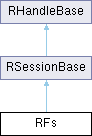
Classes | |
| class | TNameValidParam |
| This class is used to for returning meaningful error code values to users of RFs::IsValidName(const TDesC& ,TNameValidParam& ) More... | |
Public Types | |
| enum | TFinaliseDrvMode { EFinal_RW , EFinal_RO , EForceUnfinalise } |
| specifies drive finalisation modes More... | |
| enum | { KRootFileSystem = 0x00800000 , KFirstChildFileSystem = 0 } |
| Special enumerator values for the SupportedFileSystemName() API. More... | |
| enum | TForceMediaChangeFlags { KForceMediaChangeReOpenAllMediaDrivers = 0 , KMediaRemountForceMediaChange = 0x00000001 , KForceMediaChangeReOpenMediaDriver = 0x80000000 } |
| A set of special flags passed directly to the media driver via RFs::RemountDrive() API. More... | |
 Public Types inherited from RSessionBase Public Types inherited from RSessionBase | |
| enum | TAttachMode { EExplicitAttach , EAutoAttach } |
| Indicates whether or not threads in the process are automatically attached to the session when passed as a parameter to the Share() function. More... | |
| Public Types inherited from RHandleBase | |
| enum | TAttributes { EReadAccess =0x1 , EWriteAccess =0x2 , EDirectReadAccess =0x4 , EDirectWriteAccess =0x8 } |
| Read/Write attributes for the handle. More... | |
Public Member Functions | |
| EFSRV_IMPORT_C TInt | Connect (TInt aMessageSlots=KFileServerDefaultMessageSlots) |
| Connects a client to the file server. | |
| EFSRV_IMPORT_C void | Close () |
| EFSRV_IMPORT_C TVersion | Version () const |
| Gets the client side version number. | |
| EFSRV_IMPORT_C TInt | AddFileSystem (const TDesC &aFileName) const |
| Adds a file system to the file server. | |
| EFSRV_IMPORT_C TInt | MountFileSystem (const TDesC &aFileSystemName, TInt aDrive) const |
| Mounts a file system on a drive. | |
| EFSRV_IMPORT_C TInt | MountFileSystem (const TDesC &aFileSystemName, TInt aDrive, TBool aIsSync) const |
| Mounts a file system on a specified drive. | |
| EFSRV_IMPORT_C TInt | MountFileSystemAndScan (const TDesC &aFileSystemName, TInt aDrive, TBool &aIsMountSuccess) const |
| Mounts a file system on a drive, and performs a scan on that drive. | |
| EFSRV_IMPORT_C TInt | MountFileSystem (const TDesC &aFileSystemName, const TDesC &aExtensionName, TInt aDrive) |
| Mounts a file system on a drive, and the specified extension. | |
| EFSRV_IMPORT_C TInt | MountFileSystem (const TDesC &aFileSystemName, const TDesC &aExtensionName, TInt aDrive, TBool aIsSync) |
| Mounts a file system on a drive, and the specified extension. | |
| EFSRV_IMPORT_C TInt | MountFileSystemAndScan (const TDesC &aFileSystemName, const TDesC &aExtensionName, TInt aDrive, TBool &aIsMountSuccess) const |
| Mounts a file system on a drive, and the specified extension and performs a scan on that drive. | |
| EFSRV_IMPORT_C TInt | DismountFileSystem (const TDesC &aFileSystemName, TInt aDrive) const |
| Dismounts the file system from the specified drive. | |
| EFSRV_IMPORT_C TInt | RemoveFileSystem (const TDesC &aFileSystemName) const |
| Removes the specified file system. | |
| EFSRV_IMPORT_C TInt | FileSystemName (TDes &aName, TInt aDrive) const |
| Gets the name of the file system mounted on the specified drive. | |
| EFSRV_IMPORT_C TInt | AddExtension (const TDesC &aFileName) |
| Loads the specified extension. | |
| EFSRV_IMPORT_C TInt | MountExtension (const TDesC &aExtensionName, TInt aDrive) |
| Mounts the the specified extension. | |
| EFSRV_IMPORT_C TInt | DismountExtension (const TDesC &aExtensionName, TInt aDrive) |
| Dismounts the specified extension. | |
| EFSRV_IMPORT_C TInt | RemoveExtension (const TDesC &aExtensionName) |
| Removes the specified extension. | |
| EFSRV_IMPORT_C TInt | ExtensionName (TDes &aExtensionName, TInt aDrive, TInt aPos) |
| Gets the name of the extension on the specified drive at the specified position in the extension hierarchy. | |
| EFSRV_IMPORT_C TInt | RemountDrive (TInt aDrive, const TDesC8 *aMountInfo=NULL, TUint aFlags=0) |
| Forces a remount of the specified drive. | |
| EFSRV_IMPORT_C void | NotifyChange (TNotifyType aType, TRequestStatus &aStat) |
| Requests a notification of change to files or directories. | |
| EFSRV_IMPORT_C void | NotifyChange (TNotifyType aType, TRequestStatus &aStat, const TDesC &aPathName) |
| Requests a notification of change to files or directories, allowing a directory/file path to be specified. | |
| EFSRV_IMPORT_C void | NotifyChangeCancel () |
| Cancels all outstanding requests for notification of change to files or directories. | |
| EFSRV_IMPORT_C void | NotifyChangeCancel (TRequestStatus &aStat) |
| Cancels the specific request for notification of change to files or directories. | |
| EFSRV_IMPORT_C void | NotifyDiskSpace (TInt64 aThreshold, TInt aDrive, TRequestStatus &aStat) |
| Requests notification when the free disk space on the specified drive crosses the specified threshold value. | |
| EFSRV_IMPORT_C void | NotifyDiskSpaceCancel (TRequestStatus &aStat) |
| Cancels a specific outstanding request for free disk space notification. | |
| EFSRV_IMPORT_C void | NotifyDiskSpaceCancel () |
| Cancels all outstanding requests for free disk space notification. | |
| EFSRV_IMPORT_C TInt | DriveList (TDriveList &aList) const |
| Gets a list of the available (not remote and non hidden) drives. | |
| EFSRV_IMPORT_C TInt | DriveList (TDriveList &aList, TUint aFlags) const |
| Gets a list of the available drives that match a combination of drive attributes,specified in aFlags. | |
| EFSRV_IMPORT_C TInt | Drive (TDriveInfo &anInfo, TInt aDrive=KDefaultDrive) const |
| Gets information about a drive and the medium mounted on it. | |
| EFSRV_IMPORT_C TInt | Volume (TVolumeInfo &aVol, TInt aDrive=KDefaultDrive) const |
| Gets volume information for a formatted device. | |
| EFSRV_IMPORT_C void | Volume (TVolumeInfo &aVol, TInt aDrive, TRequestStatus &aStat) const |
| Gets volume information for a formatted device asynchronously. | |
| EFSRV_IMPORT_C TInt | SetVolumeLabel (const TDesC &aName, TInt aDrive=KDefaultDrive) |
| Sets the label for a volume. | |
| EFSRV_IMPORT_C TInt | Subst (TDes &aPath, TInt aDrive=KDefaultDrive) const |
| Gets the path assigned to a drive letter by an earlier call to SetSubst(). | |
| EFSRV_IMPORT_C TInt | SetSubst (const TDesC &aPath, TInt aDrive=KDefaultDrive) |
| Assigns a path to a drive letter. | |
| EFSRV_IMPORT_C TInt | RealName (const TDesC &aName, TDes &aResult) const |
| Gets the real name of a file. | |
| EFSRV_IMPORT_C TInt | GetMediaSerialNumber (TMediaSerialNumber &aSerialNum, TInt aDrive) |
| Gets the serial number of media. | |
| EFSRV_IMPORT_C TInt | SessionPath (TDes &aPath) const |
| Gets the session path. | |
| EFSRV_IMPORT_C TInt | SetSessionPath (const TDesC &aPath) |
| Sets the session path for the current file server client. | |
| EFSRV_IMPORT_C TInt | Parse (const TDesC &aName, TParse &aParse) const |
| Parses a filename specification. | |
| EFSRV_IMPORT_C TInt | Parse (const TDesC &aName, const TDesC &aRelated, TParse &aParse) const |
| Parses a filename specification, specifying related file path components. | |
| EFSRV_IMPORT_C TInt | MkDir (const TDesC &aPath) |
| Makes a directory. | |
| EFSRV_IMPORT_C TInt | MkDirAll (const TDesC &aPath) |
| Makes one or more directories. | |
| EFSRV_IMPORT_C TInt | RmDir (const TDesC &aPath) |
| Removes a directory. | |
| EFSRV_IMPORT_C TInt | GetDir (const TDesC &aName, TUint anEntryAttMask, TUint anEntrySortKey, CDir *&anEntryList) const |
| Gets a filtered list of a directory's contents. | |
| EFSRV_IMPORT_C TInt | GetDir (const TDesC &aName, TUint anEntryAttMask, TUint anEntrySortKey, CDir *&anEntryList, CDir *&aDirList) const |
| Gets a filtered list of the directory and file entries contained in a directory, and a list of the directory entries only. | |
| EFSRV_IMPORT_C TInt | GetDir (const TDesC &aName, const TUidType &anEntryUid, TUint anEntrySortKey, CDir *&aFileList) const |
| Gets a filtered list of a directory's contents by UID type. | |
| EFSRV_IMPORT_C TInt | Delete (const TDesC &aName) |
| Deletes a single file. | |
| EFSRV_IMPORT_C TInt | Rename (const TDesC &anOldName, const TDesC &aNewName) |
| Renames a single file or directory. | |
| EFSRV_IMPORT_C TInt | Replace (const TDesC &anOldName, const TDesC &aNewName) |
| Replaces a single file with another. | |
| EFSRV_IMPORT_C TInt | Att (const TDesC &aName, TUint &aAttValue) const |
| Gets a file's attributes. | |
| EFSRV_IMPORT_C TInt | SetAtt (const TDesC &aName, TUint aSetAttMask, TUint aClearAttMask) |
| Sets or clears the attributes of a single file or directory. | |
| EFSRV_IMPORT_C TInt | Modified (const TDesC &aName, TTime &aTime) const |
| Gets the last modification date and time of a file or a directory, in UTC. | |
| EFSRV_IMPORT_C TInt | SetModified (const TDesC &aName, const TTime &aTime) |
| Sets the date and time that the contents of a file or directory were modified, in UTC. | |
| EFSRV_IMPORT_C TInt | Entry (const TDesC &aName, TEntry &anEntry) const |
| Gets the entry details for a file or directory. | |
| EFSRV_IMPORT_C TInt | SetEntry (const TDesC &aName, const TTime &aTime, TUint aSetAttMask, TUint aClearAttMask) |
| Sets both the attributes and the last modified date and time for a file or directory. | |
| EFSRV_IMPORT_C TInt | SetSystemDrive (TDriveNumber aSystemDrive) |
| Set a specified drive as a "System Drive", see RFs::GetSystemDrive(). | |
| EFSRV_IMPORT_C void | ResourceCountMarkStart () const |
| Marks the start of resource count checking. | |
| EFSRV_IMPORT_C void | ResourceCountMarkEnd () const |
| Ends resource count checking. | |
| EFSRV_IMPORT_C TInt | ResourceCount () const |
| Gets the number of currently open resources. | |
| EFSRV_IMPORT_C TInt | IsFileOpen (const TDesC &aFile, TBool &anAnswer) const |
| Tests whether a file is open. | |
| EFSRV_IMPORT_C TInt | CheckDisk (const TDesC &aDrive) const |
| Checks the integrity of the File System mounted on the specified drive. | |
| EFSRV_IMPORT_C TInt | ScanDrive (const TDesC &aDrive) const |
| Checks the integrity of the File System mounted on the specified drive and attempts to correct some known File System errors. | |
| EFSRV_IMPORT_C TInt | GetShortName (const TDesC &aLongName, TDes &aShortName) const |
| Gets the short filename associated with a VFAT long filename. | |
| EFSRV_IMPORT_C TInt | GetLongName (const TDesC &aShortName, TDes &aLongName) const |
| Gets the long filename associated with a short (8.3) filename. | |
| EFSRV_IMPORT_C TBool | GetNotifyUser () |
| Tests whether user notification of file read or write failure is in effect. | |
| EFSRV_IMPORT_C void | SetNotifyUser (TBool aValue) |
| Sets whether the user should be notified of file read or write failure. | |
| EFSRV_IMPORT_C TUint8 * | IsFileInRom (const TDesC &aFileName) const |
| Gets a pointer to the specified file, if it is in ROM. | |
| EFSRV_IMPORT_C TBool | IsValidName (const TDesC &anEntryName) const |
| Tests whether a filename and path are syntactically correct. | |
| EFSRV_IMPORT_C TBool | IsValidName (const TDesC &aFileName, TText &aBadChar) const |
| The following restrictions apply to the path and to its components: | |
| EFSRV_IMPORT_C TInt | GetDriveName (TInt aDrive, TDes &aDriveName) const |
| Gets the name of a drive. | |
| EFSRV_IMPORT_C TInt | SetDriveName (TInt aDrive, const TDesC &aDriveName) |
| Sets the name of a drive. | |
| EFSRV_IMPORT_C TInt | LoaderHeapFunction (TInt aFunction, TAny *aArg1=NULL, TAny *aArg2=NULL) |
| This member function is not implemented in this version of Symbian OS. | |
| IMPORT_C TInt | SetErrorCondition (TInt anError, TInt aCount=0) |
| Sets the failure condition. | |
| EFSRV_IMPORT_C TInt | SetDebugRegister (TInt aVal) |
| Sets the debug register to the given value. | |
| EFSRV_IMPORT_C TInt | SetAllocFailure (TInt aAllocNum) |
| Fails an allocation after aAllocNum successes. | |
| EFSRV_IMPORT_C void | DebugNotify (TInt aDrive, TUint aNotifyType, TRequestStatus &aStat) |
| Request notification of a file server event - file system specific. | |
| EFSRV_IMPORT_C TInt | ControlIo (TInt aDrive, TInt aCommand) |
| General purpose test interface - file system specific. | |
| EFSRV_IMPORT_C TInt | ControlIo (TInt aDrive, TInt aCommand, TDes8 &aParam1) |
| General purpose test interface - file system specific. | |
| EFSRV_IMPORT_C TInt | ControlIo (TInt aDrive, TInt aCommand, TDes8 &aParam1, TDes8 &aParam2) |
| General purpose test interface - file system specific. | |
| EFSRV_IMPORT_C TInt | ControlIo (TInt aDrive, TInt aCommand, TAny *aParam1, TAny *aParam2) |
| General purpose test interface - file system specific. | |
| EFSRV_IMPORT_C TInt | LockDrive (TInt aDrv, const TMediaPassword &aOld, const TMediaPassword &aNew, TBool aStr) |
| Sets the password for the media in the specified drive. | |
| EFSRV_IMPORT_C TInt | UnlockDrive (TInt aDrv, const TMediaPassword &Pswd, TBool aStr) |
| Unlocks the media in the specified drive. | |
| EFSRV_IMPORT_C TInt | ClearPassword (TInt aDrv, const TMediaPassword &aPswd) |
| Clears the password from the locked MultiMedia card in the specified drive. | |
| EFSRV_IMPORT_C TInt | ErasePassword (TInt aDrv) |
| Erase the password from the locked MultiMedia card in the specified drive. | |
| EFSRV_IMPORT_C TInt | SetSessionToPrivate (TInt aDrive) |
| Sets the session path to point to the private path on the specified drive. | |
| EFSRV_IMPORT_C TInt | PrivatePath (TDes &aPath) |
| Creates the text defining the private path for a process. | |
| EFSRV_IMPORT_C TInt | CreatePrivatePath (TInt aDrive) |
| Creates the private path for a process on the specified drive. | |
| EFSRV_IMPORT_C void | StartupInitComplete (TRequestStatus &aStat) |
| Noifies the file server that startup initialisation is complete. | |
| EFSRV_IMPORT_C TInt | SetLocalDriveMapping (const TDesC8 &aMapping) |
| EFSRV_IMPORT_C TInt | FinaliseDrives () |
| Makes the best effort to finalise all drives in the system. | |
| EFSRV_IMPORT_C TInt | FinaliseDrive (TInt aDriveNo, TFinaliseDrvMode aMode) const |
| Finalise the given drive. | |
| EFSRV_IMPORT_C TInt | SwapFileSystem (const TDesC &aOldFileSystemName, const TDesC &aNewFileSystemName, TInt aDrive) const |
| Dismount aOldFileSystemName and mount aNewFileSystemName in an atomic operation. | |
| EFSRV_IMPORT_C TInt | ReserveDriveSpace (TInt aDriveNo, TInt aSpace) |
| Reserves an area of a drive. | |
| EFSRV_IMPORT_C TInt | GetReserveAccess (TInt aDriveNo) |
| Get exclusive access for this session to overwrite a specific disk area, which has previously been reserved via RFs::ReserveDriveSpace. | |
| EFSRV_IMPORT_C TInt | ReleaseReserveAccess (TInt aDriveNo) |
| Release exclusive access for this session to overwrite a specific disk area. | |
| EFSRV_IMPORT_C TInt | AddPlugin (const TDesC &aFileName) const |
| Loads a specified Plugin. | |
| EFSRV_IMPORT_C TInt | RemovePlugin (const TDesC &aPluginName) const |
| Removes the specified plugin. | |
| EFSRV_IMPORT_C TInt | PluginName (TDes &aPluginName, TInt aDrive, TInt aPos) |
| Gets the name of the plugin on the specified drive at the specified position in the plugin hierarchy. | |
| EFSRV_IMPORT_C TInt | MountPlugin (const TDesC &aPluginName) const |
| Mounts a specified plugin. | |
| EFSRV_IMPORT_C TInt | MountPlugin (const TDesC &aPluginName, TInt aDrive) const |
| Mounts a specified plugin specifying the drive plugin will support. | |
| EFSRV_IMPORT_C TInt | MountPlugin (const TDesC &aPluginName, TInt aDrive, TInt aPos) const |
| Mounts a specified plugin using absolute position and a specific drive. | |
| EFSRV_IMPORT_C TInt | DismountPlugin (const TDesC &aPluginName) const |
| Dismounts the specified plugin from all drives on which it is mounted. | |
| EFSRV_IMPORT_C TInt | DismountPlugin (const TDesC &aPluginName, TInt aDrive) const |
| Dismounts the specified plugin. | |
| EFSRV_IMPORT_C TInt | DismountPlugin (const TDesC &aPluginName, TInt aDrive, TInt aPos) const |
| Dismounts the specified plugin. | |
| EFSRV_IMPORT_C void | NotifyDismount (TInt aDrive, TRequestStatus &aStat, TNotifyDismountMode aMode=EFsDismountRegisterClient) const |
| Controls file system dismounting on the specified drive, the way of control depends on the parameter TNotifyDismountMode. | |
| EFSRV_IMPORT_C void | NotifyDismountCancel (TRequestStatus &aStat) const |
| Cancels the oustanding dismount notifier, completing with KErrCancel. | |
| EFSRV_IMPORT_C void | NotifyDismountCancel () const |
| Cancels all oustanding dismount notifiers for this session, completing with KErrCancel. | |
| EFSRV_IMPORT_C TInt | AllowDismount (TInt aDrive) const |
| Used by a client to indicate that it is safe to dismount the file system. | |
| EFSRV_IMPORT_C TInt | SetStartupConfiguration (TInt aCommand, TAny *aParam1, TAny *aParam2) const |
| Only can be called in estart. | |
| EFSRV_IMPORT_C TInt | AddCompositeMount (const TDesC &aFileSystemName, TInt aLocalDriveToMount, TInt aCompositeDrive, TBool aSync) const |
| Adds a local drive to the composite filesystem. | |
| EFSRV_IMPORT_C TInt | SetNotifyChange (TBool aNotifyChange) |
| Enables/Disables change notification on a per-session basis. | |
| EFSRV_IMPORT_C TInt | QueryVolumeInfoExt (TInt aDrive, TQueryVolumeInfoExtCmd aCommand, TDes8 &aInfo) const |
| Queries specific information on volumes by commands. | |
| EFSRV_IMPORT_C TInt | VolumeIOParam (TInt aDriveNo, TVolumeIOParamInfo &aParamInfo) const |
| This function queries a set of I/O parameters on the specified volume, this includes the block size of underlying media, cluster size of the mounted file system and the recommended read/write buffer sizes. | |
| EFSRV_IMPORT_C TInt | FileSystemSubType (TInt aDriveNo, TDes &aName) const |
| This function queries the sub type of the file system mounted on the specified volume. | |
| EFSRV_IMPORT_C TInt | InitialisePropertiesFile (const TPtrC8 &aPtr) const |
| Sets the F32 properties file - Can only be called from the ESTART process. | |
| IMPORT_C TInt | AddProxyDrive (const TDesC &aFileName) |
| Loads the specified extension. | |
| IMPORT_C TInt | RemoveProxyDrive (const TDesC &aDriveName) |
| Removes the specified extension. | |
| template<class T0 , class T1 > | |
| TInt | MountProxyDrive (const TUint aDrive, const TDesC &aName, T0 a0, T1 a1) |
| IMPORT_C TInt | DismountProxyDrive (const TUint aDrive) |
| Dismounts a proxy drive. | |
| TInt | Unclamp (const RFileClamp &aHandle) |
| Makes available for paging-out the media space occupied by the file identified by the supplied handle. | |
| EFSRV_IMPORT_C TInt | ReadFileSection (const TDesC &aName, TInt64 aPos, TDes8 &aDes, TInt aLength) const |
| Reads data from a file without opening it. | |
| EFSRV_IMPORT_C TBool | IsValidName (const TDesC &aName, TNameValidParam &aParam) |
| This API can be used to validate both directory and file names. | |
| EFSRV_IMPORT_C TInt | SupportedFileSystemName (TDes &aName, TInt aDrive, TInt aFsEnumerator) const |
| Get one of the supported file system names on a specified drive. | |
| Public Member Functions inherited from RSessionBase | |
| TInt | ShareAuto () |
| Creates a session that can be shared by other threads in the current process. | |
| TInt | ShareProtected () |
| Creates a session handle that can be be passed via IPC to another process as well as being shared by other threads in the current process. | |
| IMPORT_C TInt | Open (RMessagePtr2 aMessage, TInt aParam, TOwnerType aType=EOwnerProcess) |
| Opens a handle to a session using a handle number sent by a client to a server. | |
| IMPORT_C TInt | Open (RMessagePtr2 aMessage, TInt aParam, const TSecurityPolicy &aServerPolicy, TOwnerType aType=EOwnerProcess) |
| Opens a handle to a session using a handle number sent by a client to a server, and validate that the session's server passes a given security policy. | |
| IMPORT_C TInt | Open (TInt aArgumentIndex, TOwnerType aType=EOwnerProcess) |
| Opens a handle to a session using a handle number passed as an environment data item to the child process during the creation of that child process. | |
| IMPORT_C TInt | Open (TInt aArgumentIndex, const TSecurityPolicy &aServerPolicy, TOwnerType aType=EOwnerProcess) |
| Opens a handle to a session using a handle number passed as an environment data item to the child process during the creation of that child process, after validating that the session's server passes the given security policy. | |
| TInt | SetReturnedHandle (TInt aHandleOrError) |
| Sets the handle-number of this handle to the specified value. | |
| IMPORT_C TInt | SetReturnedHandle (TInt aHandleOrError, const TSecurityPolicy &aServerPolicy) |
| Sets the handle-number of this session handle to the specified value after validating that the session's server passes a given security policy. | |
| Public Member Functions inherited from RHandleBase | |
| RHandleBase () | |
| Default constructor. | |
| TInt | Handle () const |
| Retrieves the handle-number of the object associated with this handle. | |
| void | SetHandle (TInt aHandle) |
| Sets the handle-number of this handle to the specified value. | |
| TInt | SetReturnedHandle (TInt aHandleOrError) |
| Sets the handle-number of this handle to the specified value. | |
| IMPORT_C void | Close () |
| Closes the handle. | |
| IMPORT_C TName | Name () const |
| Gets the name of the handle. | |
| IMPORT_C TFullName | FullName () const |
| Gets the full name of the handle. | |
| IMPORT_C void | FullName (TDes &aName) const |
| Gets the full name of the handle. | |
| IMPORT_C void | SetHandleNC (TInt aHandle) |
| Sets the handle-number of this handle to the specified value, and marks it as not closable. | |
| IMPORT_C TInt | Duplicate (const RThread &aSrc, TOwnerType aType=EOwnerProcess) |
| Creates a valid handle to the kernel object for which the specified thread already has a handle. | |
| IMPORT_C void | HandleInfo (THandleInfo *anInfo) |
| Gets information about the handle. | |
| IMPORT_C TUint | Attributes () const |
| IMPORT_C TInt | BTraceId () const |
| Returns a unique object identifier for use with BTrace. | |
| IMPORT_C void | NotifyDestruction (TRequestStatus &aStatus) |
| Internal technology API. | |
Static Public Member Functions | |
| static EFSRV_IMPORT_C TBool | IsValidDrive (TInt aDrive) |
| Tests whether the specified drive number is valid. | |
| static EFSRV_IMPORT_C TInt | CharToDrive (TChar aChar, TInt &aDrive) |
| Maps a drive character to a drive number. | |
| static EFSRV_IMPORT_C TInt | DriveToChar (TInt aDrive, TChar &aChar) |
| Maps a drive number to the corresponding character. | |
| static EFSRV_IMPORT_C TBool | IsRomAddress (TAny *aAny) |
| Tests whether the specified address is in ROM. | |
| static EFSRV_IMPORT_C TDriveNumber | GetSystemDrive () |
| Obtain the system drive number. | |
| static EFSRV_IMPORT_C TChar | GetSystemDriveChar () |
| This is a wrapper around GetSystemDrive() function. | |
| Static Public Member Functions inherited from RHandleBase | |
| static void | DoExtendedClose () |
Protected Member Functions | |
| TInt | SendReceive (TInt aFunction, const TIpcArgs &aArgs) const |
| Issues a synchronous request to the server with the specified function number and arguments. | |
| Protected Member Functions inherited from RSessionBase | |
| TInt | CreateSession (const TDesC &aServer, const TVersion &aVersion) |
| Creates a session with a server, specifying no message slots. | |
| IMPORT_C TInt | CreateSession (const TDesC &aServer, const TVersion &aVersion, TInt aAsyncMessageSlots) |
| Creates a session with a server. | |
| IMPORT_C TInt | CreateSession (const TDesC &aServer, const TVersion &aVersion, TInt aAsyncMessageSlots, TIpcSessionType aType, const TSecurityPolicy *aPolicy=0, TRequestStatus *aStatus=0) |
| Creates a session with a server. | |
| TInt | CreateSession (RServer2 aServer, const TVersion &aVersion) |
| Creates a session with a server, specifying no message slots. | |
| IMPORT_C TInt | CreateSession (RServer2 aServer, const TVersion &aVersion, TInt aAsyncMessageSlots) |
| Creates a session with a server. | |
| IMPORT_C TInt | CreateSession (RServer2 aServer, const TVersion &aVersion, TInt aAsyncMessageSlots, TIpcSessionType aType, const TSecurityPolicy *aPolicy=0, TRequestStatus *aStatus=0) |
| Creates a session with a server. | |
| TInt | CreateSession (const TDesC &aServer, const TVersion &aVersion, TInt aAsyncMessageSlots, TRequestStatus *aStatus) |
| TInt | Send (TInt aFunction, const TIpcArgs &aArgs) const |
| Issues a blind request to the server with the specified function number, and arguments. | |
| void | SendReceive (TInt aFunction, const TIpcArgs &aArgs, TRequestStatus &aStatus) const |
| Issues an asynchronous request to the server with the specified function number and arguments. | |
| TInt | SendReceive (TInt aFunction, const TIpcArgs &aArgs) const |
| Issues a synchronous request to the server with the specified function number and arguments. | |
| TInt | Send (TInt aFunction) const |
| Issues a blind request to the server with the specified function number, but with no arguments. | |
| void | SendReceive (TInt aFunction, TRequestStatus &aStatus) const |
| Issues an asynchronous request to the server with the specified function number, but with no arguments. | |
| TInt | SendReceive (TInt aFunction) const |
| Issues a synchronous request to the server with the specified function number, but with no arguments. | |
| Protected Member Functions inherited from RHandleBase | |
| RHandleBase (TInt aHandle) | |
| Copy constructor. | |
| IMPORT_C TInt | Open (const TFindHandleBase &aHandle, TOwnerType aType) |
| Opens a handle to a kernel side object found using a find-handle object. | |
| TInt | OpenByName (const TDesC &aName, TOwnerType aOwnerType, TInt aObjectType) |
| Implementation for RXxxxx::Open/OpenGlocbal(const TDesC &aName,,TOwnerType aType) functions. | |
Friends | |
| class | TOpenFileScan |
| class | RFsPlugin |
Additional Inherited Members | |
| Static Protected Member Functions inherited from RSessionBase | |
| static TInt | SetReturnedHandle (TInt aHandleOrError, RHandleBase &aHandle) |
| Static Protected Member Functions inherited from RHandleBase | |
| static TInt | SetReturnedHandle (TInt aHandleOrError, RHandleBase &aHandle) |
| Protected Attributes inherited from RHandleBase | |
| TInt | iHandle |
Detailed Description
A handle to a file server session.
A program or thread may have arbitrarily many sessions open simultaneously.
Use this class for all file system manipulation, including:
- adding, removing, moving and renaming files and directories
- inspecting and changing file attributes and directory entry details. These include the time and date when the file or directory was last written to, its size and various attribute flags such as read-only, hidden, archive or system.
- finding a file’s real name; if the file system on which it is stored has to "mangle" the name into a shorter format
- getting directory listings
- maintaining a default path; unlike some other systems, there is a single system default path, rather than one for each drive: the default path consists of a drive and a path specification.
- performing context-sensitive parses using TParse objects, and the session path
- obtaining information on drives and volumes
- formatting and labelling volumes
- obtaining a list of valid drives
- emulating the DOS subst command, which allows any directory to appear as if it were a separate drive
- requesting notification of when significant change occurs. This can be used for programs which maintain file lists, but must update those lists when change occurs.
- finding the version number of the file server
- resource counting to ensure that all resources are closed when the session terminates.
This class is not intended for user derivation.
The following restrictions apply when a path is specified:
- its total length must not exceed 256 characters
- wildcards cannot be used in the drive or in any directory name, although they may be allowed in the filename and extension.
- double backslashes are not allowed in the path.
- the following characters must not be included anywhere in the path: < > " / |
- a colon may only be included between the drive and path
- no directory name or filename plus extension may consist solely of space characters, or of a single or double dot.
- spaces between the drive, if specified, and the first directory in the path are illegal, although there may be spaces between other path components, for instance between directories.
- API status
- Published to all clients. Released API.
Member Enumeration Documentation
◆ anonymous enum
| anonymous enum |
Special enumerator values for the SupportedFileSystemName() API.
| Enumerator | |
|---|---|
| KRootFileSystem | specifies "root" file system. The result will be the same as for FileSystemName() API call |
| KFirstChildFileSystem | specifies the first child file system number, the second will be KFirstChildFileSystem+1 etc. |
◆ TFinaliseDrvMode
specifies drive finalisation modes
◆ TForceMediaChangeFlags
A set of special flags passed directly to the media driver via RFs::RemountDrive() API.
They are used to specify how exactly the drive should be remounted. For more information see RLocalDrive::ForceMediaChange()
- See also
- RFs::RemountDrive()
| Enumerator | |
|---|---|
| KForceMediaChangeReOpenAllMediaDrivers | Passing this flag to RFs::RemountDrive() API results in all media drivers associated with the primary media being closed and reopened. All pending requests on all logical drives associated with the primary media will be cancelled. |
| KMediaRemountForceMediaChange | This flag is used to simulate ejecting and re-inserting the media. All pending requests on all logical drives associated with the primary media will be cancelled. |
| KForceMediaChangeReOpenMediaDriver | This flag is used to force the media driver for the specified logical drive to be closed and reopened. It should not affect any pending requests on other logical drives associated with the primary media. |
Member Function Documentation
◆ AddCompositeMount()
| EFSRV_IMPORT_C TInt RFs::AddCompositeMount | ( | const TDesC & | aFileSystemName, |
| TInt | aLocalDriveToMount, | ||
| TInt | aCompositeDrive, | ||
| TBool | aSync | ||
| ) | const |
Adds a local drive to the composite filesystem.
This can only be used before the composite filesystem is mounted. The local drive is mounted with the filesystem provided. If any local drive added is marked to be asynchronous, then the whole composite drive will be treated asynchronous.
- Parameters
-
aFileSystemName The filesystem of the local drive to be added. aLocalDriveToMount The local drive to be added. aCompositeDrive The drive the composite filesystem will be mounted on. aSync If the filesystem added here is preferred to be synchronous.
- capability
- DiskAdmin
(generated from Symbian Developer Library)
◆ AddExtension()
| EFSRV_IMPORT_C TInt RFs::AddExtension | ( | const TDesC & | aFileName | ) |
Loads the specified extension.
- Parameters
-
aFileName The file name of the extension
(generated from Symbian Developer Library)
◆ AddFileSystem()
| EFSRV_IMPORT_C TInt RFs::AddFileSystem | ( | const TDesC & | aFileName | ) | const |
Adds a file system to the file server.
After calling this function, use MountFileSystem() to mount the file system on a drive.
- Parameters
-
aFileName The name of the file system .FSY to install. Its full path can be specified.
- capability
- DiskAdmin
(generated from Symbian Developer Library)
◆ AddPlugin()
| EFSRV_IMPORT_C TInt RFs::AddPlugin | ( | const TDesC & | aFileName | ) | const |
Loads a specified Plugin.
- Parameters
-
aFileName The file name of the plugin
- capability
- DiskAdmin
(generated from Symbian Developer Library)
◆ AddProxyDrive()
| IMPORT_C TInt RFs::AddProxyDrive | ( | const TDesC & | aFileName | ) |
Loads the specified extension.
- Parameters
-
aFileName The file name of the extension
(generated from Symbian Developer Library)
◆ AllowDismount()
| EFSRV_IMPORT_C TInt RFs::AllowDismount | ( | TInt | aDrive | ) | const |
Used by a client to indicate that it is safe to dismount the file system.
This should be called after receiving a pending media removal notification.
Not calling this does not guarantee that the dismount will not occur as the application requesting the dismount may decide to forcibly dismount after a given timeout period.
(generated from Symbian Developer Library)
◆ Att()
| EFSRV_IMPORT_C TInt RFs::Att | ( | const TDesC & | aName, |
| TUint & | aAttValue | ||
| ) | const |
Gets a file's attributes.
- Parameters
-
aName The filename. Any path components which are not specified here will be taken from the session path. aAttValue On return, the individual bits within the byte indicate which attributes have been set. For more information see KEntryAttNormal and the other file/directory attributes.
- capability
- Dependent If aName contains /sys/ then AllFiles capability is required.
- capability
- Dependent If aName contains /Private/ and does not match this process' SID then AllFiles capability is required.
(generated from Symbian Developer Library)
◆ CharToDrive()
|
static |
Maps a drive character to a drive number.
The drive character must be in the range A to Z or a to z. For example, drive A (or a) corresponds to zero, drive B (or b) corresponds to 1 etc. For the drive number enumeration, see TDriveNumber.
TDriveNumber
- Parameters
-
aChar The drive character. aDrive On return, contains the drive number.
(generated from Symbian Developer Library)
◆ CheckDisk()
| EFSRV_IMPORT_C TInt RFs::CheckDisk | ( | const TDesC & | aDrive | ) | const |
Checks the integrity of the File System mounted on the specified drive.
The behaviour of this API and return codes are File System specific, dependent on how the File System implements its CheckDisk functionality. Note that CheckDisk does not fix any errors that may be found, it just reports the first problem it has found.
CheckDisk checks for a limited amount of possible corruption cases such as invalid cluster numbers in the FAT table, lost and cross-linked cluster chains, various errors within the directory entry etc.
If CheckDisk returns KErrNone, this means that there are no errors that CheckDisk on FAT is aware of.
Error codes returned by the FAT version of CheckDisk include: 1 Bad cluster value in FAT table detected. 2 Cross-linked cluster chain detected. 3 Lost cluster chain detected. 4 File size does not correspond to the number of clusters reported in the FAT table.
- Parameters
-
aDrive Path containing the drive to be checked. If the drive letter is not specified, the current session drive is taken by default.
- capability
- DiskAdmin
(generated from Symbian Developer Library)
◆ ClearPassword()
| EFSRV_IMPORT_C TInt RFs::ClearPassword | ( | TInt | aDrv, |
| const TMediaPassword & | aPswd | ||
| ) |
Clears the password from the locked MultiMedia card in the specified drive.
Clearing the password causes the MultiMedia card controller to set the password to null.
- Parameters
-
aDrv The drive. aPswd The current password, which is required to perform this operation.
- capability
- DiskAdmin
(generated from Symbian Developer Library)
◆ Close()
| EFSRV_IMPORT_C void RFs::Close | ( | ) |
◆ Connect()
| EFSRV_IMPORT_C TInt RFs::Connect | ( | TInt | aMessageSlots = KFileServerDefaultMessageSlots | ) |
Connects a client to the file server.
To end the file server session, use Close().
- Parameters
-
aMessageSlots The number of message slots required. The default value of KFileServerDefaultMessageSlots indicates that message slots will be acquired dynamically from the system wide pool. Override this value with a fixed number, if a fixed number of slots are to be allocated to the session. If overriding, note that the number of message slots represents the number of operations, such as reads and writes, that can be outstanding at once; always remember to provide a spare slot for the cancel operation.
(generated from Symbian Developer Library)
◆ ControlIo() [1/4]
| EFSRV_IMPORT_C TInt RFs::ControlIo | ( | TInt | aDrive, |
| TInt | aCommand | ||
| ) |
General purpose test interface - file system specific.
This function can only be used in debug builds or if _USE_CONTROLIO, _DEBUG or _DEBUG_RELEASE is defined. In release build, this method is not implemented and it always returns KErrNotSupported.
There are drive specific and non-drive specific commands. Following are non-drive specific commands
RFs::TDriveNumber()
- Parameters
-
aDrive A drive on which aCommand is to be executed; this can be one of the values defined by TDriveNumber. aCommand A command to be executed, specific to the file system implementation.
(generated from Symbian Developer Library)
◆ ControlIo() [2/4]
| EFSRV_IMPORT_C TInt RFs::ControlIo | ( | TInt | aDrive, |
| TInt | aCommand, | ||
| TAny * | aParam1, | ||
| TAny * | aParam2 | ||
| ) |
General purpose test interface - file system specific.
This function can only be used in debug builds or if _USE_CONTROLIO, _DEBUG or _DEBUG_RELEASE is defined. In release build, this method is not implemented and it always returns KErrNotSupported.
RFs::TDriveNumber()
- Parameters
-
aDrive A drive on which aCommand is to be executed; this can be one of the values defined by TDriveNumber. aCommand A command to be executed, specific to the file system implementation. aParam1 Placeholder for a parameter, specific to the file system implementation. aParam2 Placeholder for a parameter, specific to the file system implementation.
(generated from Symbian Developer Library)
◆ ControlIo() [3/4]
| EFSRV_IMPORT_C TInt RFs::ControlIo | ( | TInt | aDrive, |
| TInt | aCommand, | ||
| TDes8 & | aParam1 | ||
| ) |
General purpose test interface - file system specific.
This function can only be used in debug builds or if _USE_CONTROLIO, _DEBUG or _DEBUG_RELEASE is defined. In release build, this method is not implemented and it always returns KErrNotSupported.
RFs::TDriveNumber()
- Parameters
-
aDrive A drive on which aCommand is to be executed; this can be one of the values defined by TDriveNumber. aCommand A command to be executed, specific to the file system implementation. aParam1 Placeholder for a parameter, specific to the file system implementation.
(generated from Symbian Developer Library)
◆ ControlIo() [4/4]
| EFSRV_IMPORT_C TInt RFs::ControlIo | ( | TInt | aDrive, |
| TInt | aCommand, | ||
| TDes8 & | aParam1, | ||
| TDes8 & | aParam2 | ||
| ) |
General purpose test interface - file system specific.
This function can only be used in debug builds or if _USE_CONTROLIO, _DEBUG or _DEBUG_RELEASE is defined. In release build, this method is not implemented and it always returns KErrNotSupported.
RFs::TDriveNumber()
- Parameters
-
aDrive A drive on which aCommand is to be executed; this can be one of the values defined by TDriveNumber. aCommand A command to be executed, specific to the file system implementation. aParam1 Placeholder for a parameter, specific to the file system implementation. aParam2 Placeholder for a parameter, specific to the file system implementation.
(generated from Symbian Developer Library)
◆ CreatePrivatePath()
| EFSRV_IMPORT_C TInt RFs::CreatePrivatePath | ( | TInt | aDrive | ) |
Creates the private path for a process on the specified drive.
The private path for a process has the form: \Private\13579BDF\ where 13579BDF is the identity of the process.
- Parameters
-
aDrive The drive for which the private path is to be created. Specify a drive in the range EDriveA to EDriveZ for drives A to Z respectively.
(generated from Symbian Developer Library)
◆ DebugNotify()
| EFSRV_IMPORT_C void RFs::DebugNotify | ( | TInt | aDrive, |
| TUint | aNotifyType, | ||
| TRequestStatus & | aStat | ||
| ) |
Request notification of a file server event - file system specific.
This function can only be used in debug builds or if _DEBUG or _DEBUG_RELEASE is defined. In release build, this method is not implemented and it always returns KErrNotSupported.
RFs::TDriveNumber() TRequestStatus
- Parameters
-
aDrive A drive on which the file server event notification is requested; this can be one of the values defined by TDriveNumber. aNotifyType A number identifying the event that should cause notification; aStat The request status used to contain completion information for the function. On completion, contains a system-wide error code.
(generated from Symbian Developer Library)
◆ Delete()
| EFSRV_IMPORT_C TInt RFs::Delete | ( | const TDesC & | aName | ) |
Deletes a single file.
Wildcards are not allowed in either the file name or the extension, otherwise an error is returned.
Note that the file must be closed and must not be read-only. Hidden files can be deleted but system files cannot.
See class CFileMan for information on deleting multiple files.
- Parameters
-
aName The name of the file to be deleted. Any path components which are not specified here will be taken from the session path.
- capability
- Dependent If aName is /Sys then Tcb capability is required.
- capability
- Dependent If aName begins with /Private and does not match this process' SID then AllFiles capability is required.
- capability
- Dependent If aName is /Resource then Tcb capability is required.
(generated from Symbian Developer Library)
◆ DismountExtension()
| EFSRV_IMPORT_C TInt RFs::DismountExtension | ( | const TDesC & | aExtensionName, |
| TInt | aDrive | ||
| ) |
Dismounts the specified extension.
- Parameters
-
aExtensionName The fullname of the extension, as returned from a call to ExtensionName(). aDrive The drive this extension is to be dismounted from.
(generated from Symbian Developer Library)
◆ DismountFileSystem()
| EFSRV_IMPORT_C TInt RFs::DismountFileSystem | ( | const TDesC & | aFileSystemName, |
| TInt | aDrive | ||
| ) | const |
Dismounts the file system from the specified drive.
- Parameters
-
aFileSystemName The fullname of the file system, as returned from a call to FileSystemName(). aDrive The drive from which the file system is to be dismounted.
- capability
- DiskAdmin
(generated from Symbian Developer Library)
◆ DismountPlugin() [1/3]
| EFSRV_IMPORT_C TInt RFs::DismountPlugin | ( | const TDesC & | aPluginName | ) | const |
Dismounts the specified plugin from all drives on which it is mounted.
- Parameters
-
aPluginName The fullname of the plugin, as returned from a call to PluginName().
- capability
- DiskAdmin
(generated from Symbian Developer Library)
◆ DismountPlugin() [2/3]
| EFSRV_IMPORT_C TInt RFs::DismountPlugin | ( | const TDesC & | aPluginName, |
| TInt | aDrive | ||
| ) | const |
Dismounts the specified plugin.
- Parameters
-
aPluginName The fullname of the plugin, as returned from a call to PluginName(). aDrive The drive on which the plugin is to be dismounted; If the mounted plugin is a version2 plugin, then in order to dismount drive z, KPluginMountDriveZ should be passed as a parameter. For all other drive letters use values 0 to 24 for A to Y. Version1 plugins cannot mount on Z drive.
- capability
- DiskAdmin
(generated from Symbian Developer Library)
◆ DismountPlugin() [3/3]
| EFSRV_IMPORT_C TInt RFs::DismountPlugin | ( | const TDesC & | aPluginName, |
| TInt | aDrive, | ||
| TInt | aPos | ||
| ) | const |
Dismounts the specified plugin.
- Parameters
-
aPluginName The fullname of the plugin, as returned from a call to PluginName(). aDrive If the mounted plugin is a version2 plugin, then in order to dismount drive z, KPluginMountDriveZ should be passed as a parameter. For all other drive letters use values 0 to 24 for A to Y. Version1 plugins cannot mount on Z drive. aPos The position at which the plugin is located in the internal array of plugins. To automatically locate the position of the plugin use DismountPlugin::(TDesC&,TInt) or DismountPlugin::(TDesC&)
- capability
- DiskAdmin
(generated from Symbian Developer Library)
◆ DismountProxyDrive()
| IMPORT_C TInt RFs::DismountProxyDrive | ( | const TUint | aDrive | ) |
Dismounts a proxy drive.
- Parameters
-
aDrive drive number that will be used to mount the proxy drive
(generated from Symbian Developer Library)
◆ Drive()
| EFSRV_IMPORT_C TInt RFs::Drive | ( | TDriveInfo & | anInfo, |
| TInt | aDrive = KDefaultDrive |
||
| ) | const |
Gets information about a drive and the medium mounted on it.
Note that Volume() can also be used to give information about the drive and the volume mounted on it. These two functions are separate because, while the characteristics of a drive cannot change, those of a volume can, by mounting different media, reformatting etc.
- Parameters
-
anInfo On return, contains information describing the drive and the medium mounted on it. The value of TDriveInfo::iType shows whether the drive contains media. aDrive The drive for which information is requested. Specify KDefaultDrive for the session default drive. Specify a drive in the range EDriveA to EDriveZ for drives A to Z respectively.
(generated from Symbian Developer Library)
◆ DriveList() [1/2]
| EFSRV_IMPORT_C TInt RFs::DriveList | ( | TDriveList & | aList | ) | const |
Gets a list of the available (not remote and non hidden) drives.
The drive list consists of an array of 26 bytes. Array index zero corresponds to drive A, index one equals B etc.
Each byte with a non zero value signifies that the corresponding drive is available to the system. In the case of removable media, RFs::Drive should be used to determine whether the media is inserted or not.
The local file system always reserves drive letters A through I. Drive letter Z is always used for the ROM which means that letters J through Y are available to be used by SetSubst() or for redirecting.
- Parameters
-
aList On return, contains a list of drive attributes (only the first 8 bits) for the available non-remote and non-hidden drives.
(generated from Symbian Developer Library)
◆ DriveList() [2/2]
| EFSRV_IMPORT_C TInt RFs::DriveList | ( | TDriveList & | aList, |
| TUint | aFlags | ||
| ) | const |
Gets a list of the available drives that match a combination of drive attributes,specified in aFlags.
This combination may include,exclude or exclusively specify the attributes that that drives to be returned should match.
The drive list consists of an array of 26 bytes. Array index zero corresponds to drive A, index one equals B etc.
Each byte with a non zero value signifies that the corresponding drive is available to the system. In the case of removable media, RFs::Drive should be used to determine whether the media is inserted or not.
The local file system always reserves drive letters A through I. Drive letter Z is always used for the ROM which means that letters J through Y are available to be used by SetSubst() or for redirecting.
- Parameters
-
aList On return, contains a list of available drives that qualify aFlags. aFlags A combination of drive attributes that drives to be returned must qualify.
(generated from Symbian Developer Library)
◆ DriveToChar()
|
static |
Maps a drive number to the corresponding character.
The drive number must be in the range 0 to (KMaxDrives-1). For example, drive number zero (EDriveA) corresponds to drive A, one (EDriveB) corresponds to drive B. For the drive number enumeration, see TDriveNumber.
The drive number can also be KDefaultDrive, implying the default drive. In this case the current drive is taken and converted.
- Parameters
-
aDrive The drive number. aChar On return, contains the drive character.
(generated from Symbian Developer Library)
◆ Entry()
| EFSRV_IMPORT_C TInt RFs::Entry | ( | const TDesC & | aName, |
| TEntry & | anEntry | ||
| ) | const |
Gets the entry details for a file or directory.
This information includes UID information.
- Parameters
-
aName Name of file or directory. anEntry On return, contains the entry details for the file or directory. TEntry::iModified contains UTC date and time.
- capability
- Dependent If aName contains "\\Sys\\" and includes an additional file or directory then AllFiles capability is required. For example, the paths "c:\\sys" and "c:\\sys\\" will always be readable, whereas the path "c:\\sys\\abc\\" will only be readable with AllFiles capability.
- capability
- Dependent If aName contains \Private\ and includes an additional file, or a directory which does not match this process' SID, then AllFiles capability is required. For example, the paths "c:\\private" and "c:\\private\\" will always be readable, whereas the path "c:\\private\\<n>\\" will only be readable with AllFiles capability or if <n> matches the process' SID.
(generated from Symbian Developer Library)
◆ ErasePassword()
| EFSRV_IMPORT_C TInt RFs::ErasePassword | ( | TInt | aDrv | ) |
Erase the password from the locked MultiMedia card in the specified drive.
Used when the password is unknown, and may result in the media being erased.
Successful execution of this call may result in leaving the media in unformatted state. Hence, it is recommended to format the Multimedia card after calling RFs::ErasePassword().
- Parameters
-
aDrv The drive.
- capability
- DiskAdmin
(generated from Symbian Developer Library)
◆ ExtensionName()
| EFSRV_IMPORT_C TInt RFs::ExtensionName | ( | TDes & | aExtensionName, |
| TInt | aDrive, | ||
| TInt | aPos | ||
| ) |
Gets the name of the extension on the specified drive at the specified position in the extension hierarchy.
- Parameters
-
aExtensionName On successful return, contains the name of the extension. aDrive The drive for which the extension name is required. aPos The position of the extension in the extension hierarchy.
(generated from Symbian Developer Library)
◆ FileSystemName()
| EFSRV_IMPORT_C TInt RFs::FileSystemName | ( | TDes & | aName, |
| TInt | aDrive | ||
| ) | const |
Gets the name of the file system mounted on the specified drive.
The function can be called before calling DismountFileSystem().
Note that the file system name, returned in the aName descriptor shall be threated as case-insensitive string. I.e. "fileSystem" and "FILESYSTEM" mean absolutely the same. Therefore, case-insensitive string methods (like TDesC::FindF(), TDesC::CompareF()) shall be used to deal with the names.
- Parameters
-
aName On successful return, contains the name of the file system. aDrive The drive for which the file system name is required.
(generated from Symbian Developer Library)
◆ FileSystemSubType()
| EFSRV_IMPORT_C TInt RFs::FileSystemSubType | ( | TInt | aDriveNo, |
| TDes & | aName | ||
| ) | const |
This function queries the sub type of the file system mounted on the specified volume.
For example, 'FAT16' of the Fat file system. TFSName is recommended as the type for aName when using this function.
NOTE: For the file systems without a sub type (e.g. ROM file system), the the file system name is returned (For example, 'Rom'). Examples: "FAT" file system; the subtypes can be "fat12", "fat16" or "fat32" "ROFS" file system; the subtype will be "ROFS"
Note also that the file system name, returned in the aName descriptor shall be threated as case-insensitive string. I.e. "fileSystem" and "FILESYSTEM" mean absolutely the same. Therefore, case-insensitive string methods (like TDesC::FindF(), TDesC::CompareF()) shall be used to deal with the names.
TFSName
- Parameters
-
aDriveNo drive number, specifies which volume to query. aName descriptor containing the returned sub type name or file system name.
(generated from Symbian Developer Library)
◆ FinaliseDrive()
| EFSRV_IMPORT_C TInt RFs::FinaliseDrive | ( | TInt | aDriveNo, |
| TFinaliseDrvMode | aMode | ||
| ) | const |
Finalise the given drive.
This operation is intended to put the drive into the consistent state when it is safe to remove it physically or switch the power off.
- Parameters
-
aDriveNo drive number aMode describes the finalisation operation, see RFs::TFinaliseDrvMode enum
- capability
- DiskAdmin
(generated from Symbian Developer Library)
◆ FinaliseDrives()
| EFSRV_IMPORT_C TInt RFs::FinaliseDrives | ( | ) |
Makes the best effort to finalise all drives in the system.
Effectively calls RFs::FinaliseDrive(..., EFinal_RW) to all present drives in the system. This makes impossible to analyse the error code if the finalisation of some fails. It is much better to use RFs::FinaliseDrive(...) specifying concrete drive number and desired finalisation mode.
- capability
- DiskAdmin
(generated from Symbian Developer Library)
◆ GetDir() [1/3]
| EFSRV_IMPORT_C TInt RFs::GetDir | ( | const TDesC & | aName, |
| const TUidType & | anEntryUid, | ||
| TUint | anEntrySortKey, | ||
| CDir *& | aFileList | ||
| ) | const |
Gets a filtered list of a directory's contents by UID type.
The aUidType parameter determines which file entry types should be listed. The sort key determines the order in which they are listed.
Notes:
- The function sets aFileList to NULL, and then allocates memory for it before appending entries to the list. Therefore, aFileList should have no memory allocated to it before this function is called, otherwise this memory will become orphaned.
- The caller of this function is responsible for deleting aFileList after the function has returned.
TEntryKey
- Parameters
-
aName The name of the directory for which a listing is required. Wildcards may be used to specify particular files. anEntryUid Only those files whose UIDs match those specified within this UID type will be included in the file list. Any, or all, of the three UIDs within the UID type may be omitted. Any UID which is omitted acts in a similar manner to a wildcard character, matching to all UIDs. anEntrySortKey The sort key. This is a set of flags indicating the order in which the entries are to be sorted. These flags are defined by TEntryKey. aFileList On return contains a filtered list of directory and file entries.
(generated from Symbian Developer Library)
◆ GetDir() [2/3]
| EFSRV_IMPORT_C TInt RFs::GetDir | ( | const TDesC & | aName, |
| TUint | anEntryAttMask, | ||
| TUint | anEntrySortKey, | ||
| CDir *& | anEntryList | ||
| ) | const |
Gets a filtered list of a directory's contents.
The bitmask determines which file and directory entry types should be listed. The sort key determines the order in which they are listed.
Notes:
- If sorting by UID (as indicated when the ESortByUid bit is OR'ed with the sort key), then UID information will be included in the listing whether or not KEntryAttAllowUid is specified in anAttMask.
- The function sets aFileList to NULL, and then allocates memory for it before appending entries to the list. Therefore, aFileList should have no memory allocated to it before this function is called, otherwise this memory will become orphaned.
- The caller of this function is responsible for deleting aFileList after the function has returned.
TEntryKey
- Parameters
-
aName The name of the directory for which a listing is required. Wildcards may be used to specify particular files. anEntryAttMask Bitmask indicating the attributes of interest. Only files and directories whose attributes match those specified here can be included in the listing. For more information, see KEntryAttMatchMask and the other directory entry details. Also see KEntryAttNormal and the other file or directory attributes. anEntrySortKey The sort key. This is a set of flags indicating the order in which the entries are to be sorted. These flags are defined by TEntryKey. anEntryList On return contains a filtered list of directory and file entries.
(generated from Symbian Developer Library)
◆ GetDir() [3/3]
| EFSRV_IMPORT_C TInt RFs::GetDir | ( | const TDesC & | aName, |
| TUint | anEntryAttMask, | ||
| TUint | anEntrySortKey, | ||
| CDir *& | anEntryList, | ||
| CDir *& | aDirList | ||
| ) | const |
Gets a filtered list of the directory and file entries contained in a directory, and a list of the directory entries only.
The bitmask determines which file and directory entry types should be listed in aFileList. The contents of the second list, aDirList are not affected by the bitmask; it returns all directory entries contained in directory aName. The sort key determines the order in which both lists are sorted.
Notes:
- If sorting by UID (as indicated when the ESortByUid bit is OR'ed with the sort key), then UID information will be included in the listing whether or not KEntryAttAllowUid is specified in anAttMask.
- The function sets both aFileList and aDirList to NULL, and then allocates memory to them before appending entries to the lists. Therefore, aFileList and aDirList should have no memory allocated to them before this function is called, otherwise the allocated memory will become orphaned.
- The caller of this function is responsible for deleting aFileList and aDirList after the function has returned.
TEntryKey
- Parameters
-
aName The name of the directory for which a listing is required. Wildcards may be used to specify particular files. anEntryAttMask Bitmask indicating the attributes of interest. Only files and directories whose attributes match those specified here can be included in aFileList. aDirList is unaffected by this mask. For more information, see KEntryAttMatchMask and the other directory entry details. Also see KEntryAttNormal and the other file or directory attributes. anEntrySortKey The sort key. This is a set of flags indicating the order in which the entries in both lists are to be sorted. These flags are defined by TEntryKey. anEntryList On return contains a filtered list of directory and file entries. aDirList On return contains a filtered list of directory entries only.
(generated from Symbian Developer Library)
◆ GetDriveName()
| EFSRV_IMPORT_C TInt RFs::GetDriveName | ( | TInt | aDrive, |
| TDes & | aDriveName | ||
| ) | const |
Gets the name of a drive.
Drive naming is optional. If the drive specified has not been assigned a name, this function returns a descriptor whose length is zero.
TDriveNumber
- Parameters
-
aDrive The drive number. Specify a drive in the range EDriveA to EDriveZ for drives A to Z, respectively. The default drive is the session default drive represented by KDefaultDrive. aDriveName On return, the drive name.
(generated from Symbian Developer Library)
◆ GetLongName()
| EFSRV_IMPORT_C TInt RFs::GetLongName | ( | const TDesC & | aShortName, |
| TDes & | aLongName | ||
| ) | const |
Gets the long filename associated with a short (8.3) filename.
A long filename has a limit of 256 characters for each component, as well as a limit of 256 characters for the entire path.
- Parameters
-
aShortName The short file name. Any path components which are not specified here will be taken from the session path. If the path specifies a directory, it may or may not be followed by a trailing backslash. aLongName On return, contains the long version of the name.
- capability
- Dependent If the path for aShortName starts with /Sys capability AllFiles is required
- capability
- Dependent If the path for aShortName starts with /Private and this process does not have the relevant SID capability AllFiles is required
(generated from Symbian Developer Library)
◆ GetMediaSerialNumber()
| EFSRV_IMPORT_C TInt RFs::GetMediaSerialNumber | ( | TMediaSerialNumber & | aSerialNum, |
| TInt | aDrive | ||
| ) |
Gets the serial number of media.
Only local drive is allowed. Substed drive number will return KErrNotSupported.
TMediaSerialNumber
- Parameters
-
aSerialNum Contains serial number on successful return. aDrive Drive number.
(generated from Symbian Developer Library)
◆ GetNotifyUser()
| EFSRV_IMPORT_C TBool RFs::GetNotifyUser | ( | ) |
Tests whether user notification of file read or write failure is in effect.
(generated from Symbian Developer Library)
◆ GetReserveAccess()
| EFSRV_IMPORT_C TInt RFs::GetReserveAccess | ( | TInt | aDriveNo | ) |
Get exclusive access for this session to overwrite a specific disk area, which has previously been reserved via RFs::ReserveDriveSpace.
- Parameters
-
aDriveNo drive on which to get reserved access
(generated from Symbian Developer Library)
◆ GetShortName()
| EFSRV_IMPORT_C TInt RFs::GetShortName | ( | const TDesC & | aLongName, |
| TDes & | aShortName | ||
| ) | const |
Gets the short filename associated with a VFAT long filename.
The short filename has a limit of eight characters for the file name and three characters for the extension.
- Parameters
-
aLongName The long filename. Any path components which are not specified here will be taken from the session path. If the path specifies a directory, it may or may not be followed by a trailing backslash. aShortName On return, contains the short filename associated with the file or directory specified in aLongName.
- capability
- Dependent If the path for aLongName starts with /Sys capability AllFiles is required
- capability
- Dependent If the path for aLongName starts with /Private and this process does not have the relevant SID capability AllFiles is required
(generated from Symbian Developer Library)
◆ GetSystemDrive()
|
static |
Obtain the system drive number.
- Read/Writeable
- Internal: Always available and not removable from the device
- Non-Volatile (e.g. Flash memory, battery-backed RAM)
- Only Accessible via Rfs (e.g. not available via USB mass storage)
- Storage for Persistent settings from system and application software
- Storage for Localisation resources
- A Default Drive for user data
- A Target Drive for Software installations
It the system drive is not set previously (see RFs::SetSystemDrive) EDriveC is returned by default.
RFs::GetSystemDriveChar RFs::SetSystemDrive TDriveNumber
(generated from Symbian Developer Library)
◆ GetSystemDriveChar()
|
static |
This is a wrapper around GetSystemDrive() function.
It returns the character corresponding to the system drive.
aDriveChar On return, contains the system drive character RFs::GetSystemDrive
(generated from Symbian Developer Library)
◆ InitialisePropertiesFile()
| EFSRV_IMPORT_C TInt RFs::InitialisePropertiesFile | ( | const TPtrC8 & | aPtr | ) | const |
Sets the F32 properties file - Can only be called from the ESTART process.
- Parameters
-
aPtr A descriptor pointing to an INI file in ROM.
- capability
- KDiskAdmin
(generated from Symbian Developer Library)
◆ IsFileInRom()
| EFSRV_IMPORT_C TUint8 * RFs::IsFileInRom | ( | const TDesC & | aFileName | ) | const |
Gets a pointer to the specified file, if it is in ROM.
Note that this is not a test of whether the file is on the Z: drive, as the Z: drive may consist of a ROM and another file system, using the composite file system. For example, the file system may be ROFS, and the underlying media NAND flash.
- Parameters
-
aFileName The filename whose address is sought. Cannot include wildcards. Any path components which are not specified here will be taken from the session path.
- capability
- Dependent If the path for aFileName starts with /Sys capability AllFiles is required
- capability
- Dependent If the path for aFileName starts with /Private and this process does not have the relevant SID capability AllFiles is required
(generated from Symbian Developer Library)
◆ IsFileOpen()
| EFSRV_IMPORT_C TInt RFs::IsFileOpen | ( | const TDesC & | aFile, |
| TBool & | anAnswer | ||
| ) | const |
Tests whether a file is open.
This function is useful because several file based operations provided by the RFs class, for example: Delete(), Replace() and Rename(), require that the file be closed.
- Parameters
-
aFile The name of the file to test. Any path components which are not specified here will be taken from the session path. If a directory is specified instead of a file then KErrNone will be returned and anAnswer will be set to EFalse. anAnswer On return, true if the file is open, false if closed.
- capability
- Dependent If the path for aFileName starts with /Sys capability AllFiles is required
- capability
- Dependent If the path for aFileName starts with /Private and this process does not have the relevant SID capability AllFiles is required
(generated from Symbian Developer Library)
◆ IsRomAddress()
|
static |
Tests whether the specified address is in ROM.
- Parameters
-
aAny The address.
(generated from Symbian Developer Library)
◆ IsValidDrive()
|
static |
Tests whether the specified drive number is valid.
A valid drive number is any number between 0 and (KMaxDrives-1) inclusive, or the specific value KDefaultDrive (implying the session default drive).
TDriveNumber
- Parameters
-
aDrive The drive number.
(generated from Symbian Developer Library)
◆ IsValidName() [1/3]
| EFSRV_IMPORT_C TBool RFs::IsValidName | ( | const TDesC & | aFileName, |
| TText & | aBadChar | ||
| ) | const |
The following restrictions apply to the path and to its components:
- Wildcards are not allowed in any path component, including the filename and extension. 2. Double backslashes are not allowed anywhere in the path 3. The following 6 characters cannot appear in the path: < > : " / | 4. Either or both of a filename or extension must be present. This means that a valid aFileName can not end with backslash (like "c:\\SomeName\\"), because it will mean that "SomeName" is a directory.
- The entire component following the final backslash (the filename and extension) cannot consist solely of space characters, or of a single or double dot.
- Spaces between the drive, if specified, and the first directory in the path are illegal, although there may be spaces between other path components, for example, between directories.
- If the path in aFileName is not fully specified, i.e. doesn't look like "c:\\Dir1\\File1.bin", all missing parts of the full path will be taken from the session path, RFs::SetSessionPath, RFs::SessionPath. In this case the session path must be set, otherwise this method will return EFalse. For example: for the case "\\file1.txt" only the drive letter will be taken from the session path; for the case "file1.txt" whole session path will be internally prepended to the "file1.txt" and whole path checked. Note that in this case total length of the name in the aFileName parameter and the session path shall not exceed KMaxFileName characters.
- Parameters
-
aFileName The path to be checked for validity. May specify a filename alone, or an entire path specification, including drive letter. If a path is specified, all components are checked for validity. aBadChar reference to the variable that on return can contain illegal character from aFileName. 1. if the filename and optional path in aFileName are valid, this method will return ETrue and aBadChar will be set to 0x00. 2. if there is an illegal character in aFileName, this method will return EFalse and aBadChar will contain this illegal character. 3. if there is no illegal characters in aFileName, but this is still not a valid filename (like "\\SomeName\\") this method will return EFalse and aBadChar will contain space ' ' or code 0x20.
(generated from Symbian Developer Library)
◆ IsValidName() [2/3]
| EFSRV_IMPORT_C TBool RFs::IsValidName | ( | const TDesC & | aName, |
| TNameValidParam & | aParam | ||
| ) |
This API can be used to validate both directory and file names.
If the name ends with a trailing backslash '\' then it is considered to be a directory else a filename. For example: "C:\\test\\" would mean a directory, whereas "C:\\test" would mean a file, both of which would be returned as a Valid Name. However a name such as "C:\\test\\\\" would be returned as an Invalid name with error code TError::ErrBadName
The following restrictions apply to the path and to its components:
- Wildcards are not allowed in any path component, including the name and extension. 2. Double backslashes are not allowed anywhere in the path 3. The following 6 characters cannot appear in the path: < > : " / | 4. The entire component following the final backslash (the filename and extension) cannot consist solely of space characters, or of a single or double dot. 5. Spaces between the drive, if specified, and the first directory in the path are illegal, although there may be spaces between other path components, for example, between directories. 6. If TNameValidParam::iUseSesssionPath is set to ETrue, and if the path in aName is not fully specified, i.e. doesn't look like "c:\\Dir1\\File1.bin", all missing parts of the full path will be taken from the session path, RFs::SetSessionPath, RFs::SessionPath. In this case the session path must be set, otherwise this method will return EFalse. For example: for the case "\\file1.txt" only the drive letter will be taken from the session path; for the case "file1.txt" whole session path will be internally prepended to the "file1.txt" and whole path checked. Note that in this case total length of the name in the aName parameter and the session path shall not exceed KMaxFileName characters. 7. If TNameValidParam::iUseSesssionPath is set to EFalse, which is the default value, then the session path is not used to fill in the missing parts of the name as stated above. For example: for the case "file1.txt", session path will not be used to check the validity of the name.
- Parameters
-
aName The path to be checked for validity. May specify a name alone, or an entire path specification, including drive letter. If a path is specified, all components are checked for validity. aParam reference to the variable that on return can contain details of the error if any. While constructing an object of this type one could specify whether one wants to use the sessionPath for filling up missing parts of aName, or one would want to test aName as it is without prepending the sessionPath. By default the sessionPath is NOT used. 1. if the name and optional path in aName are valid, this method will return ETrue and TError::iError will contain ErrNone. 2. if there is an illegal character in aName, this method will return EFalse and TError::iError will contain KErrBadCharacter. Also TError::iInvalidCharPos will indicate the position of the rightmost invalid character. 3. if there is no illegal characters in aName, but this is still not a valid name (like "") this method will return EFalse and TError::iError will contain KErrBadCharacter, while iInvalidCharPos will be set to 0 4. if length of the name exceeds 256 characters, this method will return EFalse and TError::iError will contain KErrTooLong. if the optional sessionPath is used, then the length of the sessionPath is also used to determine whether the length exceeds 256 characters.
(generated from Symbian Developer Library)
◆ IsValidName() [3/3]
| EFSRV_IMPORT_C TBool RFs::IsValidName | ( | const TDesC & | anEntryName | ) | const |
Tests whether a filename and path are syntactically correct.
The following restrictions apply to the path and to its components:
- Wildcards are not allowed in any path component, including the filename and extension. 2. Double backslashes are not allowed anywhere in the path 3. The following 6 characters cannot appear in the path: < > : " / | 4. Either or both of a filename or extension must be present. This means that a valid aFileName can not end with backslash (like "c:\\SomeName\\"), because it will mean that "SomeName" is a directory.
- The entire component following the final backslash (the filename and extension) cannot consist solely of space characters, or of a single or double dot.
- Spaces between the drive, if specified, and the first directory in the path are illegal, although there may be spaces between other path components, for example, between directories.
- If the path in aFileName is not fully specified, i.e. doesn't look like "c:\\Dir1\\File1.bin", all missing parts of the full path will be taken from the session path, RFs::SetSessionPath, RFs::SessionPath. In this case the session path must be set, otherwise this method will return EFalse. For example: for the case "\\file1.txt" only the drive letter will be taken from the session path; for the case "file1.txt" whole session path will be internally prepended to the "file1.txt" and whole path checked. Note that in this case total length of the name in the aFileName parameter and the session path shall not exceed KMaxFileName characters.
- Parameters
-
anEntryName The path to be checked for validity. May specify a filename alone, or an entire path specification, including drive letter. If a path is specified, all components are checked for validity.
(generated from Symbian Developer Library)
◆ LoaderHeapFunction()
| EFSRV_IMPORT_C TInt RFs::LoaderHeapFunction | ( | TInt | aFunction, |
| TAny * | aArg1 = NULL, |
||
| TAny * | aArg2 = NULL |
||
| ) |
This member function is not implemented in this version of Symbian OS.
It always returns KErrNotSupported.
(generated from Symbian Developer Library)
◆ LockDrive()
| EFSRV_IMPORT_C TInt RFs::LockDrive | ( | TInt | aDrv, |
| const TMediaPassword & | aOld, | ||
| const TMediaPassword & | aNew, | ||
| TBool | aStr | ||
| ) |
Sets the password for the media in the specified drive.
The media is not necessarily locked afterwards. Accessibility is determined by the following rules:
- The media may not become locked until power is removed (such as with MMC cards)
- If the password is added to the password store (the aStore parameter is ETrue), the media will be automatically unlocked on the next access.
- Parameters
-
aDrv The drive. aOld The existing password. If no password is set, this must be a zero-length descriptor. aNew The new password. aStr ETrue if the new password is to be saved to the controller password store; EFalse if not.
- capability
- DiskAdmin
(generated from Symbian Developer Library)
◆ MkDir()
| EFSRV_IMPORT_C TInt RFs::MkDir | ( | const TDesC & | aPath | ) |
Makes a directory.
It should be a sub-directory of an existing directory and its name should be unique within its parent directory, otherwise the function returns error code KErrAlreadyExists.
Note that if a filename is specified in the argument, it is ignored. Therefore, there should be a trailing backslash after the final directory name in the argument to indicate that it is a directory, not a filename.
For example, following code will create directory "C:\\DIR1\\"
The last line in the following example will result in KErrAlreadyExists because "DIR2" doesn't have a trailing backslash, therefore is considered as a file name and discarded. Directory "C:\\DIR1\\" has already been created.
This example will always fail because "DIR1" doesn't have a trailing backslash and discarded while the root directory always exists.
Note, the following case
But if there is a file named "example.txt", which exists at the same location, KErrAccessDenied is returned.
Note also that because this method can return an error code (eg. because the disk is full) before checking whether the path already exists, it is not appropriate to use it just to work out whether a path exists or not.
See MkDirAll(), which may also create intermediate directories.
- Parameters
-
aPath The name of the new directory. Any path components which are not specified here will be taken from the session path. The directory name shall not contain wild cards ('?' or '*' characters) and illegal characters like '<', '>', ':', '"', '/', '|' and ''. The directory name containing only whilte space characters (See TChar::IsSpace()) is also illegal.
- capability
- Dependent If aPath is /Sys then Tcb capability is required.
- capability
- Dependent If aPath begins with /Private and does not match this process' SID then AllFiles capability is required.
- capability
- Dependent If aPath is /Resource then Tcb capability is required.
(generated from Symbian Developer Library)
◆ MkDirAll()
| EFSRV_IMPORT_C TInt RFs::MkDirAll | ( | const TDesC & | aPath | ) |
Makes one or more directories.
Any valid path component specified in aPath which does not already exist is created as a directory.
Note that if a filename is specified in the argument, it is ignored. Therefore, there should be a trailing backslash after the final directory name in the argument to indicate that it is a directory, not a filename.
See also notes on RFs::MkDir() about trailing backslashes in directory names.
Note also that because this method can return an error code (eg. because the disk is full) before checking whether the path already exists, it is not appropriate to use it just to work out whether a path exists or not.
See MkDir(), which creates only a single new directory.
- Parameters
-
aPath The path name specifiying the directory or directories to create. If the function completes successfully, this path identifies a valid directory. Any path components which are not specified here are taken from the session path.
- capability
- Dependent If aPath is /Sys then Tcb capability is required.
- capability
- Dependent If aPath begins with /Private and does not match this process' SID then AllFiles capability is required.
- capability
- Dependent If aPath is /Resource then Tcb capability is required.
(generated from Symbian Developer Library)
◆ Modified()
| EFSRV_IMPORT_C TInt RFs::Modified | ( | const TDesC & | aName, |
| TTime & | aTime | ||
| ) | const |
Gets the last modification date and time of a file or a directory, in UTC.
If there has been no modification, the function gets the date and time of the file or directory's creation.
- Parameters
-
aName File or directory name. aTime On return, contains the date and time of the file or directory's last modification in universal time.
- capability
- Dependent If aName contains /sys/ then AllFiles capability is required.
- capability
- Dependent If aName contains /Private/ and does not match this process' SID then AllFiles capability is required.
(generated from Symbian Developer Library)
◆ MountExtension()
| EFSRV_IMPORT_C TInt RFs::MountExtension | ( | const TDesC & | aExtensionName, |
| TInt | aDrive | ||
| ) |
Mounts the the specified extension.
The extension must first have been loaded using AddExtension().
- Parameters
-
aExtensionName The fullname of the extension, as returned from a call to ExtensionName(). aDrive The drive on which the extension is to be mounted;
(generated from Symbian Developer Library)
◆ MountFileSystem() [1/4]
| EFSRV_IMPORT_C TInt RFs::MountFileSystem | ( | const TDesC & | aFileSystemName, |
| const TDesC & | aExtensionName, | ||
| TInt | aDrive | ||
| ) |
Mounts a file system on a drive, and the specified extension.
The file system must first have been added to the file server using AddFileSystem(). The drive is mounted as asynchronous, i.e operations on it don't block the file server and other drives;
- Parameters
-
aFileSystemName The fullname of the file system, as returned from a call to FileSystemName(). aExtensionName The filename of the extension. aDrive The drive on which the file system is to be mounted; this can be one of the values defined by TDriveNumber.
- capability
- DiskAdmin
(generated from Symbian Developer Library)
◆ MountFileSystem() [2/4]
| EFSRV_IMPORT_C TInt RFs::MountFileSystem | ( | const TDesC & | aFileSystemName, |
| const TDesC & | aExtensionName, | ||
| TInt | aDrive, | ||
| TBool | aIsSync | ||
| ) |
Mounts a file system on a drive, and the specified extension.
The file system must first have been added to the file server using AddFileSystem().
Depending on the aIsSync parameter, the drive can be mounted as synchronous or asynchronous.
Asynchronous drive has its own processing thread, i.e operations on it don't block the file server and other drives; Synchronous drives' requests are being processed by the main file server thread and there is a possibility to block it along with all operations on other drives. Mounting a drive as synch. makes sense if the operations on such drive are very fast e.g. this is an internal RAM or ROFS drive.
- Parameters
-
aFileSystemName The fullname of the file system, as returned from a call to FileSystemName(). aExtensionName The filename of the extension. aDrive The drive on which the file system is to be mounted; this can be one of the values defined by TDriveNumber. aIsSync if ETrue the drive will be mounted as synchronous one; if EFalse the drive will be mounted as Asynchronous.
- capability
- DiskAdmin
(generated from Symbian Developer Library)
◆ MountFileSystem() [3/4]
| EFSRV_IMPORT_C TInt RFs::MountFileSystem | ( | const TDesC & | aFileSystemName, |
| TInt | aDrive | ||
| ) | const |
Mounts a file system on a drive.
The file system must first have been added to the file server using AddFileSystem(). The drive is mounted as asynchronous, i.e operations on it don't block the file server and other drives;
- Parameters
-
aFileSystemName The fullname of the file system, as returned from a call to FileSystemName(). aDrive The drive on which the file system is to be mounted; this can be one of the values defined by TDriveNumber.
- capability
- DiskAdmin
(generated from Symbian Developer Library)
◆ MountFileSystem() [4/4]
| EFSRV_IMPORT_C TInt RFs::MountFileSystem | ( | const TDesC & | aFileSystemName, |
| TInt | aDrive, | ||
| TBool | aIsSync | ||
| ) | const |
Mounts a file system on a specified drive.
The file system must first have been added to the file server using AddFileSystem(). Depending on the aIsSync parameter, the drive can be mounted as synchronous or asynchronous.
Asynchronous drive has its own processing thread, i.e operations on it don't block the file server and other drives; Synchronous drives' requests are being processed by the main file server thread and there is a possibility to block it along with all operations on other drives. Mounting a drive as synch. makes a sense if the operations on such drive are very fast e.g. this is an internal RAM or ROFS drive.
- Parameters
-
aFileSystemName The fullname of the file system, as returned from a call to FileSystemName(). aDrive The drive number on which the file system is to be mounted; this can be one of the values defined by TDriveNumber. aIsSync if ETrue the drive will be mounted as synchronous one; if EFalse the drive will be mounted as Asynchronous.
- capability
- DiskAdmin
(generated from Symbian Developer Library)
◆ MountFileSystemAndScan() [1/2]
| EFSRV_IMPORT_C TInt RFs::MountFileSystemAndScan | ( | const TDesC & | aFileSystemName, |
| const TDesC & | aExtensionName, | ||
| TInt | aDrive, | ||
| TBool & | aIsMountSuccess | ||
| ) | const |
Mounts a file system on a drive, and the specified extension and performs a scan on that drive.
The file system must first have been added to the file server, using AddFileSystem().
Note that the scan is done only if the mount is successful.
The operation is asynchronous, i.e other concurrent file server operations can continue.
- Parameters
-
aFileSystemName The fullname of the file system, as returned from a call to FileSystemName(). aExtensionName The filename of the extension. aDrive The drive on which the file system is to be mounted; this can be one of the values defined by TDriveNumber. aIsMountSuccess On return, set to: ETrue, if the if the mount is successful, set to EFalse otherwise.
- capability
- DiskAdmin
(generated from Symbian Developer Library)
◆ MountFileSystemAndScan() [2/2]
| EFSRV_IMPORT_C TInt RFs::MountFileSystemAndScan | ( | const TDesC & | aFileSystemName, |
| TInt | aDrive, | ||
| TBool & | aIsMountSuccess | ||
| ) | const |
Mounts a file system on a drive, and performs a scan on that drive.
The file system must first have been added to the file server using AddFileSystem().
Note that the scan is done only if the mount is successful.
The drive is mounted as asynchronous, i.e operations on it don't block the file server and other drives;
- Parameters
-
aFileSystemName The fullname of the file system, as returned from a call to FileSystemName(). aDrive The drive on which the file system is to be mounted; this can be one of the values defined by TDriveNumber. aIsMountSuccess On return, set to: ETrue, if the if the mount is successful, set to EFalse otherwise.
- capability
- DiskAdmin
(generated from Symbian Developer Library)
◆ MountPlugin() [1/3]
| EFSRV_IMPORT_C TInt RFs::MountPlugin | ( | const TDesC & | aPluginName | ) | const |
Mounts a specified plugin.
Note that this API uses unique position of the plugin.
This overload passes KPluginAutoAttach for the drive parameter which mounts on all of the drives specified as supported by the plugin.
Note - Plugins cannot be mounted on demand paged drives. KErrNone is returned so long as it has been able to mount on at least one drive; otherwise KErrNotSupported.
- Parameters
-
aPluginName The fullname of the plugin, as returned from a call to PluginName().
- capability
- DiskAdmin
(generated from Symbian Developer Library)
◆ MountPlugin() [2/3]
| EFSRV_IMPORT_C TInt RFs::MountPlugin | ( | const TDesC & | aPluginName, |
| TInt | aDrive | ||
| ) | const |
Mounts a specified plugin specifying the drive plugin will support.
Plugins cannot be mounted on demand paged drives. If KPluginAutoAttach is passed in, it will return KErrNone so long as it has been able to mount on at least one drive; otherwise KErrNotSupported.
- Parameters
-
aPluginName The fullname of the plugin, as returned from a call to PluginName(). aDrive If the mounted plugin is a version2 plugin, then in order to mount on drive z, KPluginMountDriveZ should be passed as a parameter. For all other drive letters use values 0 to 24 for A to Y. Version1 plugins cannot mount on Z drive. To let the plugin decide on which drives to mount, use KPluginAutoAttach.
- capability
- DiskAdmin
(generated from Symbian Developer Library)
◆ MountPlugin() [3/3]
| EFSRV_IMPORT_C TInt RFs::MountPlugin | ( | const TDesC & | aPluginName, |
| TInt | aDrive, | ||
| TInt | aPos | ||
| ) | const |
Mounts a specified plugin using absolute position and a specific drive.
Plugins cannot be mounted on demand paged drives. If KPluginAutoAttach is passed in, it will return KErrNone so long as it has been able to mount on at least one drive; otherwise KErrNotSupported.
Plugins wishing to be mounted using their CFsPlugin::iUniquePos should use MountPlugin(TDesC&,TInt) or MountPlugin(TDesC&)
If there is already a plugin at aPos then this plugin is inserted into aPos and other plugins are shifted downwards.
- Parameters
-
aPluginName The fullname of the plugin, as returned from a call to PluginName(). aDrive If the mounted plugin is a version2 plugin, then in order to mount on drive z, KPluginMountDriveZ should be passed as a parameter. For all other drive letters use values 0 to 24 for A to Y. Version1 plugins cannot mount on Z drive. To let the plugin decide on which drives to mount, use KPluginAutoAttach. aPos The position at which the plugin is to be mounted within the internal array of plugins.
- capability
- DiskAdmin
(generated from Symbian Developer Library)
◆ MountProxyDrive()
|
inline |
◆ NotifyChange() [1/2]
| EFSRV_IMPORT_C void RFs::NotifyChange | ( | TNotifyType | aType, |
| TRequestStatus & | aStat | ||
| ) |
Requests a notification of change to files or directories.
Changes are notified either:
- following any change in the file system
or
- only following the addition or deletion of a directory entry, or after a disk has been formatted or changed.
Such notification is useful for programs that maintain displays of file lists which must be dynamically updated. The alternative is to do no updating, or to perform periodic monitoring for change, which is inefficient.
This is an asynchronous request and, as such, results in precisely one signal to the request status passed as a parameter. To avoid missing any change, this request should be issued before the first file list is constructed. When the request completes, a new request should be issued before the next file list is constructed. When the file server session is closed, this request is implicitly cancelled.
Call NotifyChangeCancel() to explicitly cancel a notification request.
- Parameters
-
aType Indicates the kind of change that should result in notification. For example: ENotifyEntry causes notification only when an entry is added or deleted, or when a disk is formatted or changed; ENotifyAll causes notification following any type of change, such as when a file is written to, or when a file's attributes are changed. aStat The request status. This is set to KErrNone on completion, otherwise one of the other system-wide error codes.
(generated from Symbian Developer Library)
◆ NotifyChange() [2/2]
| EFSRV_IMPORT_C void RFs::NotifyChange | ( | TNotifyType | aType, |
| TRequestStatus & | aStat, | ||
| const TDesC & | aPathName | ||
| ) |
Requests a notification of change to files or directories, allowing a directory/file path to be specified.
Changes are notified either:
- following any change in the file system
or
- only following the addition or deletion of a directory entry, or after a disk has been formatted or changed.
Such notification is useful for programs that maintain displays of file lists which must be dynamically updated. The alternative is to do no updating, or to perform periodic monitoring for change, which is inefficient.
This is an asynchronous request and, as such, results in precisely one signal to the request status passed as a parameter. To avoid missing any change, this request should be issued before the first file list is constructed. When the request completes, a new request should be issued before the next file list is constructed. When the file server session is closed, this request is implicitly cancelled.
Call NotifyChangeCancel() to explicitly cancel a notification request.
- Parameters
-
aType Indicates the kind of change that should result in notification. For example: ENotifyEntry causes notification only when an entry is added or deleted, or when a disk is formatted or changed; ENotifyAll causes notification following any type of change, such as when a file is written to, or when a file's attributes are changed. aStat The request status. This is set to KErrNone on completion, otherwise one of the other system-wide error codes. aPathName The directory or file for which notification is required. By specifying a drive as a wildcard, for example "?:\\Resource\\apps\\", or "*:\\Resource\\apps\\", a client can ask to be notified of changes to a given directory on any drive. As with all directory paths aPathName must be terminated with '\', Please refer to "Structure of paths and filenames" section in the Symbian OS Library.
- capability
- Dependent If aName is /Sys then AllFiles capability is required.
- capability
- Dependent If aName begins with /Private and does not match this process' SID then AllFiles capability is required.
(generated from Symbian Developer Library)
◆ NotifyChangeCancel() [1/2]
| EFSRV_IMPORT_C void RFs::NotifyChangeCancel | ( | ) |
Cancels all outstanding requests for notification of change to files or directories.
All outstanding requests complete with KErrCancel.
Note that this is a synchronous function.
(generated from Symbian Developer Library)
◆ NotifyChangeCancel() [2/2]
| EFSRV_IMPORT_C void RFs::NotifyChangeCancel | ( | TRequestStatus & | aStat | ) |
Cancels the specific request for notification of change to files or directories.
The outstanding request completes with KErrCancel.
Note that this is an asynchronous function.
- Parameters
-
aStat The request status object associated with the request to be cancelled. Note that the function does not change this parameter.
(generated from Symbian Developer Library)
◆ NotifyDiskSpace()
| EFSRV_IMPORT_C void RFs::NotifyDiskSpace | ( | TInt64 | aThreshold, |
| TInt | aDrive, | ||
| TRequestStatus & | aStat | ||
| ) |
Requests notification when the free disk space on the specified drive crosses the specified threshold value.
The threshold is crossed if free disk space increases to a value above the threshold value or decreases to a value below the threshold value.
This is an asynchronous request that completes if any of the following events occur:
- the threshold is crossed
- any drive is formatted
- there is a media change on any socket
- power up
- the scandrive utility is run on any drive
- the specified threshold value is outside its limits
- the outstanding request is cancelled.
Note that free disk space notification is not supported for drives using remote file systems.
TDriveNumber
- Parameters
-
aThreshold The threshold value. This must be greater than zero and less than the total size of the disk. aDrive The drive number. This is an explicit drive defined by one of the TDriveNumber enum values or the value KDefaultDrive. If KDefaultDrive is specified, then the drive monitored is the session path drive. aStat The request status object. On request completion, contains: KErrNone, if the threshold value is crossed, if any drive is formatted, if there is a media change on any socket, if there is a power up or if the scandrive utility is run on any drive; KErrCancel, if the outstanding request is cancelled by a call to NotifyDiskSpaceCancel(); KErrArgument, if the threshold value is outside its limits.
(generated from Symbian Developer Library)
◆ NotifyDiskSpaceCancel() [1/2]
| EFSRV_IMPORT_C void RFs::NotifyDiskSpaceCancel | ( | ) |
Cancels all outstanding requests for free disk space notification.
Outstanding requests complete with KErrCancel.
(generated from Symbian Developer Library)
◆ NotifyDiskSpaceCancel() [2/2]
| EFSRV_IMPORT_C void RFs::NotifyDiskSpaceCancel | ( | TRequestStatus & | aStat | ) |
Cancels a specific outstanding request for free disk space notification.
The outstanding request completes with KErrCancel.
- Parameters
-
aStat The request status object identified with the original notification request.
(generated from Symbian Developer Library)
◆ NotifyDismount()
| EFSRV_IMPORT_C void RFs::NotifyDismount | ( | TInt | aDrive, |
| TRequestStatus & | aStat, | ||
| TNotifyDismountMode | aMode = EFsDismountRegisterClient |
||
| ) | const |
Controls file system dismounting on the specified drive, the way of control depends on the parameter TNotifyDismountMode.
This API allows interested parties to: 1. Subscribe for notification of file system dismounting events. This allows subscribers to commit their data to the media prior to the file system being dismounted. See TNotifyDismountMode::EFsDismountRegisterClient
- Make a graceful attempt to dismount the file system by notifying the subscribers about a pending file system dismount and waiting until all subscribers have finished processing the notification and have signaled that they are ready. If all clients don't respond in a reasonable time, the dismount request may be cancelled, followed by a forced dismount. If some client does not subscribe for dismounting notification and keeps handles opened, then after the file system dismounting all these handles will become invalid, any subsequent attempts to use them will result in KErrDismounted, and they should be closed(e.g. RFile::Close()). See TNotifyDismountMode::EFsDismountNotifyClients
- Dismount the file system by force even if there are opened handles (files, directories) on the volume being dismounted. Any clients that kept handles opened, after forced file system dismounting will have them invalidated. And any further attempts to use these handles will result in KErrDismounted, and they should be closed(e.g. RFile::Close()). See TNotifyDismountMode::EFsDismountForceDismount
If there are clamped files on the volume, the file system dismounting will not happen until these files are unclamped.
The use case scenario: A 'Master' application that wants to dismount the file system on some drive 'aDrive' 'Client1' and 'Client2' applications interested in file system dismount event notifications, because they need to commit their data before the file system is dismounted.
- 'Client1' and 'Client2' subscribe to the FS dismount notification using EFsDismountRegisterClient and start waiting on the request status objects. 2. 'Master' decides to dismount the file system on the drive 'aDrive'. 2.1 Graceful attempt: 'Master' calls RFs::NotifyDismount() with EFsDismountNotifyClients and starts waiting on 'aStat' for some time until all 'Client1' and 'Client2' respond or timeout occurs.
- 'Client1' and 'Client2' have their 'aStat' completed as the result of the 'Master' calling EFsDismountNotifyClients. 3.1 'Client1' and 'Client2' flush data and close file handles. 3.2 as soon as 'Client1' and 'Client2' decide that they are ready for the pending FS dismount, they signal the 'Master' that they are ready by calling RFs::AllowDismount()
- As soon as all subscribed clients ('Client1' and 'Client2') have called RFs::AllowDismount(), the file system on drive 'aDrive' is dismounted and 'Master' has 'aStat' completed.
If, for example, 'Client2' hasn't responded in a reasonable time by calling RFs::AllowDismount(), the 'Master' can cancel the pending 'aStat' and dismount the file system by force by calling this API with EFsDismountForceDismount. In this case all subsequent attempts by 'Client2' to use its opened handles will result in KErrDismounted; these handles should be closed.
- Parameters
-
aStat Asynchronous request state. aMode specifies the behaviour of the notification API
(generated from Symbian Developer Library)
◆ NotifyDismountCancel() [1/2]
| EFSRV_IMPORT_C void RFs::NotifyDismountCancel | ( | ) | const |
Cancels all oustanding dismount notifiers for this session, completing with KErrCancel.
(generated from Symbian Developer Library)
◆ NotifyDismountCancel() [2/2]
| EFSRV_IMPORT_C void RFs::NotifyDismountCancel | ( | TRequestStatus & | aStat | ) | const |
Cancels the oustanding dismount notifier, completing with KErrCancel.
- Parameters
-
aStat The request status object associated with the request to be cancelled.
(generated from Symbian Developer Library)
◆ Parse() [1/2]
| EFSRV_IMPORT_C TInt RFs::Parse | ( | const TDesC & | aName, |
| const TDesC & | aRelated, | ||
| TParse & | aParse | ||
| ) | const |
Parses a filename specification, specifying related file path components.
Parsing is done with wildcard resolution, using the session path as the default. You can then use TParse's getter functions to extract individual components of the resulting name. All the path components that are included in aName are put into the resulting filename. Any missing components are taken from the optional aRelated argument, which has the next order of precedence. Finally, any components that are still missing are taken from the session path.
Specifying:
is equivalent to
Note that the function does not check for illegal characters, or for illegal path components in any of the paths specified.
- Parameters
-
aName The file name to be parsed, using the session path and the related path to provide the missing components. aRelated The related file specification. aParse A TParse objct that provides functions for extracting individual components of the resulting file name.
(generated from Symbian Developer Library)
◆ Parse() [2/2]
| EFSRV_IMPORT_C TInt RFs::Parse | ( | const TDesC & | aName, |
| TParse & | aParse | ||
| ) | const |
Parses a filename specification.
Parsing is done with wildcard resolution, using the session path as the default. You can then use TParse's getter functions to extract individual components of the resulting name. All the path components that are included in aName are put into the resulting filename. Any components that are still missing are taken from the session path.
Specifying:
is equivalent to
Note that the function does not check for illegal characters, or for illegal path components in either of the paths specified.
- Parameters
-
aName The file name to be parsed, using the session path to provide the missing components. aParse A TParse objct that provides functions for extracting individual components of the resulting file name.
(generated from Symbian Developer Library)
◆ PluginName()
| EFSRV_IMPORT_C TInt RFs::PluginName | ( | TDes & | aPluginName, |
| TInt | aDrive, | ||
| TInt | aPos | ||
| ) |
Gets the name of the plugin on the specified drive at the specified position in the plugin hierarchy.
- Parameters
-
aPluginName On successful return, contains the name of the plugin. aDrive The drive for which the plugin name is required. aPos The position of the plugin in the plugin hierarchy.
(generated from Symbian Developer Library)
◆ PrivatePath()
| EFSRV_IMPORT_C TInt RFs::PrivatePath | ( | TDes & | aPath | ) |
Creates the text defining the private path for a process.
The private path for a process has the form: \Private\13579BDF\ where 13579BDF is the identity of the process.
- Parameters
-
aPath On successful return, contains the private path for a process.
(generated from Symbian Developer Library)
◆ QueryVolumeInfoExt()
| EFSRV_IMPORT_C TInt RFs::QueryVolumeInfoExt | ( | TInt | aDrive, |
| TQueryVolumeInfoExtCmd | aCommand, | ||
| TDes8 & | aInfo | ||
| ) | const |
Queries specific information on volumes by commands.
Available commands is defined by TQueryVolumeInfoExtCmd.
TQueryVolumeInfoExtCmd TVolumeIOParamInfo
- Parameters
-
aCommand A command to specify which information is under query aInfo A TPckgBuf<> to carry returned results.
(generated from Symbian Developer Library)
◆ ReadFileSection()
| EFSRV_IMPORT_C TInt RFs::ReadFileSection | ( | const TDesC & | aName, |
| TInt64 | aPos, | ||
| TDes8 & | aDes, | ||
| TInt | aLength | ||
| ) | const |
Reads data from a file without opening it.
The contents of the file can be accessed regardless of the file's lock state.
The file may be open by any number of other clients for reading or writing. In allowing such access to a file, the fileserver makes no guarantees as to the validity of the data it returns.
- Parameters
-
aName Name of the file to be accessed. aPos The offset, in bytes, from the start of the file where reading is to start. aDes On return, contains the data read from the file. The length of the descriptor is set to the number of bytes read. If the specified offset lies beyond the end of the file, no data is read and the length of this descriptor is set to zero. aLength The number of bytes to be read from the file.
Panic condition: FSCLIENT 19 if aPos negative.
Panic condition: FSCLIENT 27 if aLength is greater than the maximum length of the target descriptor.
- capability
- Dependent If the path for aName starts with /Sys capability AllFiles is required
- capability
- Dependent If the path for aName starts with /Private and this process does not have the relevant SID capability AllFiles is required
(generated from Symbian Developer Library)
◆ RealName()
| EFSRV_IMPORT_C TInt RFs::RealName | ( | const TDesC & | aName, |
| TDes & | aResult | ||
| ) | const |
Gets the real name of a file.
This is used in circumstances where a file system needs to mangle Symbian OS natural names so that it can store them on that file system.
- Parameters
-
aName Contains the name by which the file is normally referred. aResult On return, contains the real name of the file, comprising the full path, including the drive letter.
- capability
- Dependent If aName is /Sys then AllFiles capability is required.
- capability
- Dependent If aName begins with /Private and does not match this process' SID then AllFiles capability is required.
(generated from Symbian Developer Library)
◆ ReleaseReserveAccess()
| EFSRV_IMPORT_C TInt RFs::ReleaseReserveAccess | ( | TInt | aDriveNo | ) |
Release exclusive access for this session to overwrite a specific disk area.
- Parameters
-
aDriveNo drive on which to release reserved access
(generated from Symbian Developer Library)
◆ RemountDrive()
| EFSRV_IMPORT_C TInt RFs::RemountDrive | ( | TInt | aDrive, |
| const TDesC8 * | aMountInfo = NULL, |
||
| TUint | aFlags = 0 |
||
| ) |
Forces a remount of the specified drive.
- Parameters
-
aDrive The drive for which a remount is to be forced. aMountInfo Information passed down to the media driver. The meaning of this information depends on the media driver, for example, keys for secure areas. aFlags When the flag is set to 0x00000001 - Used to simulate ejecting and re-inserting the media. 0x80000000 - used to force the media driver for the specified logical drive to be closed and reopened.
(generated from Symbian Developer Library)
◆ RemoveExtension()
| EFSRV_IMPORT_C TInt RFs::RemoveExtension | ( | const TDesC & | aExtensionName | ) |
Removes the specified extension.
- Parameters
-
aExtensionName The fullname of the extension, as returned from a call to ExtensionName().
(generated from Symbian Developer Library)
◆ RemoveFileSystem()
| EFSRV_IMPORT_C TInt RFs::RemoveFileSystem | ( | const TDesC & | aFileSystemName | ) | const |
Removes the specified file system.
- Parameters
-
aFileSystemName The fullname of the file system, as returned from a call to FileSystemName(), to be removed.
- capability
- DiskAdmin
(generated from Symbian Developer Library)
◆ RemovePlugin()
| EFSRV_IMPORT_C TInt RFs::RemovePlugin | ( | const TDesC & | aPluginName | ) | const |
Removes the specified plugin.
- Parameters
-
aPluginName The full name of the plugin to be removed.
- capability
- DiskAdmin
(generated from Symbian Developer Library)
◆ RemoveProxyDrive()
| IMPORT_C TInt RFs::RemoveProxyDrive | ( | const TDesC & | aDriveName | ) |
Removes the specified extension.
- Parameters
-
aDriveName The fullname of the extension, as returned from a call to ExtensionName().
(generated from Symbian Developer Library)
◆ Rename()
| EFSRV_IMPORT_C TInt RFs::Rename | ( | const TDesC & | anOldName, |
| const TDesC & | aNewName | ||
| ) |
Renames a single file or directory.
It can also be used to move a file or directory by specifying different destination and source directories. If so, the destination and source directories must be on the same drive. If a directory is moved, then the directory structure beneath it is also moved.
If a directory specified by aNewName is different from one specified by anOldName, then the file or directory is moved to the new directory. The file or directory cannot be moved to another device by this means, either explicitly (by another drive specified in the name) or implicitly (because the directory has been mapped to another device with SetSubst().
The function fails and returns an error code in the following circumstances:
- If either the old or new name includes wildcards.
- If a file or directory with the new name already exists in the target directory. Overwriting is not permitted.
- If file anOldName does not exist, or is open.
Read-only, system and hidden files may be renamed. The renamed file's attributes are preserved.
Note that when this function is operating on directories, a trailing backslash is not required after the final directory name in either anOldName or aNewName.
See class CFileMan for information on renaming multiple files.
- Parameters
-
anOldName File or directory to be renamed. Any path components which are not specified here will be taken from the session path. aNewName Path specifying the new name for the file or directory and/or its new parent directory. All directories specified in this path must exist. Any path components which are not specified here will be taken from the session path.
- capability
- Dependent If either anOldName or aNewName is /Sys then Tcb capability is required.
- capability
- Dependent If either anOldName or aNewName begins with /Private and does not match this process' SID then AllFiles capability is required.
- capability
- Dependent If either anOldName or aNewName is /Resource then Tcb capability is required.
(generated from Symbian Developer Library)
◆ Replace()
| EFSRV_IMPORT_C TInt RFs::Replace | ( | const TDesC & | anOldName, |
| const TDesC & | aNewName | ||
| ) |
Replaces a single file with another.
This function does not support the use of wildcards. Unlike Rename(), it only applies to files.
This function operates as follows:
- if the aNewName file does not exist, it is created.
- anOldName's contents, attributes and the date and time of its last modification are copied to file aNewName, overwriting any existing contents and attribute details.
- anOldName is deleted.
anOldName may be hidden, read-only or a system file. However, neither anOldName, nor, if it exists, aNewName, can be open; aNewName must not be read-only. Both files must be on the same drive.
- Parameters
-
anOldName The file to be replaced. Must exist and must be closed. It is deleted by this function. aNewName The file to replace anOldName. Does not need to exist, but if it does exist, it must be closed. If it exists, its name remains unchanged but its contents, attributes and the date and time of its last modification are replaced by those of anOldName. If it does not exist, it will be created and is assigned the contents and attributes of anOldName. Must not be followed by a trailing backslash.
- capability
- Dependent If either anOldName or aNewName is /Sys then Tcb capability is required.
- capability
- Dependent If either anOldName or aNewName begins with /Private and does not match this process' SID then AllFiles capability is required.
- capability
- Dependent If either anOldName or aNewName is /Resource then Tcb capability is required.
(generated from Symbian Developer Library)
◆ ReserveDriveSpace()
| EFSRV_IMPORT_C TInt RFs::ReserveDriveSpace | ( | TInt | aDriveNo, |
| TInt | aSpace | ||
| ) |
Reserves an area of a drive.
It is intended that sensible (tm) apps will reserve a small area of disk for 'emergency' use in case of later out of disk situations. If the amount of reserved space later needs to be readjusted, this method should be called again with aSpace as the amount of extra space needed.
Once space has been reserved via this method, an application can use RFs::GetReserveAccess to gain access to the reserved area prior to executing disk space critical sections of code. After the section of code is complete, the application should release access to the reserved area.
For internal drives, reserved space will be lost if a reboot occurs. For removeable drives, reserved space may be lost if there is a media change.
Reserved space will be cleaned up automatically when the RFs is closed.
Each drive has a max amount of space available to be reserved, and individual sessions also have a max amount of space. These are defined in f32/sfile/sf_std.h as KMaxTotalDriveReserved and KMaxSessionDriveReserved respectively. Once space is reserved, it is only available to the reserving session until that session releases the reserved space.
- Parameters
-
aDriveNo Which drive to reserve space on aSpace Amount of space to reserve
(generated from Symbian Developer Library)
◆ ResourceCount()
| EFSRV_IMPORT_C TInt RFs::ResourceCount | ( | ) | const |
Gets the number of currently open resources.
The resource count is incremented by one: when a file or directory is opened, when a device is opened in preparation for formatting, when a direct access channel to a disk is opened.
(generated from Symbian Developer Library)
◆ ResourceCountMarkEnd()
| EFSRV_IMPORT_C void RFs::ResourceCountMarkEnd | ( | ) | const |
Ends resource count checking.
Typically, this function is called immediately before closing a session with the file server.
Panic condition: CSessionFs 2 if the number of resources opened since the start of resource count checking is not equal to the number of resources closed.
(generated from Symbian Developer Library)
◆ ResourceCountMarkStart()
| EFSRV_IMPORT_C void RFs::ResourceCountMarkStart | ( | ) | const |
Marks the start of resource count checking.
Typically, this function is called immediately after a client is connected to the file server, and before any resources are opened.
(generated from Symbian Developer Library)
◆ RmDir()
| EFSRV_IMPORT_C TInt RFs::RmDir | ( | const TDesC & | aPath | ) |
Removes a directory.
The directory must be empty and cannot be the root directory.
Note that if a filename is specified in the argument, it is ignored.
For example, following code will result in directory "C:\\SRC\\" being removed as long as it is empty, the existance of "ENTRY" will not be checked:
Therefore, there should be a trailing backslash after the final directory name in the argument to indicate that it is a directory, not a filename.
See class CFileMan for information on deleting a non-empty directory and all of its contents.
- Parameters
-
aPath The path name of the directory to be removed. Any path components which are not specified here are taken from the session path. Only the lowest-level directory identified is removed.
- capability
- Dependent If aPath is /Sys then Tcb capability is required.
- capability
- Dependent If aPath begins with /Private and does not match this process' SID then AllFiles capability is required.
- capability
- Dependent If aPath is /Resource then Tcb capability is required.
(generated from Symbian Developer Library)
◆ ScanDrive()
| EFSRV_IMPORT_C TInt RFs::ScanDrive | ( | const TDesC & | aDrive | ) | const |
Checks the integrity of the File System mounted on the specified drive and attempts to correct some known File System errors.
The behaviour of this API and return codes are File System specific, dependent on how the File System implements its ScanDrive functionality.
ScanDrive will not run on drives that have files or directories opened.
ScanDrive is intended to be run ONLY on "Rugged-FAT" file system which is applicable to internal non-removable drives. Internal RAM drives are not supported.
The "Rugged FAT" file system is designed in such a way that only a limited number of known cases of corruption can be caused by sudden power loss. All of these known cases can be corrected by ScanDrive. Hence, running ScanDrive on "Rugged FAT" file system will result in: KErrNone If there was no File System corruption or ScanDrive has successfully repaired the File System. KErrCorrupt If ScanDrive has found a File System error that it cannot repair. Other system-wide error codes, see above.
Running ScanDrive on removable media or media that has FAT file system not in "Rugged FAT" mode is not practical, because ScanDrive is not designed for this. Therefore, do not treat ScanDrive on removable media as a generic "disk repair utility".
- Parameters
-
aDrive Path indicating the drive which contains the disk to be checked. If the drive letter is not specified, the current session drive is taken by default.
- capability
- DiskAdmin
(generated from Symbian Developer Library)
◆ SendReceive()
|
protected |
Issues a synchronous request to the server with the specified function number and arguments.
- Parameters
-
aFunction The function number identifying the request. aArgs A set of up to 4 arguments and their types to be passed to the server.
Panic condition: USER 72 if the function number is negative.
(generated from Symbian Developer Library)
◆ SessionPath()
| EFSRV_IMPORT_C TInt RFs::SessionPath | ( | TDes & | aPath | ) | const |
Gets the session path.
When a client connects to the file server, its session path is initialised to the system default path. The session path of an existing client can only be changed by this function.
- Parameters
-
aPath On return, contains the session path, including a trailing backslash.
(generated from Symbian Developer Library)
◆ SetAllocFailure()
| EFSRV_IMPORT_C TInt RFs::SetAllocFailure | ( | TInt | aAllocNum | ) |
Fails an allocation after aAllocNum successes.
This function can only be used in debug builds or if _DEBUG or _DEBUG_RELEASE is defined. In release build, this method is not implemented and it always returns KErrNotSupported.
- Parameters
-
aAllocNum Count after which allocation failure is expected.
(generated from Symbian Developer Library)
◆ SetAtt()
| EFSRV_IMPORT_C TInt RFs::SetAtt | ( | const TDesC & | aName, |
| TUint | aSetAttMask, | ||
| TUint | aClearAttMask | ||
| ) |
Sets or clears the attributes of a single file or directory.
The function uses two bitmasks. The first bitmask specifies the attributes to be set; the second specifies the attributes to be cleared.
An attempt to set or clear the KEntryAttDir, KEntryAttVolume or KEntryAttRemote attributes have no effect.
- Parameters
-
aName File or directory name. Any path components which are not specified here will be taken from the session path. Must not include wildcard characters. The file must be closed. aSetAttMask Bitmask indicating the attributes to be set. aClearAttMask Bitmask indicating the attributes to be cleared. For more information, see KEntryAttNormal and the other file or directory attributes.
Panic condition: FSCLIENT 21 if any attribute appears in both bitmasks.
- capability
- Dependent If aName is /Sys then Tcb capability is required.
- capability
- Dependent If aName begins with /Private and does not match this process' SID then AllFiles capability is required.
- capability
- Dependent If aName is /Resource then Tcb capability is required.
(generated from Symbian Developer Library)
◆ SetDebugRegister()
| EFSRV_IMPORT_C TInt RFs::SetDebugRegister | ( | TInt | aVal | ) |
Sets the debug register to the given value.
This function can only be used in debug builds or if _DEBUG or _DEBUG_RELEASE is defined. In release build, this method is not implemented and it always returns KErrNotSupported.
- Parameters
-
aVal Value to be set
(generated from Symbian Developer Library)
◆ SetDriveName()
| EFSRV_IMPORT_C TInt RFs::SetDriveName | ( | TInt | aDrive, |
| const TDesC & | aDriveName | ||
| ) |
Sets the name of a drive.
Drive naming is optional. Any drive can be assigned a name, and more than one drive can share the same name.
- Parameters
-
aDrive The drive number. Specify a drive in the range EDriveA to EDriveZ for drives A to Z, respectively. Specify KDefaultDrive for the session default drive. aDriveName The name of the drive, with a maximum of 256 characters. The name cannot contain the 6 characters < > : " / |
- capability
- DiskAdmin
(generated from Symbian Developer Library)
◆ SetEntry()
| EFSRV_IMPORT_C TInt RFs::SetEntry | ( | const TDesC & | aName, |
| const TTime & | aTime, | ||
| TUint | aSetAttMask, | ||
| TUint | aClearAttMask | ||
| ) |
Sets both the attributes and the last modified date and time for a file or directory.
The function uses two bitmasks. The first bitmask determines which attributes should be set. The second bitmask determines which should be cleared.
An attempt to set or clear the KEntryAttDir, KEntryAttVolume or KEntryAttRemote attributes have no effect.
- Parameters
-
aName File or directory name. aTime New date and time. UTC date and time should be used. aSetAttMask Bitmask indicating which attributes are to be set. aClearAttMask Bitmask indicating which attributes are cleared. For more information, see KEntryAttNormal, and the other file or directory attributes.
Panic condition: FSCLIENT 21 if any attribute appears in both bitmasks.
- capability
- Dependent If aName is /Sys then Tcb capability is required.
- capability
- Dependent If aName begins with /Private and does not match this process' SID then AllFiles capability is required.
- capability
- Dependent If aName is /Resource then Tcb capability is required.
(generated from Symbian Developer Library)
◆ SetErrorCondition()
| IMPORT_C TInt RFs::SetErrorCondition | ( | TInt | anError, |
| TInt | aCount = 0 |
||
| ) |
Sets the failure condition.
This function can only be used in debug builds or if _DEBUG or _DEBUG_RELEASE is defined. In release build, this method is not implemented and it always returns KErrNotSupported.
- Parameters
-
anError An error condition to be simulated aCount An error condition is set after aCount instances of occurence.
(generated from Symbian Developer Library)
◆ SetLocalDriveMapping()
| EFSRV_IMPORT_C TInt RFs::SetLocalDriveMapping | ( | const TDesC8 & | aMapping | ) |
◆ SetModified()
| EFSRV_IMPORT_C TInt RFs::SetModified | ( | const TDesC & | aName, |
| const TTime & | aTime | ||
| ) |
Sets the date and time that the contents of a file or directory were modified, in UTC.
- Parameters
-
aName File or directory name. aTime The new date and time that the file or directory was modified in universal time.
- capability
- Dependent If aName is /Sys then Tcb capability is required.
- capability
- Dependent If aName begins with /Private and does not match this process' SID then AllFiles capability is required.
- capability
- Dependent If aName is /Resource then Tcb capability is required.
(generated from Symbian Developer Library)
◆ SetNotifyChange()
| EFSRV_IMPORT_C TInt RFs::SetNotifyChange | ( | TBool | aNotifyChange | ) |
Enables/Disables change notification on a per-session basis.
Change notification is enabled by default, and can be disabled using this API. Disabling change notification will result in clients of the file server not being notified of events such as directory/file changes.
- Parameters
-
aNotifyChange ETrue to enable change notifications, EFalse to disable.
- capability
- DiskAdmin
(generated from Symbian Developer Library)
◆ SetNotifyUser()
| EFSRV_IMPORT_C void RFs::SetNotifyUser | ( | TBool | aValue | ) |
Sets whether the user should be notified of file read or write failure.
Note that if some drive is mounted as synchronous (see RFs::MountFileSystem), the user won't be notified about read/write failures on it.
- Parameters
-
aValue ETrue, if user is to be notified of read or write failures; EFalse, for no notification.
(generated from Symbian Developer Library)
◆ SetSessionPath()
| EFSRV_IMPORT_C TInt RFs::SetSessionPath | ( | const TDesC & | aPath | ) |
Sets the session path for the current file server client.
When the client first connects to the file server, its session path is initialised to the system default path.
Note that the session path is text-only. It does not cause any locking. Thus, although the path must be syntactically correct, its components do not need to be valid at the time the path is set, and any component may be deleted, removed or unmounted while the path is set.
- Parameters
-
aPath The new session path. Consists of a drive and path. Normally, a drive should be specified, but if not, the drive specified in the existing session path is preserved. If a file is specified, then the function fails and returns an error code. Therefore, the final component in the path must have a trailing backslash to indicate that it is a directory. All components of the path must be syntactically correct, for example, wildcard characters and double backslashes are not allowed in any part of it.
- capability
- Dependent If aPath is /Sys then AllFiles capability is required.
- capability
- Dependent If aPath begins with /Private and does not match this process' SID then AllFiles capability is required.
(generated from Symbian Developer Library)
◆ SetSessionToPrivate()
| EFSRV_IMPORT_C TInt RFs::SetSessionToPrivate | ( | TInt | aDrive | ) |
Sets the session path to point to the private path on the specified drive.
The private directory does not need to exist at this point.
The private path for a process has the form: \Private\13579BDF\ where 13579BDF is the identity of the process.
- Parameters
-
aDrive The drive for which information is requested. Specify a drive in the range EDriveA to EDriveZ for drives A to Z respectively.
(generated from Symbian Developer Library)
◆ SetStartupConfiguration()
| EFSRV_IMPORT_C TInt RFs::SetStartupConfiguration | ( | TInt | aCommand, |
| TAny * | aParam1, | ||
| TAny * | aParam2 | ||
| ) | const |
Only can be called in estart.
Licensees could use this function to configure file server at startup through their own version of estart.
Currently only loader thread priority can be specified.
- Parameters
-
aCommand Command indicating what aspect of file server should be configured. aParam1 Command specific parameter. aParam2 Command specific parameter.
(generated from Symbian Developer Library)
◆ SetSubst()
| EFSRV_IMPORT_C TInt RFs::SetSubst | ( | const TDesC & | aPath, |
| TInt | aDrive = KDefaultDrive |
||
| ) |
Assigns a path to a drive letter.
Whenever that drive letter is used, it will be translated into a reference to the path specified here. To clear a drive substitution, specify an empty descriptor for aPath.
Note that the substituted path is text-only. Its components need not be syntactically correct, nor must they be valid at the time the substitution is set. Any component may be deleted, removed or unmounted while the substitution is set.
- Parameters
-
aPath The path to be assigned to the drive letter. If a drive letter is specified in the path, it must not itself be substituted or redirected, or the function will return an error. If no drive is specified, the drive contained in the default session path is used, and if no path is specified, the default session path is used. If a filename or extension is included in the path, the function will return an error. Therefore, the final component in the path must have a trailing backslash to indicate that it is a directory. aDrive The drive to which a path is to be assigned. Specify a number in the range 0 (EDriveA) to 25 (EDriveZ) for drives A to Z. Must not be local, ROM, or redirected, otherwise an error is returned. May be substituted, but only if the function is being used to clear the substitution. If the same drive is specified in the path, the function will return an error. The default drive is the session default drive KDefaultDrive.
- capability
- DiskAdmin
- capability
- Dependent If aPath is /Sys then Tcb capability is required.
- capability
- Dependent If aPath begins with /Private and does not match this process' SID then AllFiles capability is required.
- capability
- Dependent If aPath is /Resource then Tcb capability is required.
(generated from Symbian Developer Library)
◆ SetSystemDrive()
| EFSRV_IMPORT_C TInt RFs::SetSystemDrive | ( | TDriveNumber | aSystemDrive | ) |
Set a specified drive as a "System Drive", see RFs::GetSystemDrive().
The "System Drive" can be set only once, any subsequent calls will result in the error 'KErrAlreadyExists'.
The media type for the system drive shall be one of the: EMediaHardDisk, EMediaFlash, EMediaNANDFlash, EMediaRam Required drive attributes: KDriveAttLocal, KDriveAttInternal Prohibited drive attributes: KDriveAttRom,KDriveAttRedirected,KDriveAttSubsted,KDriveAttRemovable
- Parameters
-
aSystemDrive specifies the drive number to be set as System Drive
- capability
- TCB
(generated from Symbian Developer Library)
◆ SetVolumeLabel()
| EFSRV_IMPORT_C TInt RFs::SetVolumeLabel | ( | const TDesC & | aName, |
| TInt | aDrive = KDefaultDrive |
||
| ) |
Sets the label for a volume.
Note that similar to file names, volume labels can be set with unicode characters. However it may not be recognized properly if correct code page is not loaded or it is mounted onto a system that does not support DBCS volume labels
- Parameters
-
aName The volume label. aDrive The drive containing the media whose label is to be set. Specify a drive in the range EDriveA to EDriveZ for drives A to Z. The default drive is the session default drive KDefaultDrive.
- capability
- DiskAdmin
(generated from Symbian Developer Library)
◆ StartupInitComplete()
| EFSRV_IMPORT_C void RFs::StartupInitComplete | ( | TRequestStatus & | aStat | ) |
Noifies the file server that startup initialisation is complete.
- Parameters
-
aStat Request status object.
(generated from Symbian Developer Library)
◆ Subst()
| EFSRV_IMPORT_C TInt RFs::Subst | ( | TDes & | aPath, |
| TInt | aDrive = KDefaultDrive |
||
| ) | const |
Gets the path assigned to a drive letter by an earlier call to SetSubst().
To find out whether a drive letter has been substituted, first get the drive information, using Drive(), and then test the value of the KDriveAttSubsted bit provided by TDriveInfo::iDriveAtt.
RFs::SetSubst TDriveInfo RFs::Drive
- Parameters
-
aPath On return, contains the path which has been assigned to the drive. If the drive letter has not been substituted, this argument returns an empty descriptor. aDrive The drive which is the subject of the enquiry. Specify a number in the range 0 (EDriveA) to 25 (>EDriveZ) for drives A to Z. The default drive is the session default drive KDefaultDrive.
(generated from Symbian Developer Library)
◆ SupportedFileSystemName()
| EFSRV_IMPORT_C TInt RFs::SupportedFileSystemName | ( | TDes & | aName, |
| TInt | aDrive, | ||
| TInt | aFsEnumerator | ||
| ) | const |
Get one of the supported file system names on a specified drive.
This API can be used for enumerating file systems that can be recognised and mounted automatically, without user's interaction. If the automatic recognition and mountng some known file systems is supported on the specified drive, there shall be at least 2 names in the list. For example "FAT" and "exFAT". If "automatic file system recognising" feature is not supported, the list will consist of just one name, and this will be the name returned by RFs::FileSystemName() API.
Note that the file system name, returned in the aName descriptor shall be threated as case-insensitive string. I.e. "fileSystem" and "FILESYSTEM" mean absolutely the same. Therefore, case-insensitive string methods (like TDesC::FindF(), TDesC::CompareF()) shall be used to deal with the names.
FileSystemName() KRootFileSystem
- Parameters
-
aName On successful return, contains the name of the file system that correspond to the aFsEnumerator value. m aDrive The drive number aFsEnumerator The supported file system enumerator. can be: KRootFileSystem a special value; in this case the returned name will be the same as obtained by FileSystemName() 0,1,2... integer values specifying the sequential number of supported filesystem. See the return error code.
(generated from Symbian Developer Library)
◆ SwapFileSystem()
| EFSRV_IMPORT_C TInt RFs::SwapFileSystem | ( | const TDesC & | aOldFileSystemName, |
| const TDesC & | aNewFileSystemName, | ||
| TInt | aDrive | ||
| ) | const |
Dismount aOldFileSystemName and mount aNewFileSystemName in an atomic operation.
If swapping in the composite filesystem, and no mounts have been added to it, then ROFS is added to it by default. The synchronous state of the composite filesystem will be used in preference to that of the old filesystem when it is mounted.
- Parameters
-
aOldFileSystemName The filesystem name that is currently on the drive. aNewFileSystemName The filesystem name that is to be swapped onto the drive. aDrive The drive for which the filesystem is to be swapped.
- capability
- DiskAdmin
(generated from Symbian Developer Library)
◆ Unclamp()
| TInt RFs::Unclamp | ( | const RFileClamp & | aHandle | ) |
Makes available for paging-out the media space occupied by the file identified by the supplied handle.
- Parameters
-
aHandle handle to the file on the media.
- capability
- ???
(generated from Symbian Developer Library)
◆ UnlockDrive()
| EFSRV_IMPORT_C TInt RFs::UnlockDrive | ( | TInt | aDrv, |
| const TMediaPassword & | Pswd, | ||
| TBool | aStr | ||
| ) |
Unlocks the media in the specified drive.
The password must be added to the MultiMedia card controller's password store so that the controller can subsequently issue the password without the user having to be prompted for it again.
- Parameters
-
aDrv The drive. Pswd The password. aStr Specify ETrue to add the password to the controller's password store.
- capability
- DiskAdmin
(generated from Symbian Developer Library)
◆ Version()
| EFSRV_IMPORT_C TVersion RFs::Version | ( | ) | const |
Gets the client side version number.
(generated from Symbian Developer Library)
◆ Volume() [1/2]
| EFSRV_IMPORT_C void RFs::Volume | ( | TVolumeInfo & | aVol, |
| TInt | aDrive, | ||
| TRequestStatus & | aStat | ||
| ) | const |
Gets volume information for a formatted device asynchronously.
TInt RFs::Volume(TVolumeInfo& aVol,TInt aDrive) for the synchronous version."Asynchronously" corresponds to the amount of free space on the volume in TVolumeInfo::iFree. I.e. this function returns the current amount of free space on the volume, which can be changing due to some filesystems' activities. For example, some filesystems can be performing free space calculations in the background. Comparing to the RFs::Volume(TVolumeInfo& aVol,TInt aDrive), this method doesn't block the client until background filesystem activity finishes, which can be useful in some situations.
- Parameters
-
aVol On return, contains the volume information with the current value in the TVolumeInfo::iFree. aDrive Drive number to query. Specify a drive in the range EDriveA to EDriveZ for drives A to Z respectively. aStat request status. At present is used just for indication of the asynchronous version and gets immediately completed, so there is no reason to analyse its value.
(generated from Symbian Developer Library)
◆ Volume() [2/2]
| EFSRV_IMPORT_C TInt RFs::Volume | ( | TVolumeInfo & | aVol, |
| TInt | aDrive = KDefaultDrive |
||
| ) | const |
Gets volume information for a formatted device.
This function provides additional information to that given by Drive(), including the volume label, if set, and the amount of free space on the disk.
Note, use Drive() to get information about the drive without reference to a volume. These two functions are separate because, while the characteristics of a drive cannot change, those of a volume can, by mounting different media, reformatting etc. A volume may not even be present if the media is removable.
- Parameters
-
aVol On return, contains the volume information. aDrive The drive which contains the media for which volume information is to be displayed. Specify a drive in the range EDriveA to EDriveZ for drives A to Z respectively. The default drive is the session default drive KDefaultDrive.
(generated from Symbian Developer Library)
◆ VolumeIOParam()
| EFSRV_IMPORT_C TInt RFs::VolumeIOParam | ( | TInt | aDriveNo, |
| TVolumeIOParamInfo & | aParamInfo | ||
| ) | const |
This function queries a set of I/O parameters on the specified volume, this includes the block size of underlying media, cluster size of the mounted file system and the recommended read/write buffer sizes.
The volume information is retuned through aParamInfo. Even if VolumeIOParam() returns successful, errors can effect the return value of each field within aParamInfo.
- Parameters
-
aDriveNo A drive number, specifies which volume to query. aParamInfo A TVolumeIOParamInfo containing the volume parameters.
(generated from Symbian Developer Library)
Friends And Related Symbol Documentation
◆ RFsPlugin
◆ TOpenFileScan
|
friend |
The documentation for this class was generated from the following files: