Client-side handle to a server-side window. More...
#include <w32std.h>
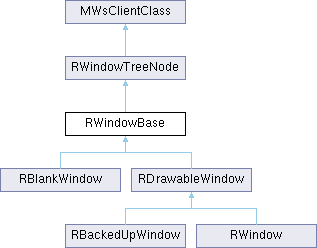
Public Types | |
| enum | TCaptureFlags { TCaptureFlagEnabled =0x01 , TCaptureFlagDragDrop =0x02 , TCaptureFlagAllGroups =0x04 , TCaptureDisabled =0 , TCaptureEnabled =TCaptureFlagEnabled , TCaptureDragDrop =TCaptureFlagEnabled|TCaptureFlagDragDrop|TCaptureFlagAllGroups } |
| Capture behaviour flags. More... | |
 Public Types inherited from RWindowTreeNode Public Types inherited from RWindowTreeNode | |
| enum | TFadeControl { EFadeIncludeChildren =ETrue , EFadeWindowOnly =EFalse } |
| Fade control flags. More... | |
Public Member Functions | |
| IMPORT_C void | Activate () |
| Displays the window and enables it to receive events. | |
| IMPORT_C void | SetPosition (const TPoint &point) |
| Sets the position of a window relative to its parent. | |
| IMPORT_C TInt | SetSizeErr (const TSize &size) |
| Sets the size of a backed-up window. | |
| IMPORT_C TInt | SetExtentErr (const TPoint &point, const TSize &size) |
| Sets a backed-up window's extent, relative to its parent, and returns an error code from the server. | |
| IMPORT_C TSize | Size () const |
| Gets the window's current size. | |
| IMPORT_C TPoint | InquireOffset (const RWindowTreeNode &aWindow) const |
| Enquires the offset between this and another window. | |
| IMPORT_C void | PointerFilter (TUint32 aFilterMask, TUint32 aFilter) |
| Sets the filter which controls which pointer events are sent to the client session. | |
| IMPORT_C void | SetPointerGrab (TBool aState) |
| Allows or disallows pointer grabs in a window. | |
| IMPORT_C void | ClaimPointerGrab (TBool aSendUpEvent=ETrue) |
| Claims the pointer grab from another window. | |
| IMPORT_C TInt | ClaimPointerGrab (const TUint8 aPointerNumber, const TBool aSendUpEvent=ETrue) |
| Dummy implementation in order to preserve compatibility with WSERV NGA. | |
| IMPORT_C void | SetPointerCapture (TInt aFlags) |
| Sets the pointer capture state. | |
| IMPORT_C void | SetPointerCapturePriority (TInt aPriority) |
| Sets the window's pointer capture priority. | |
| IMPORT_C TInt | GetPointerCapturePriority () const |
| Gets the windows's pointer capture priority. | |
| IMPORT_C void | SetVisible (TBool aState) |
| Sets the window's visibility. | |
| IMPORT_C void | SetShadowHeight (TInt aHeight) |
| Sets a window's shadow height. | |
| IMPORT_C void | SetShadowDisabled (TBool aState) |
| Enables or disables whether a window casts a shadow. | |
| IMPORT_C TPoint | Position () const |
| Gets a window's position relative to its parent. | |
| IMPORT_C TPoint | AbsPosition () const |
| Gets a window's absolute position - ie the windows position relative to the current screen size mode. | |
| IMPORT_C TInt | SetCornerType (TCornerType aCornerType, TInt aCornerFlags=0) |
| Sets the shape of a window's corners. | |
| IMPORT_C TInt | SetShape (const TRegion &aRegion) |
| Sets a window's shape arbitrarily, if rectangular windows are not required. | |
| IMPORT_C TInt | SetRequiredDisplayMode (TDisplayMode aMode) |
| Sets the window's display mode. | |
| IMPORT_C TDisplayMode | DisplayMode () const |
| Gets the window's current display mode. | |
| IMPORT_C void | EnableBackup (TUint aBackupType=EWindowBackupAreaBehind) |
| Requests that this window backs up all or part of the screen's contents. | |
| IMPORT_C void | RequestPointerRepeatEvent (TTimeIntervalMicroSeconds32 aTime, const TRect &aRect) |
| Requests a pointer repeat event. | |
| IMPORT_C void | CancelPointerRepeatEventRequest () |
| Cancels a request for a pointer repeat event. | |
| IMPORT_C TInt | RequestPointerRepeatEvent (TTimeIntervalMicroSeconds32 aTime, const TRect &aRect, const TUint8 aPointerNumber) |
| Dummy implementation in order to preserve compatibility with WSERV NGA. | |
| IMPORT_C TInt | CancelPointerRepeatEventRequest (const TUint8 aPointerNumber) |
| Dummy implementation in order to preserve compatibility with WSERV NGA. | |
| IMPORT_C TInt | AllocPointerMoveBuffer (TInt aMaxPoints, TUint aFlags) |
| Allocates a buffer for storing pointer movements. | |
| IMPORT_C void | FreePointerMoveBuffer () |
| Frees the pointer move buffer. | |
| IMPORT_C void | EnablePointerMoveBuffer () |
| Enables the pointer move buffer for receiving pointer move events. | |
| IMPORT_C void | DisablePointerMoveBuffer () |
| Instructs the window server to stop adding pointer events to the pointer move buffer. | |
| IMPORT_C TInt | RetrievePointerMoveBuffer (TDes8 &aBuf) const |
| Retrieves events from the pointer move buffer. | |
| IMPORT_C void | DiscardPointerMoveBuffer () |
| Discards all events in the pointer move buffer. | |
| IMPORT_C TInt | AddKeyRect (const TRect &aRect, TInt aScanCode, TBool aActivatedByPointerSwitchOn) |
| Adds an on-screen key rectangle. | |
| IMPORT_C void | RemoveAllKeyRects () |
| Removes all the on-screen keys that have been added to this window. | |
| IMPORT_C TInt | PasswordWindow (TPasswordMode aPasswordMode) |
| Makes this window the password window. | |
| IMPORT_C void | FadeBehind (TBool aFade) |
| Sets whether or not all windows behind the current window, in the same window group, should be faded or unfaded. | |
| IMPORT_C TBool | IsFaded () const |
| Tests whether the current window is faded. | |
| IMPORT_C TBool | IsNonFading () const |
| Tests whether the current window is non-fading. | |
| IMPORT_C TInt | MoveToGroup (TInt aIdentifier) |
| Moves this window to another window group. | |
| IMPORT_C TInt | SetBackgroundSurface (const TSurfaceId &aSurface) |
| This sets the background of the window to be the given surface. | |
| IMPORT_C TInt | SetBackgroundSurface (const TSurfaceConfiguration &aConfiguration, TBool aTriggerRedraw) |
| This sets a surface to appear in front of the window's background within a given area of that window. | |
| IMPORT_C void | RemoveBackgroundSurface (TBool aTriggerRedraw) |
| This removes any background surface that has been set to the window. | |
| IMPORT_C TInt | GetBackgroundSurface (TSurfaceConfiguration &aConfiguration) const |
| Retrieves a copy of the current configuration for background surface attached to the window. | |
| IMPORT_C void | SetSurfaceTransparency (TBool aSurfaceTransparency) |
| Not supported in non-NGA. | |
| IMPORT_C TRgb | KeyColor () const |
| This function returns the key color for the window, if used. | |
| IMPORT_C void | EnableAdvancedPointers () |
| Dummy implementation in order to preserve compatibility with WSERV NGA. | |
| IMPORT_C void | SetPurpose (TInt aPurpose) |
| IMPORT_C void | SendEffectCommand (TInt aTfxCmd, const TDesC8 &aTfxCmdData=KNullDesC8) |
| IMPORT_C void | OverrideEffects (TInt aAction, const TFileName &aResourceDir, const TFileName &aFilenameOutgoing, const TFileName &aFilenameIncoming, TBitFlags aFlags=0) |
| IMPORT_C TInt | FixNativeOrientation () |
| Dummy implementation in order to preserve compatibility with WSERV NGA. | |
| IMPORT_C TSize | SizeForEgl () const |
| Dummy implementation in order to preserve compatibility with WSERV NGA. | |
| Public Member Functions inherited from RWindowTreeNode | |
| IMPORT_C void | Close () |
| Closes the node. | |
| IMPORT_C void | Destroy () |
| Closes and deletes the node. | |
| IMPORT_C TUint32 | ClientHandle () const |
| Gets the window's client handle. | |
| IMPORT_C TUint32 | Parent () const |
| Gets the node's parent. | |
| IMPORT_C TUint32 | PrevSibling () const |
| Gets the node before this one in the sibling list. | |
| IMPORT_C TUint32 | NextSibling () const |
| Gets the next window after this one in its sibling list. | |
| IMPORT_C TUint32 | Child () const |
| Gets the first child of the node. | |
| IMPORT_C TInt | OrdinalPriority () const |
| Gets the ordinal priority of the specified window. | |
| IMPORT_C TInt | OrdinalPosition () const |
| Gets the current ordinal position of the window tree node. | |
| IMPORT_C TInt | FullOrdinalPosition () const |
| Get the current full ordinal position of a window. | |
| IMPORT_C void | SetOrdinalPosition (TInt aPos) |
| Sets the ordinal position of a window. | |
| IMPORT_C void | SetOrdinalPosition (TInt aPos, TInt aOrdinalPriority) |
| Sets the ordinal position and ordinal priority of a window. | |
| IMPORT_C TInt | ScreenNumber () const |
| Get the screen number that a window is located on. | |
| IMPORT_C TInt | WindowGroupId () const |
| Returns the window group Id of the parent window group. | |
| IMPORT_C TInt | SetPointerCursor (TInt aCursorNumber) |
| Sets the pointer cursor from the system pointer cursor list. | |
| IMPORT_C void | SetCustomPointerCursor (const RWsPointerCursor &aPointerCursor) |
| Sets the pointer cursor to an application-defined cursor. | |
| IMPORT_C TInt | EnableOnEvents (TEventControl aCircumstances=EEventControlOnlyWithKeyboardFocus) |
| Requests notification of 'on' events. | |
| IMPORT_C void | DisableOnEvents () |
| Cancels notification of 'on' events. | |
| IMPORT_C TInt | EnableGroupChangeEvents () |
| Requests notification of group-change events. | |
| IMPORT_C void | DisableGroupChangeEvents () |
| Cancels notification of group changed events. | |
| IMPORT_C TInt | EnableFocusChangeEvents () |
| Enables focus changed events. | |
| IMPORT_C void | DisableFocusChangeEvents () |
| Disables delivery of focus changed events. | |
| IMPORT_C TInt | EnableGroupListChangeEvents () |
| Enables reporting of window group list change events. | |
| IMPORT_C void | DisableGroupListChangeEvents () |
| Disables reporting of window group list change events. | |
| IMPORT_C TInt | EnableVisibilityChangeEvents () |
| Enables reporting of window visibility change events. | |
| IMPORT_C void | DisableVisibilityChangeEvents () |
| Disables reporting of window visibility change events. | |
| IMPORT_C TInt | EnableErrorMessages (TEventControl aCircumstances) |
| Requests notification of error message events. | |
| IMPORT_C void | DisableErrorMessages () |
| Cancels notification of error message events. | |
| IMPORT_C TInt | EnableModifierChangedEvents (TUint aModifierMask, TEventControl aCircumstances) |
| Requests notification of modifier changed events. | |
| IMPORT_C void | DisableModifierChangedEvents () |
| Cancels notification of modifier changed events. | |
| IMPORT_C void | SetNonFading (TBool aNonFading) |
| Sets whether a window is non-fading. | |
| IMPORT_C void | SetFaded (TBool aFaded, TFadeControl aIncludeChildren) |
| Sets the window as faded or unfaded. | |
| IMPORT_C void | SetFaded (TBool aFaded, TFadeControl aIncludeChildren, TUint8 aBlackMap, TUint8 aWhiteMap) |
| Sets one or more windows as faded or unfaded, specifying a fading map. | |
| IMPORT_C void | ClearPointerCursor () |
| Clears pointer cursor settings. | |
| IMPORT_C RWsSession * | Session () const |
| Returns the window server session that is used to create this window handle. | |
| Public Member Functions inherited from MWsClientClass | |
| MWsClientClass () | |
| MWsClientClass (RWsBuffer *aBuffer) | |
| TInt | WsHandle () const |
| Gets the server side handle for the object. | |
Protected Member Functions | |
| RWindowBase () | |
| Protected default constructor; creates an uninitialised, sessionless window handle. | |
| RWindowBase (RWsSession &aWs) | |
| Protected constructor; creates an uninitialised window handle within a session. | |
| TInt | construct (const RWindowTreeNode &parent, TUint32 aHandle, TInt aType, TDisplayMode aDisplayMode) |
| Panic condition: TW32Panic 17 in debug builds if called on an already constructed object. | |
| Protected Member Functions inherited from RWindowTreeNode | |
| RWindowTreeNode () | |
| Protected default constructor. | |
| RWindowTreeNode (RWsSession &aWs) | |
| Protected constructor which creates an uninitialised window tree node handle within a server session. | |
| Protected Member Functions inherited from MWsClientClass | |
| void | Write (const TAny *aData1, TInt aLength1, TInt aLength2, TUint aOpcode) const |
| void | Write (const TAny *aData, TInt aLength, const TAny *aData2, TInt aLength2, TUint aOpcode, const TIpcArgs *aIpcArgs=NULL) const |
| void | Write (const TAny *aBuf, TInt aBufLen, TUint aOpcode, const TIpcArgs *aIpcArgs=NULL) const |
| void | Write (TUint aOpcode) const |
| void | WriteInt (TInt aInt, TUint aOpcode) const |
| void | WriteRect (const TRect &aRect, TUint aOpcode) const |
| void | WritePoint (const TPoint &aPoint, TUint aOpcode) const |
| void | WriteSize (const TSize &aSize, TUint aOpcode) const |
| TInt | WriteReply (TUint aOpcode, const TIpcArgs *aIpcArgs=NULL) const |
| TInt | WriteReplyInt (TInt aInt, TUint aOpcode, const TIpcArgs *aIpcArgs=NULL) const |
| TInt | WriteReply (const TAny *aBuf, TInt aBufLen, TUint aOpcode, const TIpcArgs *aIpcArgs=NULL) const |
| TInt | WriteReply (const TAny *aBuf, TInt aBufLen, const TAny *aBuf2, TInt aBuflen2, TUint aOpcode, const TIpcArgs *aIpcArgs=NULL) const |
| TInt | WriteReplyP (const TWriteDescriptorType &aReplyPackage, TUint aOpcode) const |
| TInt | WriteReplyIntP (TInt aInt, const TWriteDescriptorType &aReplyPackage, TUint aOpcode) const |
| TInt | WriteReplyP (const TAny *aBuf, TInt aBufLen, const TWriteDescriptorType &aReplyPackage, TUint aOpcode) const |
| TInt | WriteReplyP (const TAny *aBuf, TInt aBufLen, const TAny *aBuf2, TInt aBuflen2, const TWriteDescriptorType &aReplyPackage, TUint aOpcode) const |
| TInt | WriteReplyByProvidingRemoteReadAccess (const TAny *aBuf, TInt aBufLen, const TReadDescriptorType &aRemoteReadBuffer, TUint aOpcode) const |
| void | AddToBitmapArray (const TInt aBitmapHandle) const |
| void | AsyncRequest (TRequestStatus &aStatus, TUint aOpcode) const |
| TBool | WindowSizeCacheEnabled () const |
| void | MarkWindowSizeCacheDirty () |
| void | RefreshWindowSizeCache (const TSize &aNewSize) const |
| TInt | CachedWindowSize (TSize &aSize) const |
| void | DestroyWindowSizeCacheEntry () |
Additional Inherited Members | |
| Protected Attributes inherited from RWindowTreeNode | |
| __DECLARE_TEST | |
| Protected Attributes inherited from MWsClientClass | |
| TInt32 | iWsHandle |
| WARNING: Member variable for internal use ONLY. | |
| RWsBuffer * | iBuffer |
| WARNING: Member variable for internal use ONLY. | |
Detailed Description
Client-side handle to a server-side window.
The server-side windows of handles derived from this class can be displayed on the device's screen, and associated with pointer events.
This class is not for user derivation; however derived classes form part of the Window Server API.
- API status
- Published to all clients. Released API.
Member Enumeration Documentation
◆ TCaptureFlags
Capture behaviour flags.
- See also
- SetPointerCapture()
- EEventDragDrop
Constructor & Destructor Documentation
◆ RWindowBase() [1/2]
|
protected |
Protected default constructor; creates an uninitialised, sessionless window handle.
Handles to server-side objects must be created in a session in order to be operational; this constructor is merely a convenience to allow the handle to be stored as a data member. See RWindowTreeNode::RWindowTreeNode() for details of how the complete setup of a handle field may be deferred until the window server session is known.
(generated from Symbian Developer Library)
◆ RWindowBase() [2/2]
|
protected |
Protected constructor; creates an uninitialised window handle within a session.
- Parameters
-
aWs Window server session.
(generated from Symbian Developer Library)
Member Function Documentation
◆ AbsPosition()
| IMPORT_C TPoint RWindowBase::AbsPosition | ( | ) | const |
Gets a window's absolute position - ie the windows position relative to the current screen size mode.
This function always causes a flush of the window server buffer.
(generated from Symbian Developer Library)
◆ Activate()
| IMPORT_C void RWindowBase::Activate | ( | ) |
Displays the window and enables it to receive events.
Calling this method on a window causes it to receive a redraw event if it is a non-backed-up window, and should be called after a window has been constructed and initialised.
Windows are not displayed automatically when they are constructed. This allows them to be customised using SetPosition(), SetOrdinalPosition(), SetExtent(), etc., before they are displayed.
(generated from Symbian Developer Library)
◆ AddKeyRect()
| IMPORT_C TInt RWindowBase::AddKeyRect | ( | const TRect & | aRect, |
| TInt | aScanCode, | ||
| TBool | aActivatedByPointerSwitchOn | ||
| ) |
Adds an on-screen key rectangle.
This function configures an area of the screen, given by aRect, to act as an on-screen key. Any subsequent pointer events within this area will be translated by the window server into key events with a scan code of aScanCode.
aActivatedByPointerSwitchOn indicates whether or not to generate a key event as a result of a pointer event that acts to switch the machine on.
Before v7.0, calling this function stopped the window from receiving pointer events (they were received as key events) and pointer events outside the specified key rectangle were discarded. From v7.0, pointer events outside the key rectangles are not discarded and may be handled.
This function always causes a flush of the window server buffer.
- Parameters
-
aRect Rectangle to act as an on-screen key, relative to the window origin aScanCode Scan code of key events generated by this on-screen key aActivatedByPointerSwitchOn If ETrue, a switch-on pointer event will produce a key event. If EFalse, a switch-on pointer event will not produce a key event.
(generated from Symbian Developer Library)
◆ AllocPointerMoveBuffer()
| IMPORT_C TInt RWindowBase::AllocPointerMoveBuffer | ( | TInt | aMaxPoints, |
| TUint | aFlags | ||
| ) |
Allocates a buffer for storing pointer movements.
The pointer move buffer is used by applications that need to process every single pointer move or drag event: for example, a freehand drawing application.
Normally, multiple drag events which the window server receives from the pointer device driver are translated into a single drag event. The single drag event incorporates all pointer events that occurred while the client was processing the previous pointer event. If the pointer move buffer is used, the window server stores all pointer events in a pointer buffer, and then delivers the entire buffer when it is full.
AllocPointerMoveBuffer() must be called before the pointer move buffer can be used. It would typically be called during window construction.
After the pointer move buffer has been allocated, the window server does not start putting pointer events into it until EnablePointerMoveBuffer() is called.
Note: move events are not available on all hardware.
This function always causes a flush of the window server buffer.
- Parameters
-
aMaxPoints Maximum number of pointer events the buffer can hold. This affects the frequency at which the buffer is flushed. aFlags Obsolete argument: set to zero always.
(generated from Symbian Developer Library)
◆ CancelPointerRepeatEventRequest() [1/2]
| IMPORT_C void RWindowBase::CancelPointerRepeatEventRequest | ( | ) |
Cancels a request for a pointer repeat event.
(generated from Symbian Developer Library)
◆ CancelPointerRepeatEventRequest() [2/2]
| IMPORT_C TInt RWindowBase::CancelPointerRepeatEventRequest | ( | const TUint8 | aPointerNumber | ) |
Dummy implementation in order to preserve compatibility with WSERV NGA.
(generated from Symbian Developer Library)
◆ ClaimPointerGrab() [1/2]
| IMPORT_C TInt RWindowBase::ClaimPointerGrab | ( | const TUint8 | aPointerNumber, |
| const TBool | aSendUpEvent = ETrue |
||
| ) |
Dummy implementation in order to preserve compatibility with WSERV NGA.
(generated from Symbian Developer Library)
◆ ClaimPointerGrab() [2/2]
| IMPORT_C void RWindowBase::ClaimPointerGrab | ( | TBool | aSendUpEvent = ETrue | ) |
Claims the pointer grab from another window.
If a pointer grab is already in effect in another window, a window can claim the pointer grab from that window by calling this function. All subsequent events will be delivered to this window, up to and including the next "up" event. This next up event terminates the pointer grab.
This function would typically be used where clicking in a window pops up another window, and where the popped-up window wishes to grab the pointer as though the original click had been in that window.
Note:
If aSendUpEvent is set to ETrue, the window losing the grab is immediately sent an up event, signalling the end of its pointer grab.
- Parameters
-
aSendUpEvent Whether to deliver an up event to the window that previously had the grab.
(generated from Symbian Developer Library)
◆ construct()
|
protected |
Panic condition: TW32Panic 17 in debug builds if called on an already constructed object.
(generated from Symbian Developer Library)
◆ DisablePointerMoveBuffer()
| IMPORT_C void RWindowBase::DisablePointerMoveBuffer | ( | ) |
Instructs the window server to stop adding pointer events to the pointer move buffer.
(generated from Symbian Developer Library)
◆ DiscardPointerMoveBuffer()
| IMPORT_C void RWindowBase::DiscardPointerMoveBuffer | ( | ) |
Discards all events in the pointer move buffer.
The window server subsequently continues to put new pointer events into the pointer move buffer as usual (if the buffer is enabled).
(generated from Symbian Developer Library)
◆ DisplayMode()
| IMPORT_C TDisplayMode RWindowBase::DisplayMode | ( | ) | const |
Gets the window's current display mode.
This function always causes a flush of the window server buffer.
(generated from Symbian Developer Library)
◆ EnableAdvancedPointers()
| IMPORT_C void RWindowBase::EnableAdvancedPointers | ( | ) |
Dummy implementation in order to preserve compatibility with WSERV NGA.
(generated from Symbian Developer Library)
◆ EnableBackup()
| IMPORT_C void RWindowBase::EnableBackup | ( | TUint | aBackupType = EWindowBackupAreaBehind | ) |
Requests that this window backs up all or part of the screen's contents.
There are two backup possibilities:- just the area behind this window (the default), or the whole screen. Backing up the whole screen is useful for windows that require the rest of the screen to fade when they are displayed. In this case, the full screen backup is of the unfaded content of the screen.
It is possible to specify both types of backup at the same time. This may be used by fade behind windows that can be dragged across the screen, e.g. a dialog. This is done by calling this function with the parameter EWindowBackupAreaBehind|EWindowBackupFullScreen.
When backing up the whole screen, this function should be called before the window is activated, and before you call fade behind on it (RWindowBase::FadeBehind()).
Backing up a window is an optimisation feature that is honoured only if there is enough memory to do so, (it requires bitmaps and a region to be created and maintained). If there is not enough memory, all or part of the backup will be lost. In this case, a redraw will be issued at the relevant point just as if the window had not been backed up.
The backup bitmap is made and is claimed by the window not when EnableBackup() is called, but when the window becomes visible (this is normally when the window is activated).
Only one backed up window of the same type can exist at any one time (although the same window can have both types of backup at the same time). If a window requests a backup of type EWindowBackupAreaBehind, any window that has already claimed a backup of this type will lose it. If a window requests a backup of type EWindowBackupFullScreen, this request will fail if another window has already claimed a backup of this type.
TWindowBackupType
- Parameters
-
aBackupType The type of backed up window. See the TWindowBackupType enum for possible values.
(generated from Symbian Developer Library)
◆ EnablePointerMoveBuffer()
| IMPORT_C void RWindowBase::EnablePointerMoveBuffer | ( | ) |
Enables the pointer move buffer for receiving pointer move events.
This function instructs the window server to begin putting pointer events into the pointer move buffer. AllocPointerMoveBuffer() must have previously been called, or a panic will occur.
As soon as the pointer buffer has at least one point in it, the window server sends an event of type EEventPointerBufferReady to the client, and the events can be retrieved from the pointer move buffer using RetrievePointerMoveBuffer().
Note: pointer move, drag and enter/exit events are not delivered to a window by default. An application using the pointer move buffer should use PointerFilter() to request that these events be delivered.
(generated from Symbian Developer Library)
◆ FadeBehind()
| IMPORT_C void RWindowBase::FadeBehind | ( | TBool | aFade | ) |
Sets whether or not all windows behind the current window, in the same window group, should be faded or unfaded.
This function can be used to fade all windows used by an application when a dialogue is displayed.
Fading works on a count basis. Fading increases the fade count, while unfading decreases it. If the fade count is greater than zero the window will be drawn faded. Only when it drops back to zero will it stop being faded.
This functionality is used to support nested dialogues. When bringing up a dialogue the rest of the application windows are faded. If an option is selected to launch another dialogue, the original dialogue is faded (fade count 1) and the remaining windows have their fade count increased to 2. When the dialogue is closed the fade count is reduced by one, which displays the original dialogue, but the remaining windows remain faded. They are only displayed when the other dialogue is closed and their fade count is reduced to zero.
Note:
Information is lost when a window is faded, so a redraw is required to restore the window content when it is unfaded (blank and backup windows deal with this themselves). A redraw is also required for the areas that were in shadow when the window was faded, since the shadowing also causes information loss. While a window is faded all drawing to that window will be adjusted appropriately by the window server.
RWindowTreeNode::SetFaded() RWindowTreeNode::SetNonFading()
- Parameters
-
aFade ETrue to increase the fade count of all windows behind the current window (within the current window group), EFalse to reduce the fade count.
(generated from Symbian Developer Library)
◆ FixNativeOrientation()
| IMPORT_C TInt RWindowBase::FixNativeOrientation | ( | ) |
Dummy implementation in order to preserve compatibility with WSERV NGA.
(generated from Symbian Developer Library)
◆ FreePointerMoveBuffer()
| IMPORT_C void RWindowBase::FreePointerMoveBuffer | ( | ) |
Frees the pointer move buffer.
This function should be called on a window which calls AllocPointerMoveBuffer().
(generated from Symbian Developer Library)
◆ GetBackgroundSurface()
| IMPORT_C TInt RWindowBase::GetBackgroundSurface | ( | TSurfaceConfiguration & | aConfiguration | ) | const |
Retrieves a copy of the current configuration for background surface attached to the window.
The client must present a properly initialized TSurfaceConfiguration on entry in particular the size field must be valid before the call. The server will then fill the object with the available data.
If the server supports more fields it will truncate the returned data to the size the client has requested. If the server has fewer fields it will set the returned size field to the lower value.
Note that the returned attribute values will only be guaranteed equivalent to the input values, not exact copies, as the values may be calculated from internal flags rather than reported from a cached exact copy.
- Parameters
-
aConfiguration On entry the Size field specifies the maximum size of the object.On return fields up to this size are filled in.
- Pre-condition
- The window is either a RWindow or an RBlankWindow, or the client is panicked with the code EWservPanicDrawable. The window has not been set as transparent, or the client is panicked with the code EWservPanicTransparencyMisuse. The Size member of the configuration must be an acceptable value. The size must match the Size() member of a defined TSurfaceConfiguration variant, or be larger than all variants known to the server. If not, the client is panicked with code EWservPanicInvalidSurfaceConfiguration.
- Post-condition
- aConfiguration object filled to specified size. This function always causes a flush of the WServ session buffer.
(generated from Symbian Developer Library)
◆ GetPointerCapturePriority()
| IMPORT_C TInt RWindowBase::GetPointerCapturePriority | ( | ) | const |
Gets the windows's pointer capture priority.
(generated from Symbian Developer Library)
◆ InquireOffset()
| IMPORT_C TPoint RWindowBase::InquireOffset | ( | const RWindowTreeNode & | aWindow | ) | const |
Enquires the offset between this and another window.
A positive value indicates a position to the right and down from aWindow, a negative value indicates a position to the left and up.
This function always causes a flush of the window server buffer.
- Parameters
-
aWindow Another window tree node.
(generated from Symbian Developer Library)
◆ IsFaded()
| IMPORT_C TBool RWindowBase::IsFaded | ( | ) | const |
Tests whether the current window is faded.
This function always causes a flush of the window server buffer.
(generated from Symbian Developer Library)
◆ IsNonFading()
| IMPORT_C TBool RWindowBase::IsNonFading | ( | ) | const |
Tests whether the current window is non-fading.
This function always causes a flush of the window server buffer.
RWindowTreeNode::SetNonFading()
(generated from Symbian Developer Library)
◆ KeyColor()
| IMPORT_C TRgb RWindowBase::KeyColor | ( | ) | const |
This function returns the key color for the window, if used.
In chroma key composition mode, this will be an opaque color; in alpha composition mode, it will be transparent black, i.e. TRgb(0, 0, 0, 0). If the window does not have a surface or overlay background, the return value is transparent black.
The value of a chroma key color depends on the background type. Windows with surface backgrounds return the system defined key color, whereas windows with overlay backgrounds return the color passed in.
If the return value is opaque, the client should take care to avoid using the color when rendering further content in the window, since it may cause that content to become invisible.
- Post-condition
- This function always causes a flush of the window server buffer.
(generated from Symbian Developer Library)
◆ MoveToGroup()
| IMPORT_C TInt RWindowBase::MoveToGroup | ( | TInt | aIdentifier | ) |
Moves this window to another window group.
This function allows a window with a window group as its immediate parent to be moved from one window group to another one. The two window groups must be owned by the same client. The new parent window group is specified by its identifier.
This function always causes a flush of the window server buffer.
- Parameters
-
aIdentifier The identifier of the target window group. This is the value returned by RWindowGroup::Identifier().
(generated from Symbian Developer Library)
◆ OverrideEffects()
| IMPORT_C void RWindowBase::OverrideEffects | ( | TInt | aAction, |
| const TFileName & | aResourceDir, | ||
| const TFileName & | aFilenameOutgoing, | ||
| const TFileName & | aFilenameIncoming, | ||
| TBitFlags | aFlags = 0 |
||
| ) |
◆ PasswordWindow()
| IMPORT_C TInt RWindowBase::PasswordWindow | ( | TPasswordMode | aPasswordMode | ) |
Makes this window the password window.
Only one password window can exist concurrently. Another window may take over as the password window if either (a) the current password window calls this function with aPasswordMode=EPasswordCancel, or (b) the current password window is destroyed.
This function always causes a flush of the window server buffer.
- Parameters
-
aPasswordMode The type of password handling required.
(generated from Symbian Developer Library)
◆ PointerFilter()
| IMPORT_C void RWindowBase::PointerFilter | ( | TUint32 | aFilterMask, |
| TUint32 | aFilter | ||
| ) |
Sets the filter which controls which pointer events are sent to the client session.
A pointer filter can be defined for each window separately, and changed dynamically. The default behaviour when a window is created is that move, drag, enter and exit events are filtered out and not delivered to the client.
TPointerFilter
- Parameters
-
aFilterMask Bitwise OR of values from TPointerFilter masking event types which will be updated. aFilter Bits containing new values for the masked event types. A 1 bit causes the corresponding event to be filtered out, a 0 bit lets through the corresponding event.
(generated from Symbian Developer Library)
◆ Position()
| IMPORT_C TPoint RWindowBase::Position | ( | ) | const |
Gets a window's position relative to its parent.
This function always causes a flush of the window server buffer.
(generated from Symbian Developer Library)
◆ RemoveAllKeyRects()
| IMPORT_C void RWindowBase::RemoveAllKeyRects | ( | ) |
Removes all the on-screen keys that have been added to this window.
After this function has been called, all pointer events are delivered to the window, reversing the effect of AddKeyRect().
(generated from Symbian Developer Library)
◆ RemoveBackgroundSurface()
| IMPORT_C void RWindowBase::RemoveBackgroundSurface | ( | TBool | aTriggerRedraw | ) |
This removes any background surface that has been set to the window.
The surface ID registration associated with the window will be released. This is independent of any outstanding calls to RWsSession::RegisterSurface, which should be completed with a corresponding call to UnregisterSurface.
The aTriggerRedraw parameter triggers a redraw of at least the affected areas of the window at the end of this method.
- Parameters
-
aTriggerRedraw If set causes WServ to repaint any affected portions of the display.
- Post-condition
- Any background surface associated with this window has been removed. The appearance on screen may not change until the window is redrawn and the next refresh occurs. The aTriggerRedraw parameter can be set to trigger this redrawing. This function does not explicitly force a flush of the WServ session buffer. Internal reference counting will keep the Surface ID "live" until the client code has released any handles and provisioners, and WServ processes the buffered remove command, and the final frame containing this surface has finished being displayed.
(generated from Symbian Developer Library)
◆ RequestPointerRepeatEvent() [1/2]
| IMPORT_C void RWindowBase::RequestPointerRepeatEvent | ( | TTimeIntervalMicroSeconds32 | aTime, |
| const TRect & | aRect | ||
| ) |
Requests a pointer repeat event.
This function instructs the window server to send a single pointer repeat event if the pointer state that caused the last event (e.g. EButton1Down) has not changed within aTime and the pointer has not moved outside aRect. Pointer repeat events are pointer events of type TPointerEvent::EButtonRepeat.
While the repeat is in operation all move and drag events within the rectangle are filtered out. The repeat is cancelled if the pointer moves outside the rectangle or generates any other pointer event.
A typical use of this function would be for a scrollbar, so that holding down the pointer results in a continuous scroll.
CancelPointerRepeatEventRequest()
- Parameters
-
aTime Time interval before pointer repeat event should be sent. aRect Repeat event occurs only if pointer is within this rectangle.
(generated from Symbian Developer Library)
◆ RequestPointerRepeatEvent() [2/2]
| IMPORT_C TInt RWindowBase::RequestPointerRepeatEvent | ( | TTimeIntervalMicroSeconds32 | aTime, |
| const TRect & | aRect, | ||
| const TUint8 | aPointerNumber | ||
| ) |
Dummy implementation in order to preserve compatibility with WSERV NGA.
(generated from Symbian Developer Library)
◆ RetrievePointerMoveBuffer()
| IMPORT_C TInt RWindowBase::RetrievePointerMoveBuffer | ( | TDes8 & | aBuf | ) | const |
Retrieves events from the pointer move buffer.
Use this function to get pointer events from the pointer move buffer. This function should be called when an event has occurred of type EEventPointerBufferReady (defined in TEventCode).
This function always causes a flush of the window server buffer.
- Parameters
-
aBuf Buffer to store events retrieved from pointer move buffer
(generated from Symbian Developer Library)
◆ SendEffectCommand()
| IMPORT_C void RWindowBase::SendEffectCommand | ( | TInt | aTfxCmd, |
| const TDesC8 & | aTfxCmdData = KNullDesC8 |
||
| ) |
◆ SetBackgroundSurface() [1/2]
| IMPORT_C TInt RWindowBase::SetBackgroundSurface | ( | const TSurfaceConfiguration & | aConfiguration, |
| TBool | aTriggerRedraw | ||
| ) |
This sets a surface to appear in front of the window's background within a given area of that window.
Any rendering performed by CWindowGc operations will appear in front of surface for the window. The TSurfaceConfiguration object contains the Surface ID and allows various surface presentation attributes to be specified. This describes the mapping from surface co-ordinates to screen co-ordinates, allowing for scaling, cropping, and rotation.
For details on the attributes see TSurfaceConfiguration.
The composition mode is determined by the screen display mode: if the mode supports an alpha channel, alpha composition is used; otherwise chroma key composition is used. In chroma key composition mode, the key color used is defined by the system, for all TSurfaceId background windows to use. In alpha composition mode, transparent black is used.
If the same surface ID is already set as the window background surface, then only the configuration parameters will be updated.
If the window already has a background surface (that is not same as the new surface) or then that surface will be removed and the new background surface will be set. The Surface ID will be registered while attached to this window. This is in addition to any call to RWsSession::RegisterSurface.
- Parameters
-
aConfiguration The set of configuration that applies to the surface. aTriggerRedraw If set causes WServ to repaint any affected portions of the display.
- Pre-condition
- The window is either a RWindow or an RBlankWindow, or the client is panicked with the code EWservPanicDrawable. The surface is opaque; otherwise results are not defined. All members of the TSurfaceConfiguration recognised by the server must have valid values. If not, the client is panicked with code EWservPanicInvalidSurfaceConfiguration. The surface must not be the UI surface; otherwise the client thread is panicked with code EWservPanicInvalidSurface. The surface must not be the null surface ID; otherwise the client thread is panicked with code EWservPanicInvalidSurface.
- Post-condition
- The window has a new background surface set to be within the given area. Outside the area, the window s background color will be visible. The window must be redrawn before the surface becomes visible, and the surface's content will be visible after the composition and refresh. Composition of the surface will be automatically triggered if required. The aTriggerRedraw flush parameter will cause this redraw, or the client should cause a redraw after this call. This function always causes a flush of the WServ session buffer.
(generated from Symbian Developer Library)
◆ SetBackgroundSurface() [2/2]
| IMPORT_C TInt RWindowBase::SetBackgroundSurface | ( | const TSurfaceId & | aSurface | ) |
This sets the background of the window to be the given surface.
The surface will be stretched or compressed to fill the extent of the window. The background is updated on screen when the window is next redrawn.
When the window is moved, the surface will move with it. If the window is resized, the surface will be similarly scaled. If a 1-1 pixel mapping is required and the window size changes, the function will need to be called again with a different TSurfaceId for a surface with the new size of the window.
The key color to use in chroma key composition mode is defined by the system, for all TSurfaceId background windows to use. In alpha composition mode, transparent black is used. The composition mode is determined by the screen display mode: if the mode supports an alpha channel, alpha composition is used; otherwise chroma key composition is used.
- Parameters
-
aSurface The surface to act as the background of the window
- Pre-condition
- aSurface has been initialized. The window is either an RWindow or an RBlankWindow, or the client is panicked with the code EWservPanicDrawable. The surface must be compatible with being composited on the screen this window appears on; otherwise the client thread is panicked with code EWservPanicIncompatibleSurface.
- Post-condition
- The window has its background set to be the surface. The window is opaque. The base area of the window is the full extent of the window. A GCE surface layer has been created to associate the surface with a location on screen. The surface's content is in an undefined state, but the surface remains initialized. This function always causes a flush of the window server buffer.
(generated from Symbian Developer Library)
◆ SetCornerType()
| IMPORT_C TInt RWindowBase::SetCornerType | ( | TCornerType | aCornerType, |
| TInt | aCornerFlags = 0 |
||
| ) |
Sets the shape of a window's corners.
This function always causes a flush of the window server buffer.
TCornerFlags
- Parameters
-
aCornerType Corner type to apply. aCornerFlags Bitwise OR of flags indicating corners to exclude.
(generated from Symbian Developer Library)
◆ SetExtentErr()
Sets a backed-up window's extent, relative to its parent, and returns an error code from the server.
See SetPosition() and SetSizeErr() for a description of the rules applying to aPoint and aSize respectively.
Avoid using this function for a window of type RBlankWindow or RWindow (in other words, not a backed-up window). Instead, use SetExtent(), which is more efficient as it does not return a value. However, if the window is a backed-up window, or of unknown type, SetExtentErr() should be used, because setting the extent of a backed-up window may cause an out-of-memory error.
This function may be called at any time after the window's Construct() function: the window's extent will change dynamically.
This function always causes a flush of the window server buffer.
- Parameters
-
point The position of the window's origin, relative to its parent. size Window size.
(generated from Symbian Developer Library)
◆ SetPointerCapture()
| IMPORT_C void RWindowBase::SetPointerCapture | ( | TInt | aFlags | ) |
Sets the pointer capture state.
A window which has called this function can capture events that would otherwise go to other windows. Normally, pointer events are sent to the window at the co-ordinates where the event occurs. Capturing only works on windows which are behind the capturing window in the z order.
Capture can be enabled or disabled. If capturing is enabled a window will, by default, capture events only from windows in the same window group. A flag can be specified to allow it to capture events across all window groups.
Another flag can be used to specify drag-drop capture. This causes a drag-drop message to be sent to the window within which the pen was lifted. Drag-drop with a pen is a tap-drag-lift sequence.
Capture functionality is useful in situations where only the foreground window should receive events, e.g. in a modal dialogue.
TCaptureFlags
- Parameters
-
aFlags Bitwise OR of flag values from TCaptureFlags.
(generated from Symbian Developer Library)
◆ SetPointerCapturePriority()
| IMPORT_C void RWindowBase::SetPointerCapturePriority | ( | TInt | aPriority | ) |
Sets the window's pointer capture priority.
To allow window gain a property that allows them to be clicked on even when they are behind a modal window. The priority will be 0 by default. Windows that need to stop modal window in front of them, should set this value to positive. Window can only capture pointer events from another window of same group, if it has at least the same pointer capture priority.
- Parameters
-
aPriority Pointer capture priority
(generated from Symbian Developer Library)
◆ SetPointerGrab()
| IMPORT_C void RWindowBase::SetPointerGrab | ( | TBool | aState | ) |
Allows or disallows pointer grabs in a window.
If the pointer grab is set, any down event in this window will cause a pointer grab, terminated by the next corresponding up event. All pointer events up to and including the next up event will be sent to that window.
Pointer grab can be used for drag-and-drop or other situations when you want the events delivered to the same window even though the pen will be dragged outside that window. This function is typically called during window construction so that pointer grab is enabled for the lifetime of the window.
Pointer grab is disabled by default.
- Parameters
-
aState New state for the pointer grab setting.
(generated from Symbian Developer Library)
◆ SetPosition()
| IMPORT_C void RWindowBase::SetPosition | ( | const TPoint & | point | ) |
Sets the position of a window relative to its parent.
The co-ordinates given in aPos specify the position of the top left-hand corner of the window, relative to the top left-hand corner of its parent. A positive value indicates a direction to the right and down. Negative values are valid but will cause part of the window to be outside its parent's extent, and therefore clipped.
This function may be called at any time after the window's Construct() function: the window's position will change dynamically.
A window's position can also be set using the RWindow::SetExtent() and RWindowBase::SetExtentErr() functions.
Note: upon creation, a window's extent is the same as its parent s. In other words it has the same origin and size. If the window s parent is a group window, it is initialised to be full screen.
- Parameters
-
point The position of the window's origin, relative to its parent
(generated from Symbian Developer Library)
◆ SetPurpose()
| IMPORT_C void RWindowBase::SetPurpose | ( | TInt | aPurpose | ) |
◆ SetRequiredDisplayMode()
| IMPORT_C TInt RWindowBase::SetRequiredDisplayMode | ( | TDisplayMode | aMode | ) |
Sets the window's display mode.
Each window can be given an individual display mode because some windows may require a greater number of different colours than others.
The default display mode of a window is dependent on the individual target device. The default mode may not reflect the full capabilities of the display. On some devices a simpler colour mode may be used as the default in order to save battery power. In these cases, this method may be used to request a different display mode on a per-window basis.
At any given time, the window server uses the highest display mode of the windows currently visible, and switches the hardware into that mode. Therefore, if an application contains a window with display mode EGray16, but only EGray4 windows are visible, the screen hardware will use EGray4 until the EGray16 window becomes visible.
This function always causes a flush of the window server buffer.
- Parameters
-
aMode The display mode: can have any TDisplayMode value except TDisplayMode::ERgb (since this isn't a mode that screen hardware can ever take).
(generated from Symbian Developer Library)
◆ SetShadowDisabled()
| IMPORT_C void RWindowBase::SetShadowDisabled | ( | TBool | aState | ) |
Enables or disables whether a window casts a shadow.
By default, when a window is created, its shadow is not disabled. (But note that a shadow is only cast by top-level windows.)
- Parameters
-
aState ETrue if the shadow is to be disabled (not displayed). EFalse if the shadow is to be displayed
(generated from Symbian Developer Library)
◆ SetShadowHeight()
| IMPORT_C void RWindowBase::SetShadowHeight | ( | TInt | aHeight | ) |
Sets a window's shadow height.
This is the height that this window is above the window immediately behind it. The offset of the shadow's bottom right corner from the window's bottom right corner is the product of the window's shadow height and the system shadow vector.
A shadow is only displayed on top-level windows.
- Parameters
-
aHeight Shadow height. The default is 0.
(generated from Symbian Developer Library)
◆ SetShape()
| IMPORT_C TInt RWindowBase::SetShape | ( | const TRegion & | aRegion | ) |
Sets a window's shape arbitrarily, if rectangular windows are not required.
This function always causes a flush of the window server buffer.
- Parameters
-
aRegion Region defining window shape.
(generated from Symbian Developer Library)
◆ SetSizeErr()
| IMPORT_C TInt RWindowBase::SetSizeErr | ( | const TSize & | size | ) |
Sets the size of a backed-up window.
A window's size is not constrained by the size of its parent. However, its visible region is, and the child window's visible region will always be clipped to the parent's visible region.
Avoid using this function for a window known to be of type RBlankWindow or RWindow (i.e. not a backed-up window). Instead, use SetSize(), which is more efficient as it does not return a value. However, if the window is a backed-up window, or of unknown type, SetSizeErr() should be used, because setting the size of a backed-up window may cause an out-of-memory error.
This function may be called at any time after the window's Construct() function: the window's size will change dynamically.
This function always causes a flush of the window server buffer.
RWindow::SetSize() RWindow::SetExtent() RWindowBase::SetExtentErr()
- Parameters
-
size Window size.
(generated from Symbian Developer Library)
◆ SetSurfaceTransparency()
| IMPORT_C void RWindowBase::SetSurfaceTransparency | ( | TBool | aSurfaceTransparency | ) |
Not supported in non-NGA.
(generated from Symbian Developer Library)
◆ SetVisible()
| IMPORT_C void RWindowBase::SetVisible | ( | TBool | aState | ) |
Sets the window's visibility.
This function can be called after the window has been created to dynamically change its visibility.
Notes:
When a window is invisible, it receives no events from the window server.
A window is invisible before it is activated, irrespective of the state of its visibility flag.
- Parameters
-
aState New value for the visibility.
(generated from Symbian Developer Library)
◆ Size()
| IMPORT_C TSize RWindowBase::Size | ( | ) | const |
Gets the window's current size.
This function always causes a flush of the window server buffer.
(generated from Symbian Developer Library)
◆ SizeForEgl()
| IMPORT_C TSize RWindowBase::SizeForEgl | ( | ) | const |
Dummy implementation in order to preserve compatibility with WSERV NGA.
(generated from Symbian Developer Library)
The documentation for this class was generated from the following files: