Client-side handle to a server-side window group. More...
#include <w32std.h>
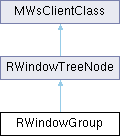
Public Member Functions | |
| IMPORT_C | RWindowGroup () |
| Creates a sessionless, uninitialised window group handle. | |
| IMPORT_C | RWindowGroup (RWsSession &aWs) |
| Creates an initialised window group handle within a server session. | |
| IMPORT_C TInt | Construct (TUint32 aClientHandle) |
| Completes construction of a window group. | |
| IMPORT_C TInt | Construct (TUint32 aClientHandle, CWsScreenDevice *aScreenDevice) |
| Completes construction of a window group on a screen. | |
| IMPORT_C TInt | Construct (TUint32 aClientHandle, TBool aIsFocusable, CWsScreenDevice *aScreenDevice) |
| Completes construction of a window group on a screen. | |
| IMPORT_C TInt | Construct (TUint32 aClientHandle, TBool aIsFocusable) |
| Completes the construction of a window group, setting its initial focus state. | |
| IMPORT_C TInt | ConstructChildApp (TInt aIdOfParentWindowGroup, TUint32 aClientHandle) |
| Completes construction of a window group. | |
| IMPORT_C TInt | ConstructChildApp (TInt aIdOfParentWindowGroup, TUint32 aClientHandle, TBool aIsFocusable) |
| Completes construction of a window group. | |
| IMPORT_C void | AllowProcessToCreateChildWindowGroups (TUid aProcessSID) |
| Allows a Window Group in the specified process to be be a child of this one. | |
| IMPORT_C void | EnableReceiptOfFocus (TBool aState) |
| Enables or disables receipt of keyboard focus. | |
| IMPORT_C void | AutoForeground (TBool aState) |
| Sets or disables auto-foreground behaviour. | |
| IMPORT_C void | SetOrdinalPriorityAdjust (TInt aAdjust) |
| Sets the window group's priority adjust value. | |
| IMPORT_C TInt | SetOrdinalPositionErr (TInt aPos, TInt aOrdinalPriority) |
| Sets the ordinal position and ordinal priority of a window. | |
| IMPORT_C TInt32 | CaptureKey (TUint aKeycode, TUint aModifierMask, TUint aModifier) |
| Requests key capture. | |
| IMPORT_C TInt32 | CaptureKey (TUint aKeycode, TUint aModifierMask, TUint aModifier, TInt aPriority) |
| Requests key capture, with a priority. | |
| IMPORT_C void | CancelCaptureKey (TInt32 aCaptureKey) |
| Cancels a request for key capture. | |
| IMPORT_C TInt32 | CaptureKeyUpAndDowns (TUint aScanCode, TUint aModifierMask, TUint aModifier) |
| Requests the capture of key-up and key-down events on behalf of a window group. | |
| IMPORT_C TInt32 | CaptureKeyUpAndDowns (TUint aScanCode, TUint aModifierMask, TUint aModifier, TInt aPriority) |
| IMPORT_C void | CancelCaptureKeyUpAndDowns (TInt32 aCaptureKey) |
| Cancels a capture request for a key up or key down event. | |
| IMPORT_C TInt32 | CaptureLongKey (TUint aInputKeyCode, TUint aOutputKeyCode, TUint aModifierMask, TUint aModifier, TInt aPriority, TUint aFlags) |
| Requests capture of long key presses. | |
| IMPORT_C TInt32 | CaptureLongKey (TTimeIntervalMicroSeconds32 aRepeatTime, TUint aInputKeyCode, TUint aOutputKeyCode, TUint aModifierMask, TUint aModifier, TInt aPriority, TUint aFlags) |
| Requests capture of long key presses. | |
| IMPORT_C void | CancelCaptureLongKey (TInt32 aCaptureKey) |
| Cancels a previous long key capture request. | |
| IMPORT_C TInt | AddPriorityKey (TUint aKeycode, TUint aModifierMask, TUint aModifier) |
| Adds a priority key. | |
| IMPORT_C void | RemovePriorityKey (TUint aKeycode, TUint aModifierMask, TUint aModifier) |
| Removes a priority key. | |
| IMPORT_C void | SetTextCursor (RWindowBase &aWin, const TPoint &aPos, const TTextCursor &aCursor) |
| Sets the text cursor. | |
| IMPORT_C void | SetTextCursor (RWindowBase &aWin, const TPoint &aPos, const TTextCursor &aCursor, const TRect &aClipRect) |
| Sets the text cursor and its clipping rectangle. | |
| IMPORT_C void | CancelTextCursor () |
| Removes the text cursor. | |
| IMPORT_C void | SetOwningWindowGroup (TInt aIdentifier) |
| Sets the owning window group for this window group. | |
| IMPORT_C void | DefaultOwningWindow () |
| Makes this window group the default owning window group. | |
| IMPORT_C TInt | SetName (const TDesC &aName) |
| Sets the window group's name. | |
| IMPORT_C TInt | Name (TDes &aWindowName) const |
| Gets the window group's name, as set by SetName(). | |
| IMPORT_C TInt | Identifier () const |
| Gets the identifier of the window group. | |
| IMPORT_C void | DisableKeyClick (TBool aState) |
| Disables key clicks. | |
| IMPORT_C TInt | EnableScreenChangeEvents () |
| Enables screen change event sending. | |
| IMPORT_C void | DisableScreenChangeEvents () |
| Disables screen change event sending. | |
| IMPORT_C void | SimulatePointerEvent (TRawEvent aEvent) |
| Simulates a pointer event. | |
| IMPORT_C void | SimulateAdvancedPointerEvent (TRawEvent aEvent) |
| Dummy implementation in order to preserve compatibility with WSERV NGA. | |
| IMPORT_C TInt | ClearChildGroup () |
| Clears all children of the current window group. | |
| IMPORT_C TInt | SetChildGroup (TInt aId) |
| Sets a window group chain onto the current window group. | |
 Public Member Functions inherited from RWindowTreeNode Public Member Functions inherited from RWindowTreeNode | |
| IMPORT_C void | Close () |
| Closes the node. | |
| IMPORT_C void | Destroy () |
| Closes and deletes the node. | |
| IMPORT_C TUint32 | ClientHandle () const |
| Gets the window's client handle. | |
| IMPORT_C TUint32 | Parent () const |
| Gets the node's parent. | |
| IMPORT_C TUint32 | PrevSibling () const |
| Gets the node before this one in the sibling list. | |
| IMPORT_C TUint32 | NextSibling () const |
| Gets the next window after this one in its sibling list. | |
| IMPORT_C TUint32 | Child () const |
| Gets the first child of the node. | |
| IMPORT_C TInt | OrdinalPriority () const |
| Gets the ordinal priority of the specified window. | |
| IMPORT_C TInt | OrdinalPosition () const |
| Gets the current ordinal position of the window tree node. | |
| IMPORT_C TInt | FullOrdinalPosition () const |
| Get the current full ordinal position of a window. | |
| IMPORT_C void | SetOrdinalPosition (TInt aPos) |
| Sets the ordinal position of a window. | |
| IMPORT_C void | SetOrdinalPosition (TInt aPos, TInt aOrdinalPriority) |
| Sets the ordinal position and ordinal priority of a window. | |
| IMPORT_C TInt | ScreenNumber () const |
| Get the screen number that a window is located on. | |
| IMPORT_C TInt | WindowGroupId () const |
| Returns the window group Id of the parent window group. | |
| IMPORT_C TInt | SetPointerCursor (TInt aCursorNumber) |
| Sets the pointer cursor from the system pointer cursor list. | |
| IMPORT_C void | SetCustomPointerCursor (const RWsPointerCursor &aPointerCursor) |
| Sets the pointer cursor to an application-defined cursor. | |
| IMPORT_C TInt | EnableOnEvents (TEventControl aCircumstances=EEventControlOnlyWithKeyboardFocus) |
| Requests notification of 'on' events. | |
| IMPORT_C void | DisableOnEvents () |
| Cancels notification of 'on' events. | |
| IMPORT_C TInt | EnableGroupChangeEvents () |
| Requests notification of group-change events. | |
| IMPORT_C void | DisableGroupChangeEvents () |
| Cancels notification of group changed events. | |
| IMPORT_C TInt | EnableFocusChangeEvents () |
| Enables focus changed events. | |
| IMPORT_C void | DisableFocusChangeEvents () |
| Disables delivery of focus changed events. | |
| IMPORT_C TInt | EnableGroupListChangeEvents () |
| Enables reporting of window group list change events. | |
| IMPORT_C void | DisableGroupListChangeEvents () |
| Disables reporting of window group list change events. | |
| IMPORT_C TInt | EnableVisibilityChangeEvents () |
| Enables reporting of window visibility change events. | |
| IMPORT_C void | DisableVisibilityChangeEvents () |
| Disables reporting of window visibility change events. | |
| IMPORT_C TInt | EnableErrorMessages (TEventControl aCircumstances) |
| Requests notification of error message events. | |
| IMPORT_C void | DisableErrorMessages () |
| Cancels notification of error message events. | |
| IMPORT_C TInt | EnableModifierChangedEvents (TUint aModifierMask, TEventControl aCircumstances) |
| Requests notification of modifier changed events. | |
| IMPORT_C void | DisableModifierChangedEvents () |
| Cancels notification of modifier changed events. | |
| IMPORT_C void | SetNonFading (TBool aNonFading) |
| Sets whether a window is non-fading. | |
| IMPORT_C void | SetFaded (TBool aFaded, TFadeControl aIncludeChildren) |
| Sets the window as faded or unfaded. | |
| IMPORT_C void | SetFaded (TBool aFaded, TFadeControl aIncludeChildren, TUint8 aBlackMap, TUint8 aWhiteMap) |
| Sets one or more windows as faded or unfaded, specifying a fading map. | |
| IMPORT_C void | ClearPointerCursor () |
| Clears pointer cursor settings. | |
| IMPORT_C RWsSession * | Session () const |
| Returns the window server session that is used to create this window handle. | |
| Public Member Functions inherited from MWsClientClass | |
| MWsClientClass () | |
| MWsClientClass (RWsBuffer *aBuffer) | |
| TInt | WsHandle () const |
| Gets the server side handle for the object. | |
Additional Inherited Members | |
| Public Types inherited from RWindowTreeNode | |
| enum | TFadeControl { EFadeIncludeChildren =ETrue , EFadeWindowOnly =EFalse } |
| Fade control flags. More... | |
| Protected Member Functions inherited from RWindowTreeNode | |
| RWindowTreeNode () | |
| Protected default constructor. | |
| RWindowTreeNode (RWsSession &aWs) | |
| Protected constructor which creates an uninitialised window tree node handle within a server session. | |
| Protected Member Functions inherited from MWsClientClass | |
| void | Write (const TAny *aData1, TInt aLength1, TInt aLength2, TUint aOpcode) const |
| void | Write (const TAny *aData, TInt aLength, const TAny *aData2, TInt aLength2, TUint aOpcode, const TIpcArgs *aIpcArgs=NULL) const |
| void | Write (const TAny *aBuf, TInt aBufLen, TUint aOpcode, const TIpcArgs *aIpcArgs=NULL) const |
| void | Write (TUint aOpcode) const |
| void | WriteInt (TInt aInt, TUint aOpcode) const |
| void | WriteRect (const TRect &aRect, TUint aOpcode) const |
| void | WritePoint (const TPoint &aPoint, TUint aOpcode) const |
| void | WriteSize (const TSize &aSize, TUint aOpcode) const |
| TInt | WriteReply (TUint aOpcode, const TIpcArgs *aIpcArgs=NULL) const |
| TInt | WriteReplyInt (TInt aInt, TUint aOpcode, const TIpcArgs *aIpcArgs=NULL) const |
| TInt | WriteReply (const TAny *aBuf, TInt aBufLen, TUint aOpcode, const TIpcArgs *aIpcArgs=NULL) const |
| TInt | WriteReply (const TAny *aBuf, TInt aBufLen, const TAny *aBuf2, TInt aBuflen2, TUint aOpcode, const TIpcArgs *aIpcArgs=NULL) const |
| TInt | WriteReplyP (const TWriteDescriptorType &aReplyPackage, TUint aOpcode) const |
| TInt | WriteReplyIntP (TInt aInt, const TWriteDescriptorType &aReplyPackage, TUint aOpcode) const |
| TInt | WriteReplyP (const TAny *aBuf, TInt aBufLen, const TWriteDescriptorType &aReplyPackage, TUint aOpcode) const |
| TInt | WriteReplyP (const TAny *aBuf, TInt aBufLen, const TAny *aBuf2, TInt aBuflen2, const TWriteDescriptorType &aReplyPackage, TUint aOpcode) const |
| TInt | WriteReplyByProvidingRemoteReadAccess (const TAny *aBuf, TInt aBufLen, const TReadDescriptorType &aRemoteReadBuffer, TUint aOpcode) const |
| void | AddToBitmapArray (const TInt aBitmapHandle) const |
| void | AsyncRequest (TRequestStatus &aStatus, TUint aOpcode) const |
| TBool | WindowSizeCacheEnabled () const |
| void | MarkWindowSizeCacheDirty () |
| void | RefreshWindowSizeCache (const TSize &aNewSize) const |
| TInt | CachedWindowSize (TSize &aSize) const |
| void | DestroyWindowSizeCacheEntry () |
| Protected Attributes inherited from RWindowTreeNode | |
| __DECLARE_TEST | |
| Protected Attributes inherited from MWsClientClass | |
| TInt32 | iWsHandle |
| WARNING: Member variable for internal use ONLY. | |
| RWsBuffer * | iBuffer |
| WARNING: Member variable for internal use ONLY. | |
Detailed Description
Client-side handle to a server-side window group.
- API status
- Published to all clients. Released API.
Constructor & Destructor Documentation
◆ RWindowGroup() [1/2]
| IMPORT_C RWindowGroup::RWindowGroup | ( | ) |
Creates a sessionless, uninitialised window group handle.
Handles to server-side objects must be created in a session in order to be operational; this constructor is merely a convenience to allow the handle to be stored as a data member. See RWindowTreeNode::RWindowTreeNode() for details of how the complete setup of a handle field may be deferred until the window server session is known.
(generated from Symbian Developer Library)
◆ RWindowGroup() [2/2]
| IMPORT_C RWindowGroup::RWindowGroup | ( | RWsSession & | aWs | ) |
Creates an initialised window group handle within a server session.
- Parameters
-
aWs The window server session owning the window group.
(generated from Symbian Developer Library)
Member Function Documentation
◆ AddPriorityKey()
| IMPORT_C TInt RWindowGroup::AddPriorityKey | ( | TUint | aKeycode, |
| TUint | aModifierMask, | ||
| TUint | aModifier | ||
| ) |
Adds a priority key.
Priority key events are typically used for providing "Abort" or "Escape" keys for an application. For priority key events to occur they must first be configured using this function. Functions provided by RWsSession can then be used to get priority key events. Note that unlike other events, the Control Framework does not get priority key events for you.
Priority key events for the key given by aKeyCode are only delivered when the modifier keys specified by aModifierMask are in the states specified by aModifiers. See RWsSession::SetHotKey() for examples of how to use aModifierMask and aModifiers.
More than one priority key can be added for each keycode, each having a different set of modifier requirements.
Note: if you press a priority key while another is waiting to be sent to the client then the first key is lost.
This function always causes a flush of the window server buffer.
- Parameters
-
aKeycode The priority key to be added. aModifierMask Only the modifier keys in this mask are tested against the states specified in aModifiers. aModifier Key is captured only when modifier keys specified in aModifierMask match these states, where 1 = modifier key on, and 0 = modifier key off. Modifier key states are defined in TEventModifier.
(generated from Symbian Developer Library)
◆ AllowProcessToCreateChildWindowGroups()
| IMPORT_C void RWindowGroup::AllowProcessToCreateChildWindowGroups | ( | TUid | aProcessSID | ) |
Allows a Window Group in the specified process to be be a child of this one.
This function will need to be called to allow another window group to become a child window group of this one.
This function always causes a flush of the window server buffer.
- Parameters
-
aProcessSID This is the process security Id of the process that will be allowed to make child window groups
(generated from Symbian Developer Library)
◆ AutoForeground()
| IMPORT_C void RWindowGroup::AutoForeground | ( | TBool | aState | ) |
Sets or disables auto-foreground behaviour.
If this behaviour is set for a window, it will automatically be given ordinal position zero whenever a pointer event of type EButton1Down occurs in any of its child windows. This will cause it to be brought to the foreground, unless another window group exists with a higher priority.
A window group that is moved to the foreground will automatically get keyboard focus unless it has explicitly had receipt-of-focus disabled or there is a focusable window group of higher priority. See EnableReceiptOfFocus().
- Parameters
-
aState Whether this group should be automatically brought to the foreground on an EButton1Down.
(generated from Symbian Developer Library)
◆ CancelCaptureKey()
| IMPORT_C void RWindowGroup::CancelCaptureKey | ( | TInt32 | aCaptureKey | ) |
Cancels a request for key capture.
Use this function to cancel a request to capture a key previously made with CaptureKey(). If the value passed in aHotKey is not a valid capture key handle, this function will cause a panic.
This function always causes a flush of the window server buffer.
- Parameters
-
aCaptureKey The key for which the capture request is cancelled.
(generated from Symbian Developer Library)
◆ CancelCaptureKeyUpAndDowns()
| IMPORT_C void RWindowGroup::CancelCaptureKeyUpAndDowns | ( | TInt32 | aCaptureKey | ) |
Cancels a capture request for a key up or key down event.
Use this function to cancel a request to capture a key, previously made with CaptureKeyUpAndDowns(). If the value passed in aHotKey is not a valid capture key handle, this function will cause a panic.
This function always causes a flush of the window server buffer.
- Parameters
-
aCaptureKey Cancels the request to capture this key.
(generated from Symbian Developer Library)
◆ CancelCaptureLongKey()
| IMPORT_C void RWindowGroup::CancelCaptureLongKey | ( | TInt32 | aCaptureKey | ) |
Cancels a previous long key capture request.
This function always causes a flush of the window server buffer.
- Parameters
-
aCaptureKey The value returned by the previous call to CaptureLongKey(). Identifies which long key capture request to cancel.
(generated from Symbian Developer Library)
◆ CancelTextCursor()
| IMPORT_C void RWindowGroup::CancelTextCursor | ( | ) |
Removes the text cursor.
Use this function to remove the current text cursor from this window group. This function does nothing if the cursor is currently in another window group.
(generated from Symbian Developer Library)
◆ CaptureKey() [1/2]
| IMPORT_C TInt32 RWindowGroup::CaptureKey | ( | TUint | aKeycode, |
| TUint | aModifierMask, | ||
| TUint | aModifier | ||
| ) |
Requests key capture.
This function instructs the window server to send key events (of type EEventKey) with the specified key code and modifier state to this window group, regardless of which window group currently has the keyboard focus.
Normally, keyboard key presses result in three events being delivered to the client: EEventKeyDown, EEventKey and EEventKeyUp. However, CaptureKey() results in only the EEventKey being delivered to the window group that called it: the EEventKeyUp and EEventKeyDown events are sent to the window group that has focus. If a window group wishes to capture the EEventKeyUp and EEventKeyDown events as well as the EEventKey, it should call CaptureKeyUpAndDowns().
Note that a window group can call this function more than once (to request capture for more than one key), and more than one window group may have requested key capture. If multiple window groups have requested to capture the same key using this function, the key is sent to the window group that most recently requested the key capture.
This function always causes a flush of the window server buffer.
- Parameters
-
aKeycode The key code for the key to be captured. Key codes for special keys are defined in TKeyCode. aModifierMask Bitmask that identifies the modifier keys of interest. Possible values are defined in TEventModifier. aModifier Bitmask that identifies which of the modifier keys in aModifierMask need to be set and which need to be unset. For example, see the description above.
- capability
- SwEvent
(generated from Symbian Developer Library)
◆ CaptureKey() [2/2]
| IMPORT_C TInt32 RWindowGroup::CaptureKey | ( | TUint | aKeycode, |
| TUint | aModifierMask, | ||
| TUint | aModifier, | ||
| TInt | aPriority | ||
| ) |
Requests key capture, with a priority.
This function instructs the window server to send key events (of type EEventKey) with the specified key code and modifier state to this window group, regardless of which window group currently has the keyboard focus.
Normally, keyboard key presses result in three events being delivered to the client: EEventKeyDown, EEventKey and EEventKeyUp. However, CaptureKey() results in only the EEventKey being delivered to the window group that called it: the EEventKeyUp and EEventKeyDown events are sent to the window group that has focus. If a window group wishes to capture the EEventKeyUp and EEventKeyDown events as well as the EEventKey, it should call CaptureKeyUpAndDowns().
Note that a window group can call this function more than once (to request capture for more than one key), and more than one window group may have requested key capture. If multiple window groups have requested to capture the same key at the same priority, the key is sent to the window group that most recently requested the key capture.
This function always causes a flush of the window server buffer.
- Parameters
-
aKeycode The key code for the key to be captured. Key codes for special keys are defined in TKeyCode. aModifierMask Bitmask that identifies the modifier keys of interest. Possible values are defined in TEventModifier. aModifier Bitmask that identifies which of the modifier keys in aModifierMask need to be set and which need to be unset. For example, see the description above. aPriority A priority value - if more than one window group has requested capture for the same key event, the one with the highest priority will capture it.
- capability
- SwEvent
(generated from Symbian Developer Library)
◆ CaptureKeyUpAndDowns() [1/2]
| IMPORT_C TInt32 RWindowGroup::CaptureKeyUpAndDowns | ( | TUint | aScanCode, |
| TUint | aModifierMask, | ||
| TUint | aModifier | ||
| ) |
Requests the capture of key-up and key-down events on behalf of a window group.
This function requests the window server to send EEventKeyUp and EEventKeyDown key events from the specified key to this window group, regardless of which window group currently has the keyboard focus. This contrasts with CaptureKey(), which causes the window server to send the EEventKey event.
Key events for the key given by aScanCode are captured only when the modifier keys specified by aModifierMask are in the states specified by aModifiers. See RWsSession::SetHotKey() for examples of how to set aModifierMask and aModifiers.
Note: in general, keyboard key presses result in three events being delivered to the client: EEventKeyDown, EEventKey and EEventKeyUp.
This function always causes a flush of the window server buffer.
- Parameters
-
aScanCode Scan code for the key to be captured. Scan codes are defined in TStdScanCode. aModifierMask Bitmask that identifies the modifier keys of interest. Possible values are defined in TEventModifier. aModifier Bitmask that identifies which of the modifier keys in aModifierMask need to be set and which need to be unset.
- capability
- SwEvent
(generated from Symbian Developer Library)
◆ CaptureKeyUpAndDowns() [2/2]
| IMPORT_C TInt32 RWindowGroup::CaptureKeyUpAndDowns | ( | TUint | aScanCode, |
| TUint | aModifierMask, | ||
| TUint | aModifier, | ||
| TInt | aPriority | ||
| ) |
- Parameters
-
aScanCode Scan code for the key to be captured. Scan codes are defined in TStdScanCode. aModifierMask Bitmask that identifies the modifier keys of interest. Possible values are defined in TEventModifier. aModifier Bitmask that identifies which of the modifier keys in aModifierMask need to be set and which need to be unset. aPriority A priority value - if more than one window group has requested capture for the same key event, the one with the highest priority will capture it.
- capability
- SwEvent
(generated from Symbian Developer Library)
◆ CaptureLongKey() [1/2]
| IMPORT_C TInt32 RWindowGroup::CaptureLongKey | ( | TTimeIntervalMicroSeconds32 | aRepeatTime, |
| TUint | aInputKeyCode, | ||
| TUint | aOutputKeyCode, | ||
| TUint | aModifierMask, | ||
| TUint | aModifier, | ||
| TInt | aPriority, | ||
| TUint | aFlags | ||
| ) |
Requests capture of long key presses.
This function causes the window server to send a long key event (which is generated when the key has been held down for the specified time), to this window group, regardless of whether it currently has keyboard focus.
For more information on this function, see the other CaptureLongKey() overload.
This function always causes a flush of the window server buffer.
- Parameters
-
aRepeatTime The time interval in microseconds between the initial key event and the first auto repeat. aInputKeyCode The key code for the key to be captured. Key codes for special keys are defined in TKeyCode. aOutputKeyCode The key code that will be output. aModifierMask Only the modifier keys in this mask are tested against the states specified in aModifier. aModifier The key is captured only when the modifier keys specified in aModifierMask match these states, where 1 = modifier set, and 0 = modifier not set. Modifier key states are defined in TEventModifier. aPriority If more than one window group has requested capture for the same long key event, the one with the highest priority will capture the event. aFlags Configures the long key capture behaviour. See the TLongCaptureFlags enum.
- capability
- SwEvent
(generated from Symbian Developer Library)
◆ CaptureLongKey() [2/2]
| IMPORT_C TInt32 RWindowGroup::CaptureLongKey | ( | TUint | aInputKeyCode, |
| TUint | aOutputKeyCode, | ||
| TUint | aModifierMask, | ||
| TUint | aModifier, | ||
| TInt | aPriority, | ||
| TUint | aFlags | ||
| ) |
Requests capture of long key presses.
This function causes the window server to send a long key event (which is generated when the key has been held down for the initial keyboard repeat time), to this window group, regardless of whether it currently has keyboard focus. The key that is output can have a different key code to the key that was captured.
Key events for the key given by aInputKeyCode are captured only when the modifier keys specified by aModifierMask are in the states specified by aModifiers.
A priority can be specified to resolve any conflicts that arise when multiple window groups attempt to capture the same long key event.
Normal key press behaviour (where no long key press capture requests have been made) is as follows. When a key is pressed, a key down event occurs, followed by one or more standard (short) key events, followed by a key up event. All of these key events are sent to the application in the foreground.
Key press behaviour when an application has made a long key press capture request is as follows. When the key is pressed and held down, a long key event is generated in addition to the events described above (although if a long key event occurs, then there will never be more than one standard key event) and this is sent to the application that made the request, even if it is not in the foreground.
If that application also wants to capture the up and down key events then it needs to call CaptureKeyUpAndDowns(). If it wants to capture the standard key event, then it needs to call CaptureKey(). Depending on flags (enumerated in TLongCaptureFlags) specified when making the long key capture request, the standard key event can either be generated when the key is pressed, as it would be if no long key capture request had been made, or it can be generated when the key is released. In the latter case, the standard key event is only generated if the key was not held down long enough to generate a long key event.
This function always causes a flush of the window server buffer.
- Parameters
-
aInputKeyCode The key code for the key to be captured. Key codes for special keys are defined in TKeyCode. aOutputKeyCode The key code that will be output. aModifierMask Only the modifier keys in this mask are tested against the states specified in aModifier. aModifier The key is captured only when the modifier keys specified in aModifierMask match these states, where 1 = modifier set, and 0 = modifier not set. Modifier key states are defined in TEventModifier. aPriority If more than one window group has requested capture for the same long key event, the one with the highest priority will capture the event. aFlags Configures the long key capture behaviour. See the TLongCaptureFlags enum.
- capability
- SwEvent
(generated from Symbian Developer Library)
◆ ClearChildGroup()
| IMPORT_C TInt RWindowGroup::ClearChildGroup | ( | ) |
Clears all children of the current window group.
The window group chain is broken directly after the current window group. In the general case (consider clearing the child group of a window group in the middle of a long chain), this results in two distinct chains. In the special cases where either the parent window group or the child window group ends up as the only member of a resultant chain, it is removed from that chain.
(generated from Symbian Developer Library)
◆ Construct() [1/4]
| IMPORT_C TInt RWindowGroup::Construct | ( | TUint32 | aClientHandle | ) |
Completes construction of a window group.
Construction must be complete before any other window group methods can be called.
This function always causes a flush of the window server buffer.
- Parameters
-
aClientHandle The client's handle for the window. See RWindow::Construct() for a description of the client handle.
(generated from Symbian Developer Library)
◆ Construct() [2/4]
| IMPORT_C TInt RWindowGroup::Construct | ( | TUint32 | aClientHandle, |
| CWsScreenDevice * | aScreenDevice | ||
| ) |
Completes construction of a window group on a screen.
Construction must be complete before any other window group methods can be called.
This function always causes a flush of the window server buffer.
- Parameters
-
aClientHandle The client's handle for the window. See RWindow::Construct() for a description of the client handle. aScreenDevice A screen device is used to specify on which screen the window should be. The screen device must exist for as long as the window is in use. Different screen devices for two different window groups in an application allow the windows to have different screen size modes and WSERV will automatically switch from one to the other when there is a screen size mode change.
(generated from Symbian Developer Library)
◆ Construct() [3/4]
| IMPORT_C TInt RWindowGroup::Construct | ( | TUint32 | aClientHandle, |
| TBool | aIsFocusable | ||
| ) |
Completes the construction of a window group, setting its initial focus state.
Construction must be complete before any other window group methods can be called.
aInitialFocusState can be specified in order to prevent a window group from automatically taking the keyboard focus when it is created. If specified, it sets the initial focus state of the window group. If a window group has a focus state of ETrue (the default), it can receive keyboard focus; if EFalse, it is prevented from receiving keyboard focus until this setting is changed. If a window group is constructed without specifying an initial focus state, keyboard focus will be enabled by default and the window group will receive keyboard focus automatically when it is created. To prevent this, set aInitialFocusState to EFalse.
This function always causes a flush of the window server buffer.
EnableReceiptOfFocus() RWindow::Construct()
- Parameters
-
aClientHandle The client's integer handle for the window. See RWindow::Construct() for a description of the client handle. aIsFocusable Whether the window is focusable. Set ETrue for it to be able to receive focus, EFalse otherwise.
(generated from Symbian Developer Library)
◆ Construct() [4/4]
| IMPORT_C TInt RWindowGroup::Construct | ( | TUint32 | aClientHandle, |
| TBool | aIsFocusable, | ||
| CWsScreenDevice * | aScreenDevice | ||
| ) |
Completes construction of a window group on a screen.
Construction must be complete before any other window group methods can be called.
The purpose of this Construct function for RWindowGroup is that it allows chains of window groups to be created on a specific screen. When one of the window groups in a chain is moved with SetOrdinalPosition then all window groups in that chain will be moved to be consecutative, with the parent being at the back in the Z-order. The purpose of this feature is to allow embedding of applications.
Note: The term parent should not be confused with the paremeter used in the function RWindow::Construct. There it means that this window is a child of that window in the tree. Here is just means that the two window groups involved will have an extra association. Note: This window group will be given the same ordinal priority as it's parent window group.
This function always causes a flush of the window server buffer.
- Parameters
-
aIsFocusable ETrue allows keyboard focus; EFalse prevents it until focus receipt is enabled. aClientHandle The client's handle for the window. See RWindow::Construct() for a description of the client handle. aScreenDevice A screen device is used to specify on which screen the window should be. The screen device must exist for as long as the window is in use. Different screen devices for two different window groups in an application allow the windows to have different screen size modes and WSERV will automatically switch from one to the other when there is a screen size mode change.
(generated from Symbian Developer Library)
◆ ConstructChildApp() [1/2]
| IMPORT_C TInt RWindowGroup::ConstructChildApp | ( | TInt | aIdOfParentWindowGroup, |
| TUint32 | aClientHandle | ||
| ) |
Completes construction of a window group.
Construction must be complete before any other window group methods can be called.
The purpose of this Construct function for RWindowGroup is that it allows chains of window groups to be created. When one of the window groups in a chain is moved with SetOrdinalPosition then all window groups in that chain will be moved to be consecutative, with the parent being at the back in the Z-order. The purpose of this feature is to allow embedding of applications.
Note: The term parent should not be confused with the paremeter used in the function RWindow::Construct. There it means that this window is a child of that window in the tree. Here is just means that the two window groups involved will have an extra association. Note: This window group will be given the same ordinal priority as it's parent window group.
This function always causes a flush of the window server buffer.
- Parameters
-
aIdOfParentWindowGroup The Identifier of the parent window group. aClientHandle The client's handle for the window. See RWindow::Construct() for a description of the client handle.
(generated from Symbian Developer Library)
◆ ConstructChildApp() [2/2]
| IMPORT_C TInt RWindowGroup::ConstructChildApp | ( | TInt | aIdOfParentWindowGroup, |
| TUint32 | aClientHandle, | ||
| TBool | aIsFocusable | ||
| ) |
Completes construction of a window group.
Construction must be complete before any other window group methods can be called.
This Construct function of RWindowGroup allows both the creation of the group window in a chain and for and for it not to recieve focus.
This function always causes a flush of the window server buffer.
- Parameters
-
aIdOfParentWindowGroup The Identifier of the parent window group. aClientHandle The client's handle for the window. See RWindow::Construct() for a description of the client handle. aIsFocusable Whether the window is focusable. Set ETrue for it to be able to receive focus, EFalse otherwise.
(generated from Symbian Developer Library)
◆ DefaultOwningWindow()
| IMPORT_C void RWindowGroup::DefaultOwningWindow | ( | ) |
Makes this window group the default owning window group.
The default owning window group is the group that is brought to the foreground when the window group which has keyboard focus (the foreground application) dies, if no other window has been set up as the owning group.
This window group will take over as the default owning window group even if another window group has previously called this function. However, if this window group is subsequently destroyed, the default owning window group will revert to being the previous window group.
- capability
- WriteDeviceData
(generated from Symbian Developer Library)
◆ DisableKeyClick()
| IMPORT_C void RWindowGroup::DisableKeyClick | ( | TBool | aState | ) |
Disables key clicks.
If a window group calls this function with aState=ETrue, key clicks (i.e. the sound generated when keys are pressed) will be disabled whenever this window group has the keyboard focus. Key clicks for this window group can be re-enabled by calling this function with aState=EFalse.
Note that this function doesn't do anything in v6.0 and v6.1.
- Parameters
-
aState If ETrue, no key clicks occur when this window group has keyboard focus. If EFalse, key clicks are enabled when this window group has keyboard focus.
(generated from Symbian Developer Library)
◆ DisableScreenChangeEvents()
| IMPORT_C void RWindowGroup::DisableScreenChangeEvents | ( | ) |
Disables screen change event sending.
This function prevents window groups from getting screen change events, which are sent, for example, when the cover on a phone that supports screen flipping is opened or closed.
Note that not getting screen change events is the default behaviour.
See EnableScreenChangeEvents().
(generated from Symbian Developer Library)
◆ EnableReceiptOfFocus()
| IMPORT_C void RWindowGroup::EnableReceiptOfFocus | ( | TBool | aState | ) |
Enables or disables receipt of keyboard focus.
The front most focusable window has keyboard focus. This function sets whether or not the window can receive keyboard focus.
- Parameters
-
aState Whether this window group can accept keyboard focus.
(generated from Symbian Developer Library)
◆ EnableScreenChangeEvents()
| IMPORT_C TInt RWindowGroup::EnableScreenChangeEvents | ( | ) |
Enables screen change event sending.
This function ensures that window groups are sent screen change events, which are sent, for example, when the cover on a phone that supports screen flipping is opened or closed.
Note that not getting screen change events is the default behaviour.
This function always causes a flush of the window server buffer.
(generated from Symbian Developer Library)
◆ Identifier()
| IMPORT_C TInt RWindowGroup::Identifier | ( | ) | const |
Gets the identifier of the window group.
This function always causes a flush of the window server buffer.
(generated from Symbian Developer Library)
◆ Name()
| IMPORT_C TInt RWindowGroup::Name | ( | TDes & | aWindowName | ) | const |
Gets the window group's name, as set by SetName().
This function always causes a flush of the window server buffer.
- Parameters
-
aWindowName On return, contains the name of this window group.
(generated from Symbian Developer Library)
◆ RemovePriorityKey()
| IMPORT_C void RWindowGroup::RemovePriorityKey | ( | TUint | aKeycode, |
| TUint | aModifierMask, | ||
| TUint | aModifier | ||
| ) |
Removes a priority key.
Use this function to remove a priority key that was added using AddPriorityKey(). If the specified priority key does not exist, this function does nothing.
Note: all 3 parameters must match exactly for a successful removal.
- Parameters
-
aKeycode Key code for the priority key to be removed aModifierMask Modifier mask for the priority key to be removed aModifier Modifier states for the priority key to be removed
(generated from Symbian Developer Library)
◆ SetChildGroup()
| IMPORT_C TInt RWindowGroup::SetChildGroup | ( | TInt | aId | ) |
Sets a window group chain onto the current window group.
Appends all the window groups chained to the child window group onto the chain containing the current window group.
(generated from Symbian Developer Library)
◆ SetName()
| IMPORT_C TInt RWindowGroup::SetName | ( | const TDesC & | aName | ) |
Sets the window group's name.
Use this function to set the name of a window group. Window group names are arbitrary and can contain any data that can be stored in a descriptor of type TDesC.
Note: if this function is successful, a window group change event is sent to everything that is set up to receive these events.
This function always causes a flush of the window server buffer.
- Parameters
-
aName The name for the window group.
(generated from Symbian Developer Library)
◆ SetOrdinalPositionErr()
| IMPORT_C TInt RWindowGroup::SetOrdinalPositionErr | ( | TInt | aPos, |
| TInt | aOrdinalPriority | ||
| ) |
Sets the ordinal position and ordinal priority of a window.
Ordinal priority is a number assigned to a window that determines its position in the z-order. For a description of ordinal priority, see the RWindowTreeNode::SetOrdinalPosition function. To set a priority of KPasswordWindowGroupPriority or greater, client will require SwEvent capability. If client does not have SwEvent capability then it will return error code.
Note: If this window is a window group in a chain, then all other window groups in the chain will be moved also. And further they will all have their ordinal priority set to the specified value. When this function is called on Window with aPos set to KOrdinalPositionSwitchToOwningWindow then the function doesn't change the ordinal position of the window, if instead it has focus then the window that would come to the forground if it died will be moved to the foreground.
This function always causes a flush of the window server buffer.
- Parameters
-
aPos The window's new ordinal position. The lower the ordinal, the closer to the front of the z-order the window will be. Specifying any negative value however, sends the window to the back of the z-order. aOrdinalPriority The window's new ordinal priority.
(generated from Symbian Developer Library)
◆ SetOrdinalPriorityAdjust()
| IMPORT_C void RWindowGroup::SetOrdinalPriorityAdjust | ( | TInt | aAdjust | ) |
Sets the window group's priority adjust value.
This function is primarily designed for sessions that own multiple window groups. After this function has been called by a window group, that window group's priority will be adjusted by the amount given by aAdjust whenever another window group owned by the same session gains keyboard focus.
When the session loses focus, the priority returns to its original value.
Note: This is ignored for window groups in chains.
- Parameters
-
aAdjust Value to be added to window group's existing priority.
(generated from Symbian Developer Library)
◆ SetOwningWindowGroup()
| IMPORT_C void RWindowGroup::SetOwningWindowGroup | ( | TInt | aIdentifier | ) |
Sets the owning window group for this window group.
The owning window group is the group that is brought to the foreground when the window group which has keyboard focus (the foreground application) dies.
If the owning window group is not set, then the window group brought to the foreground when the application dies will be the default owning window group.
- Parameters
-
aIdentifier The window group's identifier.
(generated from Symbian Developer Library)
◆ SetTextCursor() [1/2]
| IMPORT_C void RWindowGroup::SetTextCursor | ( | RWindowBase & | aWin, |
| const TPoint & | aPos, | ||
| const TTextCursor & | aCursor | ||
| ) |
Sets the text cursor.
Use this function to set a text cursor for this window group, or to change the existing text cursor's position or appearance.
- Parameters
-
aWin The text cursor is in this window, and is hence clipped to it and positioned relative to it. aPos Position of the text cursor's origin, relative to the origin of aWin. aCursor The cursor to set. This may be a standard rectangular cursor, of type TTextCursor::ETypeRectangle or TTextCursor::ETypeHollowRectangle, or it may be a custom cursor, in which case it should have previously been added to the window server using RWsSession::SetCustomTextCursor().
(generated from Symbian Developer Library)
◆ SetTextCursor() [2/2]
| IMPORT_C void RWindowGroup::SetTextCursor | ( | RWindowBase & | aWin, |
| const TPoint & | aPos, | ||
| const TTextCursor & | aCursor, | ||
| const TRect & | aClipRect | ||
| ) |
Sets the text cursor and its clipping rectangle.
Use this function to set a text cursor for this window group, or to change the existing text cursor's position or appearance.
The cursor is clipped to aClipRect. This allows, for example, the window to have a border region in which the cursor is not displayed.
- Parameters
-
aWin The text cursor is in this window, and is hence clipped to it and positioned relative to it. aPos Position of the text cursor's origin, relative to the origin of aWin. aCursor The cursor to set. This may be a standard rectangular cursor, of type TTextCursor::ETypeRectangle or TTextCursor::ETypeHollowRectangle, or it may be a custom cursor, in which case it should have previously been added to the window server using RWsSession::SetCustomTextCursor(). aClipRect The cursor is clipped to this rectangle. Rectangle co-ordinates are relative to the origin of aWin.
(generated from Symbian Developer Library)
◆ SimulateAdvancedPointerEvent()
| IMPORT_C void RWindowGroup::SimulateAdvancedPointerEvent | ( | TRawEvent | aEvent | ) |
Dummy implementation in order to preserve compatibility with WSERV NGA.
(generated from Symbian Developer Library)
◆ SimulatePointerEvent()
| IMPORT_C void RWindowGroup::SimulatePointerEvent | ( | TRawEvent | aEvent | ) |
Simulates a pointer event.
This function sends a pointer event to the window as if it had come from the kernel, except that it will be sent to a window which is a child of the window group it is called on.
Notes:
The function can be used to send a pointer event to an application when it is in the background.
The function is supported for testing purposes only.
- Parameters
-
aEvent The simulated raw event.
(generated from Symbian Developer Library)
The documentation for this class was generated from the following files: