Configure CLion for a Symbian application
The GUI example is a CMake project whose compiler target is 32-bit ARM. CLion can edit and index it with the same target flags used by the command-line build. The built ARM ELF is converted into a Symbian E32 executable before an emulator can load it.
Before opening the IDE
- Install or build the application SDK, then prepare the public headers and import proxies in the source prerequisites.
- From the repository root, check that the shared preset configures and builds:
- Return to the repository root and run
symbian emu configure-ideto create local Run/Debug settings for the prepared example. These settings live in ignored.ideafiles because they contain machine paths.
The shared symbian-pic preset uses Ninja, the SDK ARM toolchain file and
SYMBIAN_TARGET_ARCH=armv6. It requests compile_commands.json, which records
real compiler arguments for editor indexing. A local ignored clion-arm preset
may override tool locations on a prepared machine; it is optional for a fresh
checkout.
Load the CMake profile
- Open
examples/gui_appas its own project in CLion. The source root is small enough for focused code navigation. - If CLion does not load the preset automatically, use Help → Find Action →
Load CMake Presets, select
symbian-pic, and enable the imported profile under Settings → Build, Execution, Deployment → CMake. Imported preset profiles can start disabled. JetBrains' preset guide shows the current controls. - Reload CMake. Check that
app.cc,window_server.cc, the SDK-ownedexe_startup.ccandexe_startup.Sbelong togui_app, and that the profile uses the ARM triple rather than a host target. The expected compiler database is.symbian/cmake/gui-app/compile_commands.jsonfor the shared preset.
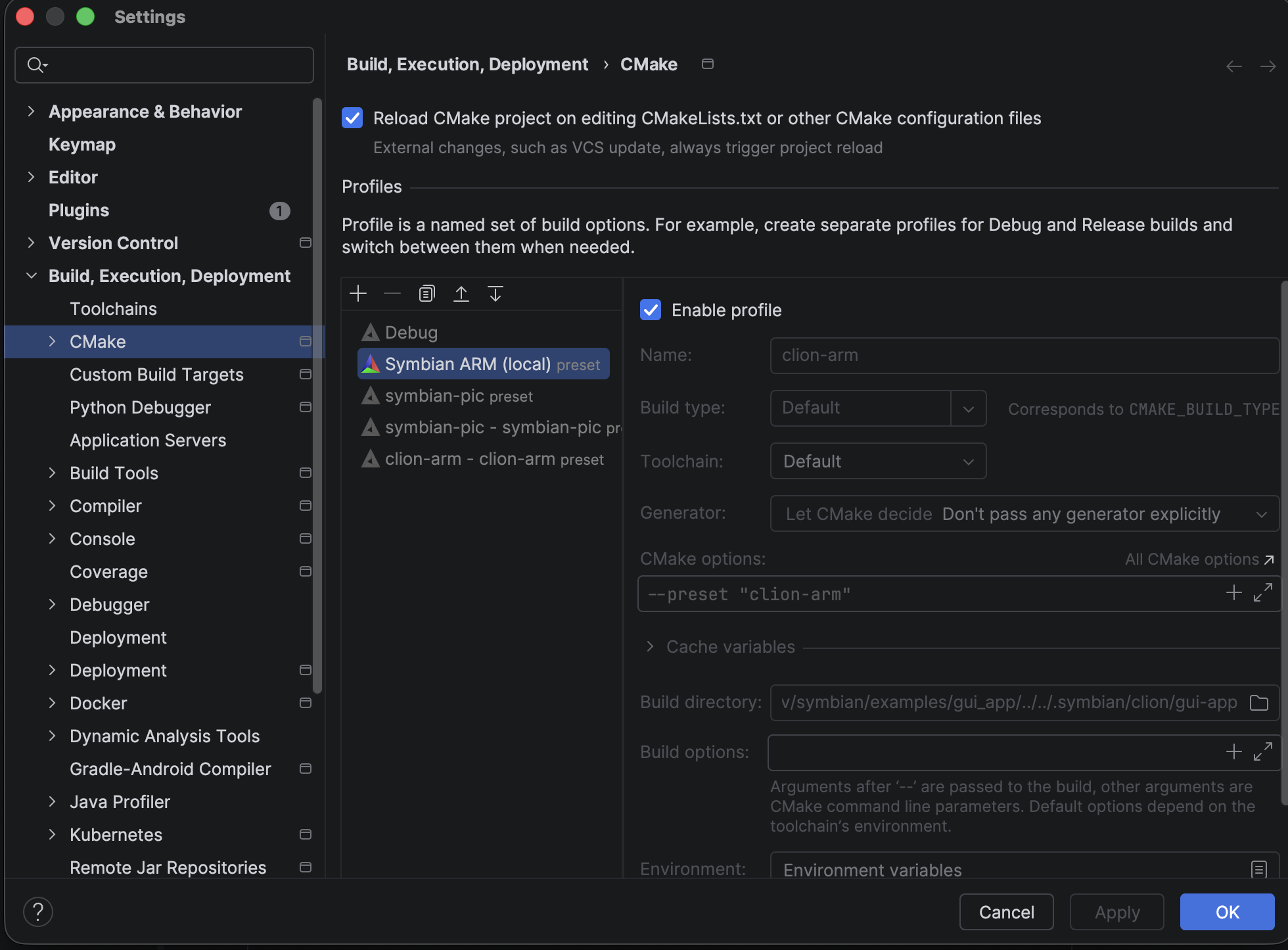
In the prepared project, the local clion-arm preset is enabled under
Settings → Build, Execution, Deployment → CMake. On a new checkout, enable
the shared symbian-pic preset instead unless you have created a local preset.
The SDK profile also publishes gui_app_e32 for E32 output. Building an ELF
alone checks compilation and linking; the E32 conversion and emulator run are
separate steps. The GUI build guide explains those artifacts.
If the profile cannot configure
| Symptom | Check |
|---|---|
symbian-pic is missing |
Load CMake Presets through Find Action; then enable the imported profile. |
| ARM headers are unresolved | Confirm the prepared SDK and SYMBIAN_GUI_SDK_INCLUDE; reload CMake after a path change. |
| LLD or Ninja is missing | Check cmake, ninja, clang++ and ld.lld on the IDE toolchain PATH. |
A local clion-arm toolchain name is unavailable |
Select the shared symbian-pic preset or restart the IDE after installing a named toolchain. |
| Indexing looks like host code | Inspect the selected profile and its compile_commands.json for --target=armv6-none-eabi. |
Use the Run and Debug guide for guest execution and breakpoints, or the advanced guide for manual debugging.